 KnowThis
Key Takeaways
Key Takeaways
- 1Clicking 'I agree' on a terms-and-conditions page generally forms a binding contract, even though the overwhelming majority of users never read the full text.
- 2A small handful of clauses — arbitration/class-action waivers, auto-renewal terms, liability limitations, and data-use permissions — account for most of the real-world impact hidden in a typical terms page.
- 3Scanning specifically for those few clause types is a realistic, achievable strategy, unlike trying to read every word of a document that can run tens of thousands of words long.
The concept
The practical goal isn't reading every clause — it's knowing which few clauses are worth the two minutes it takes to search for and actually read.
Why might searching a terms-and-conditions page for the word 'arbitration' be a more realistic strategy than reading the whole document?
Worked examples
Example 1: A streaming service subscription (baseline case)
Example 2: A dispute with an online retailer (edge case / variation)
Example 3: A free app with broad data permissions (real-world / applied case)
What is the key difference between a clickwrap agreement and a browsewrap agreement?
How it works (visual)
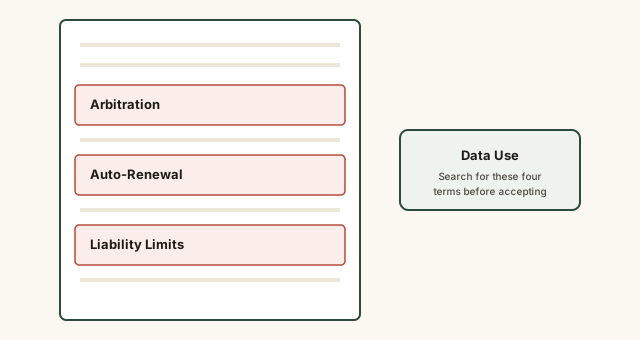
Skimming for these four sections specifically covers most of what actually changes your practical rights and obligations.
Common mistakes
Common Mistakes
Clicking 'I agree' without any scan of the terms at all, assuming it doesn't really matter since nobody reads them.
→ Spend two minutes searching the page for 'arbitration,' 'renew,' 'liability,' and 'data' before accepting — this catches the clauses most likely to affect you later.
Assuming a free service has no meaningful terms because no money changes hands.
→ Recognize that free services often monetize through data use, so the data-use section of the terms may matter more, not less, than it would for a paid service.
Ignoring auto-renewal language on a free trial because the current price is $0.
→ Check specifically what price and billing frequency apply after the trial ends, and set a reminder to cancel before that date if you don't intend to continue.
Common misconception
“Terms and conditions are just boilerplate legal filler that doesn't actually bind you to anything real.”
Clicking "I agree" on a terms-and-conditions page generally forms a real, enforceable contract — courts routinely treat clickwrap acceptance as valid consent to the terms, including consequential clauses like arbitration requirements, auto-renewal billing, and data-use permissions. The document may be long, but the obligations inside it are genuinely binding.
What to do next
What to do next
- Before clicking 'I agree' on any meaningful service, use your browser's find function (Ctrl+F or Cmd+F) to search for 'arbitration,' 'renew,' 'liability,' and 'data.'
- If you find an auto-renewal clause tied to a trial period, set a calendar reminder several days before the trial ends.
- If a dispute over a significant amount of money ever arises, check whether an arbitration clause applies before assuming you can sue in court.
- For any agreement involving significant financial or legal stakes, consider having a licensed attorney review the full terms rather than relying on a quick scan.