 KnowThis
Key Takeaways
Key Takeaways
- 1Online and mobile banking are alternate access channels into the exact same account a branch teller would see — they don't hold funds separately, they just route the same actions through the internet instead of a counter.
- 2Security relies on encrypted connections plus multi-factor authentication, meaning a password alone typically isn't enough to get in — a second verification step (a code, a biometric scan) is required as well.
- 3Mobile check deposit uses image-recognition software to read the check's amount and account details from photos, and funds from mobile deposits are often held longer than in-person deposits while the bank verifies the images.
The concept
None of this changes what the account actually is — it's the same balance, the same protections, the same underlying ledger. Online and mobile banking just change the path used to reach it, which is exactly why the security layered onto that path matters so much.
Why does a bank typically require more than just a correct password to log into online or mobile banking?
Worked examples
Example 1: Logging in to check a balance (baseline case)
Example 2: Depositing a check via mobile app, with a longer hold (edge case / variation)
Example 3: Recognizing a phishing attempt disguised as a bank login page (real-world / applied case)
A text message claims to be from your bank, warns of 'suspicious activity,' and includes a login link. What's the safest response?
How it works (visual)
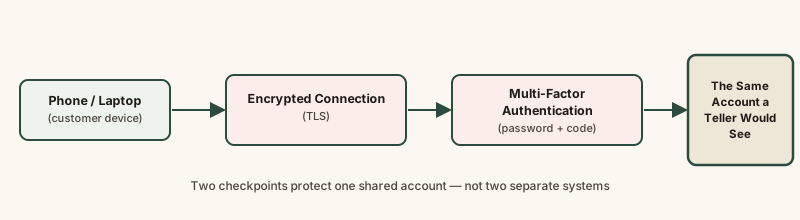
Two checkpoints stand between a device and the account: an encrypted connection that protects data in transit, and a second authentication factor that confirms the person logging in is who they claim to be. Both must be satisfied before reaching the same account a branch teller could access directly.
Common mistakes
Common Mistakes
Logging into banking apps through links sent via text or email instead of the official app or a manually typed web address.
→ Always access banking through the official app or by typing the bank's known address directly — never through an unsolicited link, which is the primary phishing vector.
Assuming a mobile check deposit clears and is available exactly like an in-person deposit.
→ Expect mobile deposits, especially larger or unusual ones, to sometimes carry a longer hold period while the bank verifies the check images.
Reusing the same password across a banking app and other, less secure websites.
→ Use a unique password for banking specifically, since a breach at an unrelated site can otherwise expose banking credentials too.
Common misconception
“Online and mobile banking are less legitimate or less secure than walking into a branch, since there's no person physically checking anything.”
Both channels access the identical underlying account, and modern digital banking is protected by encryption and multi-factor authentication specifically designed to meet or exceed the practical security of an in-person visit. The real risk isn't the channel itself — it's phishing and credential theft, which exploit user behavior rather than a weakness in the online banking system itself.
What to do next
What to do next
- Enable multi-factor authentication on your banking app if it isn't already required by default.
- Never log into banking through a link from an unsolicited text or email — use the official app or a manually typed address instead.
- Check your bank's specific hold policy for mobile check deposits before relying on quick access to a large deposited amount.
- Use a unique password for banking accounts, separate from passwords used on other websites.