Tracking spending means recording where money actually goes, using a method that ranges from manual (writing down every purchase) to fully automated (bank-linked apps that categorize transactions), all serving the same purpose of converting invisible spending patterns into a reviewable record.
Reading time
— 4 min
Updated
— Aug 22, 2026
Fact-reviewed
— Aug 22, 2026
This entry explains general spending-tracking methods — it is financial literacy, not personalized advice. The best method for any individual depends on their habits and comfort with tools; a financial advisor can help tailor an approach to a specific situation.
Key Takeaways
Key Takeaways
1Every spending-tracking method — manual ledger, spreadsheet, or bank-linked app — does the same core job: converting spending that would otherwise be invisible into a reviewable record.
2The methods differ mainly in effort and automation, not in what they measure — a manually kept ledger and an automated app can produce identical category totals if both are accurate.
3Automation trades effort for a different kind of work: reviewing and correcting auto-categorized transactions, since apps regularly miscategorize purchases without a human check.
The concept
Tracking spending just means writing down what gets spent so it can be reviewed later, instead of relying on memory or a bank balance alone. That can mean a paper notebook, a spreadsheet with a row per purchase, or an app that reads transactions directly from a bank account. Whichever method is used, the goal is the same: turn spending into a record that can be totaled by category (groceries, dining, subscriptions) and compared against a plan.
The practical differences between tracking methods show up mainly in what happens when a purchase doesn't match its category cleanly.
Quick check
A bank-linked app automatically categorizes a $60 charge from a big-box retailer as 'Shopping,' but the purchase was actually groceries. What does this reveal about automated tracking?
Worked examples
Example 1: A manual ledger for a month of spending (baseline case)
Someone writes down every purchase in a notebook for a month: $420 groceries, $180 dining, $90 subscriptions, $340 rent share of utilities and other fixed costs. At month's end, adding each category by hand produces the same kind of categorized total an app would generate automatically — the manual method just required entering all 40-plus individual line items by hand rather than having them imported.
Example 2: The same month tracked with an automated app, requiring correction (edge case / variation)
The same spending tracked in a bank-linked app auto-imports all transactions instantly, but miscategorizes a $65 pharmacy purchase (mostly groceries and household goods) as "Health," and splits a $40 restaurant delivery order into "Dining" correctly but tags the delivery fee separately as "Other." Left uncorrected, the "Health" and "Dining" totals would both be inaccurate. A five-minute review at the end of the week — reassigning the two miscategorized entries — produces the same accurate totals the manual method reached, with far less time spent on data entry overall.
Example 3: Using a spreadsheet as a middle-ground method (real-world / applied case)
A household uses a spreadsheet with one row per transaction and a dropdown category column, entering purchases every few days from memory and receipts rather than in real time. This sits between the two extremes: it requires manual entry like a paper ledger (no automatic import), but the categorization is faster and more flexible than handwriting, and totals can be calculated automatically with a formula instead of adding by hand. The tradeoff is that entries made from memory a few days later are more error-prone than either same-day manual entry or automatic import.
Quick check
Why might entering spreadsheet transactions 'every few days from memory' introduce more error than either same-day manual entry or an automated app?
How it works (visual)
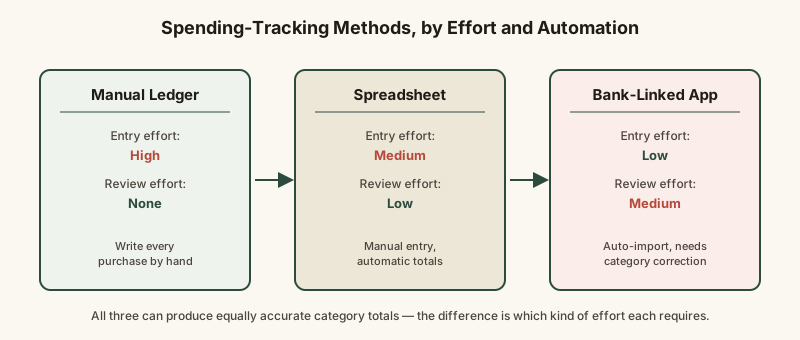
Three spending-tracking methods, compared by effort and automation
Moving right on this scale trades entry effort for review effort — no method eliminates the work entirely, it just changes what kind of attention the tracking requires.
Common mistakes
Common Mistakes
✕
Assuming an automated app's categorization is always correct without ever reviewing it.
→ Set a recurring weekly or monthly review to catch and correct miscategorized transactions — automated tools still need periodic human checking.
✕
Delaying manual entry for several days and relying on memory to fill in the details.
→ Enter transactions the same day when using a manual method, or use a receipt/photo as a memory aid if same-day entry isn't possible.
✕
Switching tracking methods frequently, which fragments the spending history across multiple incompatible records.
→ Pick one method and stick with it for at least a few months before switching, so category totals stay comparable month to month.
Common misconception
“Automated bank-linked apps are always more accurate than manual tracking because a computer is doing the categorization.”
Automated categorization is based on merchant name matching, which regularly misfiles transactions from stores that sell multiple categories of goods or from unfamiliar billing names — it isn't inherently more accurate than manual tracking, just less effortful, and it still requires periodic human review to reach the same accuracy a careful manual ledger can achieve.
What to do next
What to do next
Pick one tracking method (manual, spreadsheet, or app) based on how much automation effort you're willing to trade for review effort.
If using an automated app, schedule a recurring weekly review of categorized transactions rather than assuming they're all correct.
If tracking manually, enter transactions the same day rather than relying on memory a few days later.
Stick with one method for at least a few months so category totals stay comparable over time.
FAQ
FAQ
Related terms
Related terms
Expense tracking
The practice of recording individual purchases and payments as they happen, so total spending by category can be reviewed and compared against a budget.
Bank-linked budgeting app
Software that connects to a user's bank and card accounts to automatically import and categorize transactions, removing the need for manual entry.
Someone is saving for a house down payment they expect to make in 18 months. Which time-horizon bucket does this goal fall into, and what does that suggest about where to hold the funds?
This entry was researched from public sources and drafted with AI-assisted tools, then edited — errors are still possible. Spot one, or want a topic covered? Read our disclaimer.
 KnowThis