 KnowThis
Key Takeaways
Key Takeaways
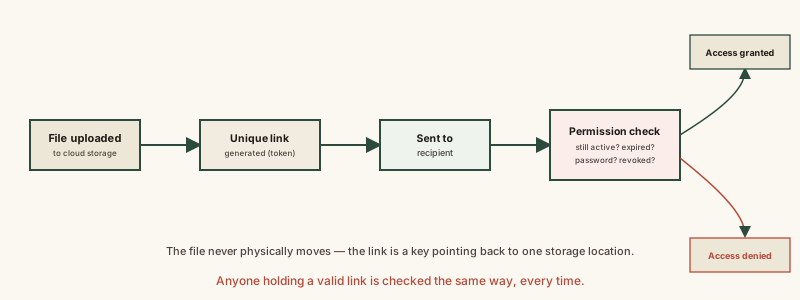
- 1A file-sharing link doesn't send anyone a copy of the file — it's an address pointing back to one file sitting in cloud storage, opened fresh each time.
- 2Every time a link is opened, the server runs a permission check first — confirming the link is still valid — before deciding whether to hand over the file at all.
- 3'Anyone with the link' access is not the same as private access, and a link can be set to expire or be revoked at any time, cutting off access instantly even for people who still have the exact address saved.
The concept
Understanding a share link as a re-checked pointer rather than a one-time delivery clears up most of the confusing behavior around expiring links, revoked access, and why the same link can behave differently for different people.
Someone shares a file link with a coworker, then later changes the link's permission from 'can edit' to 'view only.' What happens the next time the coworker opens that same link?
Worked examples
Example 1: Sharing a photo album with a family member (baseline case)
A family member can view shared photos through a link without ever creating an account with that cloud provider. How is that possible?
Example 2: A shared link accidentally being forwarded further (edge case / variation)
A document shared with 'anyone with the link' permission gets forwarded to someone the owner never intended to have access. Why does that person get in successfully?
Example 3: Revoking access after sharing sensitive files (real-world / applied case)
A business shares a sensitive contract with an external partner using a time-limited link, set to expire in seven days. After the deal concludes early, the business manually revokes the link rather than waiting for the expiration date. The next time anyone tries to open that same link — including the intended partner, if they try again later — the server's permission check finds the token has been revoked and denies access immediately, even though the file itself still physically exists untouched in the business's cloud storage. This demonstrates the real practical value of the re-checked-every-time design: access control happens at the server, independent of whether anyone still has the link's exact address saved somewhere.
A business revokes a shared contract link after a deal concludes early, before the link's original seven-day expiration date. What happens if the original partner tries to open that same link afterward?
How it works (visual)
Common mistakes
Common Mistakes
Assuming 'anyone with the link' is the same as 'private and secure.'
→ It's a real, intentional access tier — anyone possessing the token gets access, including people the link gets forwarded to. Use sign-in-restricted sharing for genuinely sensitive files.
Believing a shared link permanently locks in the permission level it had when first sent.
→ Permissions are checked fresh on every open — an owner can tighten, loosen, or fully revoke access at any time, and it takes effect on the very next attempt.
Thinking deleting the original file has no effect on links that were already shared.
→ Since a link points back to the one stored file rather than a separate delivered copy, deleting that file typically breaks every link pointing to it, immediately.
Common misconception
“Sending someone a file-sharing link is the same as giving them their own private copy of the file.”
A share link doesn't hand over a separate copy — it points back to one file sitting in the owner's cloud storage, re-verified against permissions every time it's opened. That's exactly why an owner can revoke access, set an expiration date, or change permissions after the fact, and why deleting the original file breaks every link pointing to it. The recipient never actually possessed an independent copy unless they explicitly downloaded one.
What to do next
What to do next
- For sensitive files, use sign-in-restricted sharing to specific accounts instead of 'anyone with the link,' since a link can be forwarded beyond your control.
- Set an expiration date on time-sensitive shared links so access closes automatically without you needing to remember to revoke it.
- If a shared link is no longer needed, revoke it explicitly rather than assuming it will simply be forgotten.
- Read Cloud Storage vs. Local Storage next to see the storage layer that every shared link is quietly pointing back into.