 KnowThis
Key Takeaways
Key Takeaways
- 1A browser doesn't display a page directly — it fetches raw code, parses it into structured internal models, and only then paints the result you see.
- 2HTML becomes the DOM, CSS becomes the CSSOM, and the two are combined into a render tree before a single pixel is drawn on screen.
- 3Because this happens in a fixed pipeline order, a page can visibly load in stages — text appearing before images, or a layout shifting after content arrives late — as a direct, predictable side effect of the process, not a glitch.
The concept
Once you separate "fetching the code" from "building the page from that code," a lot of everyday browser quirks — slow loads, layout jumps, a page that looks broken until a script finishes — stop being mysterious and start being traceable to one specific stage of this pipeline.
A web page's text appears almost instantly, but an image on the same page pops in a moment later. What does this most directly reflect about how browsers work?
Worked examples
Example 1: Loading a simple text page (baseline case)
A very simple text page loads almost instantly. Does this mean the browser skipped any of the usual parsing and rendering steps?
Example 2: A page that visibly shifts after loading (edge case / variation)
Why does inserting a late-loading ad into a page cause the surrounding text to visibly jump down the page?
Example 3: A page that looks unstyled for a split second (real-world / applied case)
Occasionally a page briefly flashes as plain, unstyled text before its intended design appears. This can happen when the browser starts painting the render tree before the CSSOM has fully finished building, typically because a stylesheet took unusually long to arrive or was blocked. Understanding the pipeline explains why this is possible at all: painting requires a combined render tree from both the DOM and CSSOM, so if styling information genuinely isn't available yet, the browser has limited good options — and different browsers handle that specific timing gap slightly differently, which is why this flash is more noticeable on some connections and setups than others.
A page briefly shows unstyled, plain text before its normal design appears. What does this suggest about the rendering pipeline at that moment?
How it works (visual)
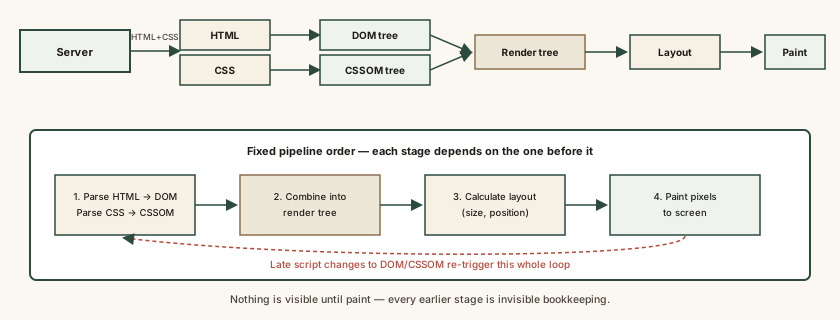
Each layer only knows about the one before it — layout can't begin until the render tree exists, and paint can't begin until layout has run — which is exactly why a delay or change at any one stage ripples forward into every stage after it.
Common mistakes
Common Mistakes
Treating a browser as a simple 'display window' that just shows a page as-is.
→ Remember a browser actively fetches, parses, and constructs the page from raw code every time — nothing appears on screen without passing through that pipeline first.
Assuming a page that looks fully loaded won't change or shift after that point.
→ Recognize that scripts and late-arriving resources can modify the DOM or CSSOM after the first paint, forcing parts of the pipeline to rerun and the visible page to change.
Blaming a slow-loading page entirely on 'the internet being slow' without considering rendering itself.
→ Separate the fetch stage (network speed, server response time) from the parsing and rendering stage (how much CSS/JavaScript the page has to process) — both can independently slow down what a user experiences as 'loading.'
Common misconception
“A web browser just shows you a page, the way a picture frame shows a photo.”
A browser is closer to a construction crew than a picture frame — it requests raw, unrendered code, then actively parses that code into structured internal models (the DOM and CSSOM) before building anything visible. Nothing is "shown" without first being built through this multi-stage process, which is exactly why the same underlying code can occasionally render or behave slightly differently across different browsers, each with their own rendering engine doing that construction work.
What to do next
What to do next
- Next time a page visibly shifts after loading, connect it to late-arriving content forcing layout and paint to rerun, rather than assuming something is broken.
- If a page loads slowly, consider whether the bottleneck is fetching resources over the network or the browser parsing and rendering heavy CSS and JavaScript — they're different problems with different fixes.
- Treat occasional small rendering differences between browsers as expected, since each browser's rendering engine parses the same code independently.
- Read What Makes a Website 'Down' vs. Just Slow next to see how this same pipeline explains the difference between a page that's failing and one that's merely slow.