 KnowThis
Key Takeaways
Key Takeaways
- 1A website loading a page always follows the same request/response chain — browser asks, servers along the way answer — and 'down' versus 'slow' describes where that chain fails, not two unrelated categories of problem.
- 2Slow means the chain completes but is delayed somewhere along the way, usually by server load or network distance; down means the chain never completes at all, because a step failed outright.
- 3A single site being unreachable for you doesn't necessarily mean it's down for everyone — the failure could be local to your network, your DNS resolver, or a specific server in a larger cluster.
The concept
Every symptom someone notices — a spinning loading icon that never finishes, a page that takes ten extra seconds but does load, or an outright error page — traces back to exactly where in this request/response chain the failure or delay occurred.
What's the key structural difference between a website that's 'slow' and one that's 'down'?
Worked examples
Example 1: A page that loads slowly under heavy traffic (baseline case)
During a traffic surge, a site's pages take much longer to load but still eventually display correctly. What does this indicate?
Example 2: A server error that returns instantly (edge case / variation)
A page shows an error message almost instantly instead of the intended content. Is this the same failure as a site being fully down?
Example 3: A site down for one visitor but fine for others (real-world / applied case)
One person reports a site is completely unreachable, while friends checking the same site at the same time load it normally. This can happen for several reasons within the same request/response framework: the person's own network or DNS resolver might be failing to resolve the domain even though the actual servers are healthy, or a large site served by multiple servers behind a load balancer might have one server having trouble while the rest handle traffic fine, with only some visitors routed to the affected one. In both cases, "down for me" and "down for everyone" are genuinely different situations produced by a failure at different points in the same overall chain.
Why might a website be completely unreachable for one person while it loads normally for everyone else?
How it works (visual)
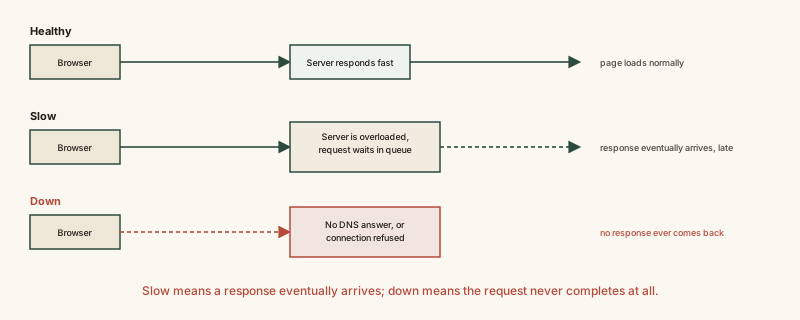
The healthy and slow paths both end with an arrow reaching the browser — a response arrived either way. The down path simply has no arrow completing the loop, which is the entire structural difference.
Common mistakes
Common Mistakes
Treating any slow-loading site as if it's 'down'.
→ Check whether the page eventually finishes loading — if a response does arrive, even a delayed one, the site is slow, not down, and the underlying cause is likely load or network latency rather than an outage.
Assuming a site being unreachable for you means it's down for everyone.
→ Try a different network or device, or check whether others can reach it, before concluding the site itself is down — the problem could be local to your own connection or DNS resolver.
Treating a fast server-error page as unrelated to a working connection.
→ Recognize that a quick error response means the request/response chain actually completed — the server is reachable and answering, just with a failure result instead of the intended page.
Common misconception
“A slow-loading website means it's down or broken.”
Slow and down are different failures in the same request/response chain. A slow site still completes the round trip — DNS resolves, a connection opens, the server processes the request and sends a response — just with added delay, often from heavy load. A down site fails to complete that chain at all: DNS doesn't resolve, the connection is refused, or the browser hits a server timeout with no response ever arriving. A page that eventually loads, however slowly, was never actually down.
What to do next
What to do next
- Before assuming a site is down, wait to see whether the page eventually finishes loading — a delayed response still counts as the site being reachable, just slow.
- If a site seems unreachable, check it from a different network or device (or ask someone else to check) before concluding the site itself has an outage.
- Notice whether an error appears instantly versus after a long wait — an instant error means the server responded; a long wait with nothing means the request likely never completed.
- Read How Online Payments Actually Get Processed next to see a different chain of request/response steps where a similar down-versus-delayed distinction applies to a declined charge.