 KnowThis
Key Takeaways
Key Takeaways
- 1Screen time tracking logs timestamps for state changes — screen on/off, and which app is in the foreground — then totals the elapsed time between those changes; it isn't watching or interpreting what's displayed.
- 2Only foreground, screen-on time gets counted toward an app's usage total. Background activity, and time with the screen off, is excluded even if the app is technically still running.
- 3Basic screen time tools generally can't distinguish active engagement from idle foreground time, which is why leaving an app open without touching it can still add to its reported usage total.
The concept
Every quirk someone notices in a usage report — a total that seems higher than expected, one app dominating the report, or a number that doesn't match how much attention was actually paid — comes back to this same mechanism: timestamps on state transitions, totaled per app, with no awareness of genuine engagement layered on top.
What is a screen time tracking system fundamentally measuring?
Worked examples
Example 1: A single continuous session in one app (baseline case)
If an app is in the foreground continuously from 8:00pm to 8:25pm with no interruptions, what usage duration will be logged for it?
Example 2: An app left open and untouched (edge case / variation)
Why does a screen time report count ten minutes of an untouched, screen-on app the same as ten minutes of active use?
Example 3: A combined report across a phone and a tablet (real-world / applied case)
A person uses a messaging app on their phone for 40 minutes during the day and the same app on a tablet, signed into the same account, for 15 minutes that evening. A combined weekly report shows 55 minutes of usage for that app. This total isn't tracked as one continuous session spanning two devices — each device independently timestamps its own foreground-state transitions and logs its own sessions, and the reporting system performs cross-device sync afterward, simply adding the two separately-logged totals together under the shared account.
How does a combined cross-device usage report typically arrive at one total for an app used on two different devices?
How it works (visual)
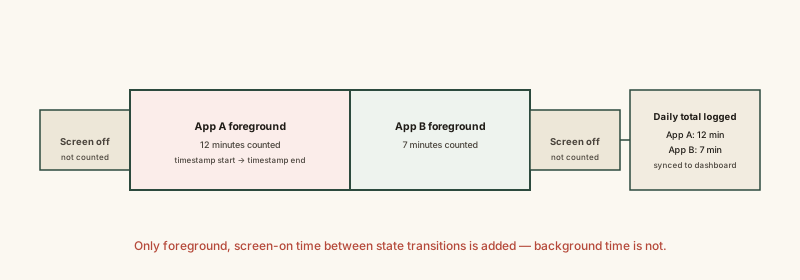
Notice the screen-off segments contribute nothing to any app's total, even though time is still passing — the tracker only accumulates duration during the segments where a specific app actually holds the foreground state.
Common mistakes
Common Mistakes
Assuming screen time totals reflect every second the screen is lit, regardless of which app is open.
→ Remember only foreground-state time for a specific app is counted toward that app's total — time on a home screen or system menu isn't attributed to any single app.
Treating a high usage number as proof of high genuine engagement.
→ Consider that most basic tools can't distinguish active interaction from an app being left open and idle in the foreground — a high total can include untouched time.
Expecting a cross-device total to reflect one continuous tracked session.
→ Recognize that each device tracks its own foreground sessions independently, and a combined report is simply those separate totals added together afterward.
Common misconception
“Screen time tracking counts every second the screen is lit, no matter what's happening.”
Tracking is tied to which app actually holds foreground state, not simply whether the screen is on. Time spent on a home screen, in system settings, or with the screen off contributes nothing to any individual app's total. And because most tools have no idle detection, an app left open in the foreground without being touched still accumulates time identically to active use — the number reflects foreground duration, not attention or interaction.
What to do next
What to do next
- Read a screen time report as 'time an app was in the foreground,' not as a direct measure of active engagement — the two can diverge, especially with video or music apps left running.
- If a total across devices looks off, check whether cross-device sync is enabled and whether it's combining sessions from a device you forgot was signed into the same account.
- Don't use a raw screen time number alone to judge how 'addictive' an app is — an app left open passively can inflate the total without reflecting active use.
- Read What App Permissions Are Actually Granting Access To next, since screen time tracking itself typically relies on a system-level usage-access permission separate from ordinary app permissions.