 KnowThis
Key Takeaways
Key Takeaways
- 1A permission grants access to one specific resource for one specific app — it isn't a master key that opens every sensitive feature on a device at once.
- 2The operating system sits between the app and the resource as a gatekeeper, checking the stored permission on every access attempt, not just once at install time.
- 3Permissions can be revoked at any time in device settings, and revocation takes effect on the app's next access attempt — it isn't a one-way, irreversible decision made only at install.
The concept
Every permission-related behavior a person notices — a prompt appearing the first time a feature is used, a setting that can be flipped off later, or one app being able to see photos while another can't — comes from this same mechanism: the OS as gatekeeper, checking one stored (app, resource) setting per request.
Why doesn't granting an app access to your camera also give it access to your contacts?
Worked examples
Example 1: A camera permission prompt at first use (baseline case)
Why does the camera permission prompt typically appear only the first time an app requests it, not every single time?
Example 2: "Only while using the app" as a scoped grant (edge case / variation)
A person granted a navigation app 'only while using the app' location access. What happens to that access once they switch to a different app?
Example 3: Revoking a permission after the fact (real-world / applied case)
A person notices an old app still has microphone access they no longer want it to have, and turns that permission off in device settings. The change is a revocation of the stored (app, resource) setting, not a request sent to the app itself. The very next time that app tries to access the microphone, the operating system's gatekeeper check now returns a denial, and the app is blocked at that layer — the app doesn't need to be updated, restarted, or reinstalled for the change to apply, because the OS is what enforces the check on every single request, not the app.
After a user turns off an app's microphone permission in settings, when does that change actually take effect?
How it works (visual)
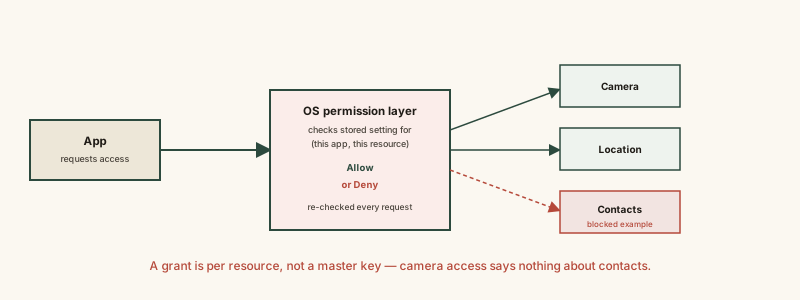
The key detail is that the middle layer checks each resource separately. An allow on one line of that check has no bearing on any other line — which is exactly why one granted permission never implies another.
Common mistakes
Common Mistakes
Assuming granting one sensitive permission implicitly grants others.
→ Check each permission separately in device settings — camera, location, contacts, and microphone are all independent grants, each checked on its own by the OS.
Believing a permission granted once can never be changed or revoked.
→ Open the app's permission settings and revoke it directly — the change is enforced by the OS on the app's very next access attempt, with no reinstall or update needed.
Treating 'always' and 'only while using the app' location access as functionally the same thing.
→ Recognize the scope difference — 'only while using the app' stops the OS from honoring background requests, which materially limits what the app can actually observe compared to an always-on grant.
Common misconception
“Once an app permission is granted, it can't be revoked and stays in effect forever.”
A permission is just a stored setting the operating system checks on every access attempt, not a one-time, irreversible handoff. Opening a device's settings and turning a permission off performs a revocation that takes effect on that app's very next request — the app itself has no ability to override that check, because it never had direct access to the resource in the first place; it only ever had access mediated through the OS.
What to do next
What to do next
- Periodically review your device's permission settings by resource (camera, location, contacts) rather than by app — it's a faster way to spot access you no longer want granted anywhere.
- When available, prefer a narrower scope like 'only while using the app' for location over an always-on grant, especially for apps that don't need background tracking to function.
- Don't assume revoking a permission requires reinstalling or updating an app — the operating system enforces the change immediately on the app's next access attempt.
- Read How Online Ad Targeting Actually Works next to see what advertisers can and can't infer once a permission like location or a tracking identifier has been granted.