 KnowThis
Key Takeaways
Key Takeaways
- 1Deleting a file, even after emptying the recycle bin or trash, usually just removes its listing from the file system's index and marks that storage space as free — the actual data often remains physically on the drive until something else overwrites it.
- 2This is why file-recovery software can frequently restore recently deleted files, and why simply deleting sensitive files is not a secure way to actually get rid of the data.
- 3Modern solid-state drives (SSDs) behave differently from traditional hard drives here: a background process called TRIM often proactively erases deleted data on an SSD for performance reasons, which is part of why undelete tools are less reliable on SSDs than on older hard drives.
The concept
That gap between "the file is gone from view" and "the data is actually destroyed" plays out differently depending on the kind of storage involved — the examples below walk through exactly how.
You delete a photo from your computer's hard drive and empty the recycle bin. An hour later, why might file-recovery software still be able to restore it?
Worked examples
Example 1: Recovering an accidentally deleted photo (baseline case)
Example 2: The same scenario on a modern SSD (edge case / variation)
Example 3: Selling or donating an old computer (real-world / applied case)
Why does the Federal Trade Commission specifically warn people against just deleting files before selling or donating an old computer?
How it works (visual)
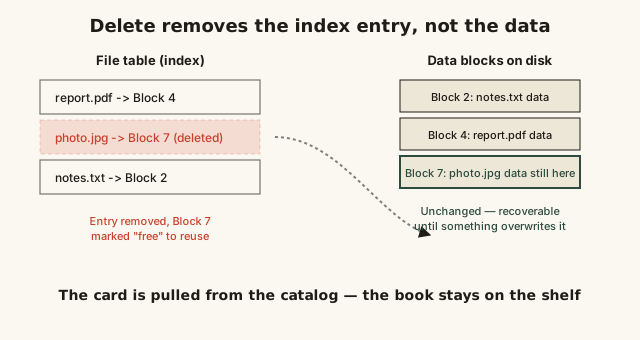
Notice the data blocks on the right don't change at all when the pointer on the left is removed — that gap between "the index says it's gone" and "the data is actually gone" is the entire mechanism this page is explaining.
Common mistakes
Common Mistakes
Assuming emptying the recycle bin or trash permanently destroys a file's data.
→ Treat emptying the recycle bin as removing the file from easy view, not as secure erasure — the underlying data can often still be recovered until it's overwritten.
Deleting sensitive files (tax documents, financial records, personal photos) as your only step before selling, donating, or recycling a device.
→ Use a dedicated secure-erase or full-disk-wipe tool, or rely on full-disk encryption with the key destroyed, before a storage device leaves your possession.
Assuming file recovery works the same, reliable way on an SSD as it does on an old-style hard drive.
→ Expect recovery odds on an SSD to be much lower once time has passed, because the TRIM command often lets the drive proactively erase freed blocks in the background well before any new file is written.
Common misconception
“Deleting a file, especially after emptying the recycle bin, instantly and permanently destroys the data.”
On most systems, deleting a file removes its entry from the file system's index and marks its storage space as available for reuse — it typically does not immediately erase the underlying data itself. That data, called data remanence, can often be reconstructed by file-recovery software until something else happens to be written into that same physical space. Real permanent destruction requires a deliberate extra step: overwriting the data with a secure-erase tool, destroying the encryption key on an encrypted drive, or physically destroying the storage media, which is exactly what NIST's official media sanitization standard and the FTC's consumer guidance both recommend before a device changes hands.
What to do next
What to do next
- Use a dedicated secure-erase or file-shredding tool for genuinely sensitive files, rather than relying on ordinary deletion.
- Before selling, donating, or recycling any computer, phone, or storage device, perform a full-disk wipe or confirm full-disk encryption is enabled and then destroy the encryption key/reset the device — don't rely on deleting files individually.
- If you've accidentally deleted a file you need back, stop using that drive immediately and run recovery software before any new data gets written, since every new write reduces your odds of a full recovery.