 KnowThis
Key Takeaways
Key Takeaways
- 1Compression works by finding redundant, repeated patterns in data and rewriting them more efficiently — it isn't deleting information at random, it's exploiting predictability.
- 2Lossless compression (like ZIP) can be perfectly reversed back to the exact original bytes; lossy compression (like standard JPEG or MP3) permanently discards some detail to reach a much smaller size.
- 3How much a file shrinks depends heavily on how repetitive its content already is — highly repetitive data compresses dramatically, while already-random or already-compressed data barely shrinks at all.
The concept
The core idea — find the redundancy, encode it more efficiently — applies whether you're zipping a folder of documents or a camera saving a photo, which is exactly what the worked examples below walk through with real numbers.
Does compressing a file mean some of its information gets permanently deleted?
Worked examples
Example 1: Zipping a folder of text documents (baseline case)
A 40MB folder of plain text documents compresses down to about 12MB in a ZIP archive. What does this tell you about the compression method used?
Example 2: Trying to compress an already-compressed video file (edge case / variation)
Compressing an already-compressed video file into a ZIP archive barely changes its size, or even makes it slightly larger. What does this indicate?
Example 3: Choosing lossy JPEG compression for photos on a website (real-world / applied case)
A website serving thousands of product photos commonly uses lossy JPEG compression rather than a lossless format, because the size savings are dramatic — often 5-10x smaller than an uncompressed original, sometimes more — and the specific detail JPEG discards (subtle color gradients most viewers won't consciously notice) is a reasonable tradeoff against page-load speed. The same site typically keeps original, uncompressed or losslessly compressed master copies of each photo in storage, precisely because lossy compression's discarded detail can't be recovered later if the images ever need to be re-edited or reproduced at higher quality.
How it works (visual)
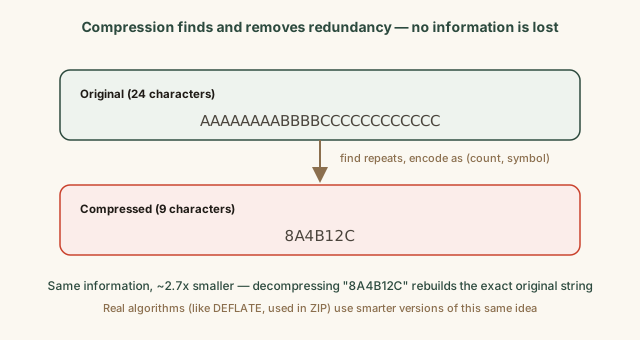
This simplified count-based encoding is the same basic idea behind real lossless algorithms like DEFLATE, just far less sophisticated — real algorithms handle far more complex and less obviously repetitive patterns, but the underlying principle (find what repeats, encode it more compactly, keep everything fully reversible) is identical.
Try it yourself
Enter a file's original size and its compressed size to see how much smaller it became.
Using the same two sizes, see what percentage smaller the compressed file is.
Common mistakes
Common Mistakes
Assuming any compression method can shrink any file by roughly the same amount.
→ Remember compression ratio depends on the source data's redundancy — highly repetitive data compresses dramatically, already-random or already-compressed data barely shrinks at all.
Zipping an already-compressed file type (like JPEG photos or MP3 audio) expecting significant further savings.
→ Skip re-compressing already lossy-compressed media for size savings — most of the exploitable redundancy is already gone after the first compression pass.
Assuming lossy compression is always the wrong choice because 'lossy' sounds bad.
→ Recognize lossy compression is a deliberate, reasonable tradeoff for content like web photos and streaming audio, where the discarded detail is largely imperceptible and the size savings are substantial.
Common misconception
“Zipping a file twice in a row will keep shrinking it further each time, the same way it shrank the first time.”
The first compression pass removes most of the redundancy a general-purpose algorithm can find; the resulting compressed data looks far more random and unpredictable than the original. Compressing that already-compressed output again typically achieves little to no further reduction, and can even add a small amount of overhead from the compression format's own header and metadata, sometimes making the result marginally larger rather than smaller.
If zipping a file once reduces it from 40MB to 12MB, will zipping that resulting ZIP file again reduce it further by a similar amount?
What to do next
What to do next
- Use lossless compression (ZIP) for documents, program files, and anything you need to be byte-for-byte identical after decompressing.
- Use lossy compression (standard JPEG, common audio formats) for photos and audio meant for viewing or listening, where some imperceptible detail loss is an acceptable tradeoff for a much smaller file.
- Keep an original, uncompressed or losslessly compressed master copy of anything you might need to re-edit or reproduce at higher quality later.
- Don't expect meaningful size savings from re-compressing files that are already in a compressed format, like photos, video, or audio.