 KnowThis
Key Takeaways
Key Takeaways
- 1'Compatible' isn't one property — it's shorthand for at least four independent layers matching: physical connector, communication protocol, operating system support, and software format.
- 2A device can pass every layer except one and still fail completely — a cable that physically fits but uses a different protocol than expected still won't work.
- 3Published technical standards exist specifically so products from different, competing manufacturers can be compatible without those companies coordinating directly with each other.
The concept
Once compatibility is understood as several separate checkpoints rather than one property, "it should work, they're both from the same era" stops being a reliable assumption — any single checkpoint failing is enough to break the whole chain.
A cable's connector fits perfectly into a device's port, but the device doesn't recognize anything is plugged in. What's the most likely explanation?
Worked examples
Example 1: A connector shape shared by multiple, incompatible protocols (baseline case)
Can two devices share an identical connector shape and still be unable to communicate any data?
Example 2: A file that opens on one device but not another running the same app (edge case / variation)
Two people use what they both call 'the same app,' but a file created by one won't open correctly for the other. What is the most likely cause?
Example 3: Backward compatibility letting an old accessory work with new hardware (real-world / applied case)
A wireless standard's newer version is commonly designed to remain backward compatible with older devices built to an earlier version of the same standard — a newer receiver can typically still recognize and communicate with an older accessory, often at the older, more limited feature set rather than the newest capabilities. This deliberate design choice is what lets a years-old accessory keep working with newer hardware at all, and it's a direct result of the standards body publishing specifications with backward compatibility as an explicit design goal, not an accident of engineering.
How it works (visual)
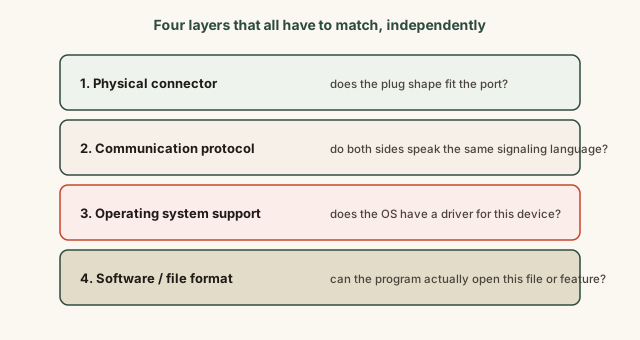
Troubleshooting a "these should work together but don't" problem is really a search through these four layers to find which one broke — because passing three out of four still produces total failure, the same as passing zero.
Common mistakes
Common Mistakes
Assuming a cable or connector that physically fits must be fully compatible.
→ Check the specific protocol and feature support the cable is rated for — physical fit is only one of several independent layers.
Blaming hardware for a compatibility failure that's actually a software version or file format mismatch.
→ Check for available updates on both sides before assuming the hardware itself is the problem — many 'incompatible' symptoms are really outdated software.
Assuming two products released around the same time must be compatible with each other.
→ Release timing doesn't guarantee shared standard support — check the specific standard or protocol each product actually supports.
Common misconception
“If a cable fits the port and the device powers on or charges, it must be fully compatible for everything, including data transfer.”
Charging and data transfer can rely on entirely different parts of the same connector and protocol stack, so a cable can reliably charge a device while carrying none of the data lines needed for file transfer or video output. "It's charging" only confirms the electrical power layer works — it says nothing about whether the data-carrying protocol layers are present or supported by that specific cable.
A cable successfully charges a laptop but can't transfer files to it. What does this indicate?
What to do next
What to do next
- When troubleshooting a device that 'should work but doesn't,' check each layer in order — physical fit, protocol/cable rating, OS/driver support, then software/file format.
- Before buying a cable or adapter, check its specific protocol and feature rating rather than assuming a matching connector shape is enough.
- If a file won't open in 'the same app' on another device, check both devices' app version before assuming a deeper incompatibility.
- Read the related entry on device drivers, since OS-level compatibility for hardware runs specifically through driver support.