 KnowThis
Key Takeaways
Key Takeaways
- 1A file format is a rulebook for how data is structured inside a file — the extension is just a label claiming which rulebook was used, and renaming a file doesn't rewrite its actual contents.
- 2Different formats trade off different things on purpose: .png keeps every pixel exact but produces a larger file, .jpg discards some detail to get a much smaller file, and .docx stores editable structure that .pdf deliberately locks down.
- 3A program can only open a file correctly if it understands that specific format's rules — 'wrong format' errors happen because the program is reading bytes it doesn't know how to interpret, not because the file is corrupted.
The concept
Once you see a format as a rulebook rather than a label, most "why won't this file open" problems stop being mysterious — they're almost always a program being handed a rulebook it was never taught to read.
If you rename a JPEG photo from photo.jpg to photo.png, does the file actually become a PNG?
Worked examples
Example 1: Sending a resume as .docx vs. .pdf (baseline case)
Why might someone specifically choose to send a resume as a .pdf instead of a .docx?
Example 2: A video file that plays audio but shows a black screen (edge case / variation)
A video file plays sound but shows only a black screen. What does this most likely indicate?
Example 3: Choosing a format for a company's long-term archived records (real-world / applied case)
Organizations planning to keep digital records readable decades from now generally favor open, well-documented formats (like plain text, PDF/A — a restricted archival variant of PDF, or open image standards) over proprietary formats tied to one company's software, precisely because an openly published specification means future software can be built to read the format even if the original program that created it disappears. This is the same reasoning national archives and libraries use when publishing format sustainability guidance: a format's long-term readability depends on its specification being public and durable, not on how popular or convenient it is today.
How it works (visual)
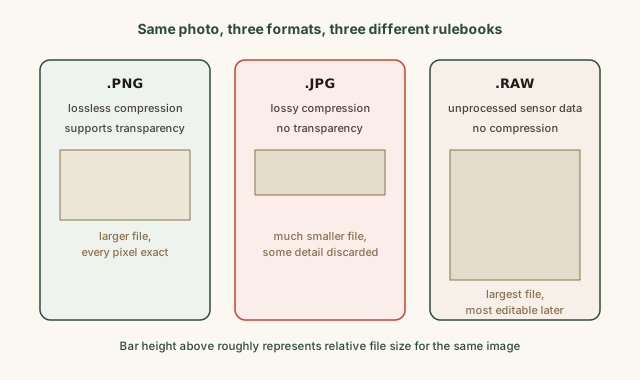
The same visual content produces three genuinely different files because each format applies a different rulebook to it — one preserves every pixel exactly at the cost of size, one discards some detail to shrink the file dramatically, and one keeps completely unprocessed data for maximum future editing flexibility at the cost of being the largest of the three.
Common mistakes
Common Mistakes
Renaming a file's extension and expecting it to actually convert to the new format.
→ Use an actual conversion tool or 'Save As' / 'Export' feature, which re-encodes the underlying data — a rename only changes the label, not the bytes.
Assuming a file that won't open is automatically corrupted.
→ Check first whether the program you're using actually supports that format at all — many 'file won't open' problems are compatibility gaps, not corruption.
Treating all image formats as interchangeable since they all 'just show a picture.'
→ Match the format to the need: PNG for transparency and exactness, JPEG for smaller photographic files, and RAW when maximum future editing flexibility matters more than file size.
Common misconception
“A file extension is a reliable, enforced label — if a file is named photo.png, it must actually be a PNG.”
The extension is metadata the operating system trusts by convention, not something the file format enforces or verifies. A file can be renamed to any extension without altering its internal structure at all, which is exactly why some file-type detection tools instead check the actual bytes at the start of a file (a format's internal signature) rather than trusting the extension alone.
Can a file genuinely be, say, JPEG data internally while carrying a .png extension in its filename?
What to do next
What to do next
- When sharing a document you don't want edited, choose PDF; when sharing one you expect the recipient to modify, choose an editable format like DOCX.
- If a file won't open, check whether your program actually supports that specific format before assuming the file itself is broken.
- Use a real 'Export' or 'Convert' feature instead of manually renaming an extension when you need to genuinely change a file's format.
- Read the related entry on file compression to see how formats like JPEG and ZIP shrink files without necessarily losing the information you care about.