 KnowThis
Key Takeaways
Key Takeaways
- 1The majority of software updates exist to fix a specific, already-discovered flaw — either a security vulnerability or a functional bug — not just to add features.
- 2When a vulnerability is publicly disclosed, the exposure clock starts immediately for everyone who hasn't updated yet, because attackers read the same disclosure that developers and security researchers do.
- 3Skipping an update doesn't leave software in some neutral, unchanged state — it leaves a device running a version with a now-publicly-known flaw that the patch already exists to fix.
The concept
Once a flaw is disclosed, the update isn't optional homework — it's the only thing standing between "known weakness, already documented publicly" and "known weakness, now fixed on this specific device."
Once a security vulnerability in a piece of software is publicly disclosed, who has access to that information?
Worked examples
Example 1: A routine monthly security update (baseline case)
After a security update is released, do the update's release notes typically make the fixed vulnerabilities public?
Example 2: Continuing to use software after its official end-of-support date (edge case / variation)
What actually happens to software the day its official support period ends?
Example 3: A large-scale breach traced to a known, unpatched flaw (real-world / applied case)
A recurring pattern behind major security incidents is not some undiscoverable, exotic new attack — it's a vulnerability that had already been publicly disclosed and patched months earlier, exploited on systems that simply hadn't applied the available fix. Government cybersecurity agencies maintain public catalogs specifically listing vulnerabilities known to be actively exploited in the wild, precisely because "a patch exists but wasn't applied" remains one of the most common root causes behind real breaches — not because the flaw was unknown, but because the fix sat uninstalled.
How it works (visual)
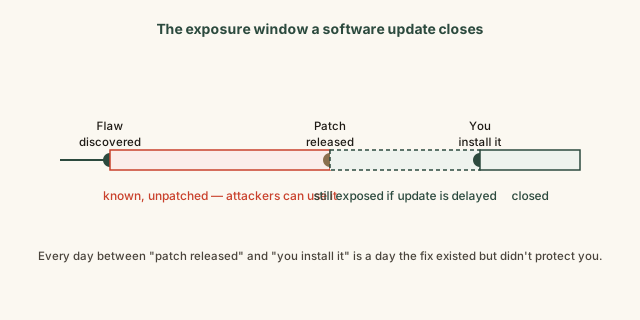
The window between "patch released" and "you install it" is the part of this timeline you directly control. The window before that — between discovery and the patch's release — is out of any individual user's hands, but it's also the strongest argument for closing your own window as soon as a fix is available, since the flaw was already exposed to public knowledge before the patch even existed.
Common mistakes
Common Mistakes
Assuming an update prompt is 'just new features' and can be safely postponed indefinitely.
→ Check the release notes — many updates, especially unscheduled or urgent ones, exist specifically to close a security flaw, not to add anything new.
Believing that not updating keeps a device 'unchanged' and therefore safe.
→ Recognize that new vulnerabilities are discovered in existing software continuously — standing still means accumulating newly discovered, unpatched risk over time, not staying safely static.
Continuing to use software long past its official end-of-support date without a plan to migrate.
→ Track end-of-support dates for major software you rely on, since no new vulnerability found after that date will ever be patched for that version.
Common misconception
“If I haven't been hacked yet, my unpatched software must not actually be at risk.”
Not being hacked yet isn't evidence of safety — it's often just a matter of when, not whether, an unpatched, publicly known flaw gets targeted. Automated scanning tools used by attackers routinely check large numbers of devices for specific known vulnerabilities, and a device isn't targeted individually so much as swept up when it happens to match a known, exploitable pattern. Absence of an incident so far reflects timing and luck at least as much as it reflects actual safety.
Is 'I haven't had a problem yet' good evidence that skipping updates on a device is safe?
What to do next
What to do next
- Turn on automatic updates for your operating system and major apps where available, so the exposure window closes as soon as possible after each patch ships.
- When an update prompt appears, glance at the release notes rather than dismissing it automatically — security-driven updates are worth prioritizing over convenience.
- Check whether any major software you depend on (an OS version, a specific app) is approaching or past its official end-of-support date, and plan a migration if so.
- Read the related entry on beta software to understand the earlier end of this same pipeline — how updates get tested before they reach you.