 KnowThis
Key Takeaways
Key Takeaways
- 1A crash is the operating system deliberately terminating a process after it hits an operation it can't safely continue from — it's a safety response, not a random malfunction.
- 2The most common technical causes are attempts to access memory the process doesn't own, run out of available memory, or divide by zero — all conditions the program has no safe way to proceed past.
- 3Terminating the crashed process, rather than letting it keep running in a broken state, is what protects the rest of the system and other running apps from being corrupted by the same fault.
The concept
Because the OS is terminating the process on purpose, as a safety measure rather than failing itself, the practical question after a crash isn't "is my device broken" — it's "what specific operation did the app attempt that had no safe way to proceed," which the examples below make concrete.
When an app crashes, is the operating system malfunctioning?
Worked examples
Example 1: An app that crashes immediately every time it opens (baseline case)
Why is a crash report more useful to a developer than a user's plain description of 'the app crashed when I opened it'?
Example 2: An app that gets progressively slower and eventually crashes after hours of use (edge case / variation)
An app runs fine for the first hour, then gradually becomes sluggish over several more hours before crashing. What bug pattern does this suggest?
Example 3: A crash fixed by a targeted software update (real-world / applied case)
Widely reported crashes affecting a specific action in a popular app — say, a certain photo filter or a specific document type — are commonly traced by developers using aggregated crash reports from many affected users, which reveal that a large share of crashes are happening at the identical point in the code. Once identified, the fix is typically narrow and targeted (correcting the exact faulty operation), shipped as a small update, after which the specific crash largely disappears from new reports — direct evidence that most crashes have one identifiable, fixable root cause rather than being an inherent, unfixable flaw in the software.
How it works (visual)
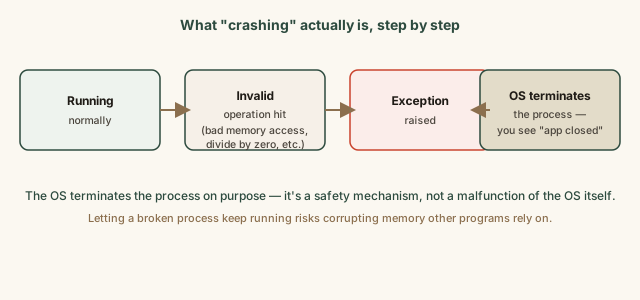
Every one of these steps is deterministic — given the exact same faulty condition, the same sequence happens the same way, which is precisely why crashes are reproducible often enough for developers to fix, rather than being random, unexplainable events.
Common mistakes
Common Mistakes
Assuming a crash means the device's hardware is failing.
→ Most crashes are caused by a specific software bug in the app itself hitting an invalid operation, not a hardware fault — check for app updates before assuming hardware failure.
Dismissing a crash-report prompt without sending it, assuming it won't help.
→ Send the automatically generated crash report when prompted — it captures precise technical detail developers use to actually locate and fix the underlying bug.
Treating a recurring, specific crash as unfixable and simply working around it indefinitely.
→ Report the specific, reproducible steps that trigger it — a consistent, repeatable crash is usually the easiest kind for developers to trace to one exact cause and fix.
Common misconception
“App crashes are essentially random and unpredictable — there's no real reason behind any specific crash.”
Crashes have a specific, deterministic technical cause — an operation the program attempted that had no valid or safe outcome, like accessing memory it didn't own. What can look random from a user's perspective (the same app working fine most of the time, then crashing occasionally) is usually a bug that only triggers under a particular, less common combination of conditions — a certain input, a certain sequence of actions, or a device running low on memory — not true randomness in the underlying cause.
An app crashes only occasionally, seemingly at random, rather than every single time it's used. Does this mean there's no identifiable cause?
What to do next
What to do next
- When an app crashes, send the automatically generated crash report if prompted — it's the most useful information a developer can get to fix the underlying bug.
- Check for an available app update before assuming a recurring crash is unfixable or hardware-related.
- If a crash is reproducible, note the exact steps that trigger it and report them — consistent, repeatable crashes are the easiest kind to trace and fix.
- Read the related entry on what an operating system actually does to see why the OS terminates a crashed process instead of letting it continue running.