 KnowThis
Key Takeaways
Key Takeaways
- 1Beta software is feature-complete — all the intended functionality is present — but hasn't yet been validated at the scale and variety of real-world use its stable release will see.
- 2Beta testing exists because no internal team, however thorough, can replicate the sheer diversity of devices, configurations, and usage patterns a program will actually face after release.
- 3Opting into a beta means trading earlier access to new features for a real, non-zero risk of bugs, including in ordinary use, not just in edge cases.
The concept
Because beta software is feature-complete rather than unfinished, the actual tradeoff isn't "does it work" — it's "how much real-world validation has this specific version had," which is exactly the distinction the next few examples make concrete.
Does 'beta' mean a piece of software's features are still incomplete or unfinished?
Worked examples
Example 1: Joining an operating system's public beta program (baseline case)
Why do companies specifically recruit outside beta testers instead of relying entirely on their own internal testing team?
Example 2: A beta update that introduces a regression (edge case / variation)
A beta version of an app breaks a feature that worked fine in the current stable release. Does this mean the beta testing process has failed?
Example 3: A company running a permanent beta channel alongside its stable release (real-world / applied case)
Some software offers an ongoing beta channel as a standing option rather than a one-time pre-release event, letting interested users permanently receive new features earlier in exchange for continuously accepting more risk of bugs. This structure benefits both sides: the company gets continuous, large-scale real-world testing feedback before each stable release, and opted-in users get early access to functionality months before it reaches everyone else — a deliberate, ongoing tradeoff rather than a temporary phase tied to a single release.
How it works (visual)
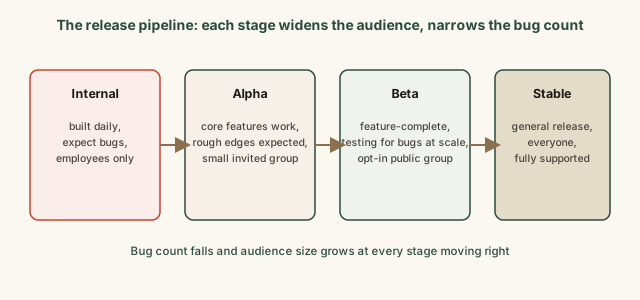
Beta sits deliberately between "mostly internal, expect real bugs" and "fully validated, general audience" — which is exactly why it's a reasonable choice for someone who wants earlier features and can tolerate occasional problems, and a poor choice for a device or task where reliability matters more than being first to a new feature.
Common mistakes
Common Mistakes
Installing beta software on a primary device relied on for critical, time-sensitive tasks.
→ Use a secondary device, or wait for the stable release, when reliability matters more than getting new features early.
Assuming a bug found in beta software means the final stable release will have the same bug.
→ Recognize that surfacing and fixing bugs before the stable release is the entire purpose of the beta stage — most reported beta bugs get fixed before general release.
Treating 'beta' as synonymous with 'unfinished' or 'missing major features.'
→ Beta software is typically feature-complete; what's incomplete is real-world validation, not the feature set itself.
Common misconception
“Beta software is basically a demo or preview that isn't really meant to be used for real tasks.”
Beta software is generally built and intended to be used for genuine, real tasks — that real usage is precisely what generates the testing data the beta stage exists to collect. It's not a non-functional preview; it's a working version carrying more risk than the stable release, which is why companies typically recommend caution (like avoiding beta on a primary device for critical work) rather than suggesting it can't be used at all.
Is beta software meant to be used for genuine, real tasks, or is it just a non-functional preview?
What to do next
What to do next
- Only install beta software on a device you can afford to have behave unpredictably, not one relied on for critical, time-sensitive tasks.
- Read a beta release's known-issues notes before installing, since companies typically disclose the specific bugs already found.
- If you find a bug in beta software, report it through the official feedback channel — that report is the actual mechanism that improves the eventual stable release.
- Read the related entry on why software updates exist to see what happens after beta, once a version reaches general, stable release.