 KnowThis
Key Takeaways
Key Takeaways
- 1The real dividing line is whether the source code is public and legally modifiable, not whether the software is free — open source and proprietary are both independent of price.
- 2An open source license still has real, enforceable terms; 'open' means the rules are published and permissive in specific ways, not that there are no rules at all.
- 3Publicly available source code is what makes a 'fork' possible — an independent group taking a project's code and developing it separately, which simply cannot happen with proprietary software.
The concept
Once source-code visibility is the actual dividing line, a lot of confusing edge cases — free proprietary software, paid open source software, open source projects run by for-profit companies — stop being contradictions and start making sense.
If a piece of software is completely free to download and use, does that automatically make it open source?
Worked examples
Example 1: A widely used open source web browser engine (baseline case)
Can a company build a proprietary product on top of an open source foundation?
Example 2: A paid, proprietary app that still receives free updates (edge case / variation)
A proprietary app is paid once and then receives free updates for years. Does receiving free updates make it open source?
Example 3: A major open source project forking after a licensing dispute (real-world / applied case)
Open source history includes several well-known cases where a community disagreed with a project's direction or a licensing change, and — because the source code was already public — an independent group forked it, continuing development under a new name with the existing codebase as a starting point. This kind of split is only possible because the original source was open; the same disagreement with a proprietary product simply results in unhappy customers, since there's no legally accessible code for anyone outside the original company to fork and continue independently.
How it works (visual)
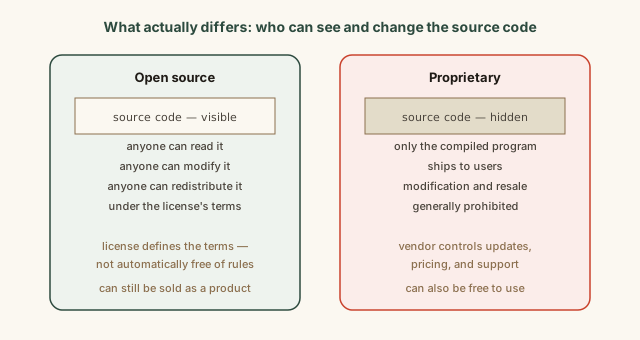
Notice that price doesn't appear anywhere in this comparison — both columns can independently be free or paid. The entire distinction sits on source code visibility and the legal permissions attached to it, which is the part worth checking before assuming "free" and "open source" are synonyms.
Common mistakes
Common Mistakes
Assuming 'open source' automatically means 'free of charge.'
→ Check the license and pricing separately — some open source projects charge for the software itself, packaged distributions, or support, while the source remains publicly viewable.
Assuming 'free software' automatically means the source code is public.
→ Look specifically for whether source code is published and what a stated license permits — plenty of free-to-use software keeps its code entirely proprietary.
Believing 'open source' means anyone can do absolutely anything with the code, with no restrictions.
→ Read the specific license — permissions and requirements (like copyleft's requirement to keep derivatives open) vary meaningfully between different open source licenses.
Common misconception
“Open source software is inherently less secure because attackers can read the code and find flaws more easily.”
Open source's public visibility cuts both ways: yes, anyone including attackers can read the code, but so can any of the many independent security researchers, contributors, and organizations who use or rely on that project, all of whom can find and report flaws. Proprietary code being hidden doesn't prevent vulnerabilities from existing — it just limits who can find and report them before an attacker does. Security outcomes for both models depend heavily on how actively a specific project is maintained and reviewed, not on the licensing category alone.
Does keeping software's source code private (proprietary) guarantee it's more secure than open source software?
What to do next
What to do next
- Before assuming software is open source because it's free, check whether its actual source code is published and under what license.
- If evaluating software for a project you'll need to modify or extend, check its license terms directly rather than assuming based on price or popularity.
- Look up which foundational tools you use daily (browser engines, programming languages, server software) are open source underneath a proprietary or branded product.
- Read the related entry on beta software to see how open and proprietary projects can differ in how openly they run their testing and release process.