 KnowThis
Key Takeaways
Key Takeaways
- 1'Software' is the umbrella category — any instructions a computer runs. An 'app' is one type of software: specifically, application software built to do a visible, user-facing job.
- 2The operating system, device drivers, and background utilities are all software too, but nobody calls them apps because they don't perform a task you directly asked for in the moment.
- 3The line isn't about size, price, or where it came from — a free, tiny program can be an app, and a massive, expensive program can still be system software.
The concept
Once you have the purpose-based split in mind, most confusing edge cases — background services, browser extensions, the settings menu itself — sort themselves out by asking one question: did a person directly ask this specific thing to run right now, for a visible result?
Is the operating system itself an 'app'?
Worked examples
Example 1: A calculator app vs. the operating system it runs on (baseline case)
While you use a calculator app, is the operating system doing any work?
Example 2: A cloud backup service running silently in the background (edge case / variation)
Why is a silent, automatic backup tool harder to classify cleanly as 'app' or 'system software'?
Example 3: Buying "software" for a business vs. installing "an app" (real-world / applied case)
A company that licenses accounting software for its whole office and a person who downloads a single game are both acquiring application software — the word "software" is simply being used at a more formal, larger scale in the business context, while "app" carries a more casual, often mobile or single-purpose connotation. Neither usage is wrong: they're the same underlying category (application software) described with different registers of the same vocabulary. This is worth knowing when reading a vendor contract or a terms-of-service document, since legal and enterprise writing almost always defaults to "software" even when describing something a consumer would casually call an app.
How it works (visual)
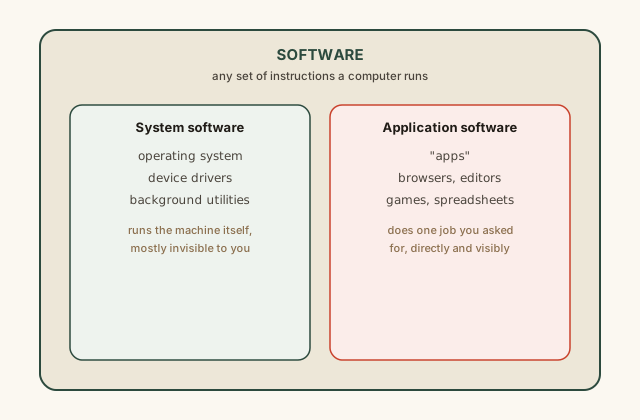
Everything inside the outer box is software by definition. The split into two branches is a split by job: does this program manage the machine itself (system software), or does it perform a specific task a user asked for directly (application software, informally "apps")? A given piece of code sits in exactly one branch based on what it's for, not on its size, price, or platform.
Common mistakes
Common Mistakes
Treating 'app' and 'software' as two unrelated categories rather than a subset relationship.
→ Remember every app is software; think 'car is a type of vehicle,' not 'car and vehicle are two separate things.'
Assuming only mobile or app-store programs count as 'apps' and desktop programs are just 'software.'
→ The app/system-software distinction is about purpose (user-facing task vs. machine management), not platform — a desktop word processor is just as much an app as a phone game.
Believing background utilities and silent services 'don't count' as software since you never see them.
→ Invisibility doesn't disqualify something from being software — plenty of essential system software, like drivers and background sync tools, has no visible interface at all.
Common misconception
“If something isn't in an app store, it isn't really an 'app' — it's just 'software' or 'a program.'”
App stores are a distribution channel, not a technical category. The word "app" simply means application software — a program built to perform a specific, visible, user-requested task — regardless of whether it was downloaded from a curated store, installed from a physical disc, or built in-house at a company. A desktop spreadsheet installed from a company's internal server is exactly as much an "app," by definition, as a game downloaded from a phone's app store.
A company builds an internal expense-reporting program and distributes it only to employees, with no app store involved. Is it still, technically, an application?
What to do next
What to do next
- Next time you say 'this app is slow,' pause and consider whether the app itself is doing the slow work, or whether it's waiting on system software (the OS, a driver) underneath it.
- Look through your device's list of installed programs and try sorting a few into 'application software' vs. 'system software' using the purpose test, not the icon or where it came from.
- Read the related entry on what an operating system actually does to see the system-software side of this split in full detail.
- Read the related entry on open source vs. proprietary software, since that distinction applies independently to both apps and system software.