 KnowThis
Key Takeaways
Key Takeaways
- 1An operating system's real job is resource management — deciding which of several running programs gets the CPU next, which gets memory, and in what order they can touch the disk or screen.
- 2Apps never touch hardware directly. They make a system call to the kernel, which is the only part of the OS with privileged access to the CPU, memory, and devices.
- 3'Multitasking' on a single-core CPU is an illusion built from speed — the kernel switches between programs many times per second, giving each a tiny slice of CPU time.
The concept
That division of labor — kernel handles hardware, everything above it just asks nicely — is the single idea that explains almost everything else an OS does, from running multiple apps at once to stopping one app's bug from crashing another.
Why can't an app just read from your device's storage directly instead of going through the operating system?
Worked examples
Example 1: Opening a text file (baseline case)
When an app 'opens a file,' what is actually happening at the OS level?
Example 2: Two apps competing for one CPU core (edge case / variation)
On a single-core CPU, can two apps actually execute at the exact same instant?
Example 3: Why one crashed app usually doesn't take down your whole device (real-world / applied case)
Modern operating systems give each process its own protected slice of memory that other processes can't read or write into, a design called memory protection. When a buggy app tries to access memory outside its own allotted space, the kernel detects the violation and terminates only that process — the OS itself, and every other running app, is unaffected because they were never sharing that memory in the first place. This is also why closing and reopening a single crashed app is usually enough to recover, instead of needing to restart the entire device: the fault was contained to one process's isolated memory space, not the shared kernel state that everything else depends on.
How it works (visual)
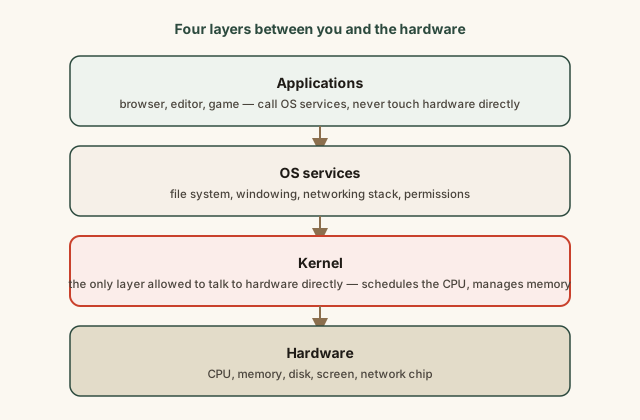
Every request an app makes has to travel down through this stack and every response travels back up. Adding a layer (OS services, kernel) costs a small amount of speed compared to an app hypothetically touching hardware directly — but it's what makes it possible to run dozens of unrelated apps on the same machine without any of them needing to know anything about the specific hardware underneath, or trusting each other not to interfere.
Common mistakes
Common Mistakes
Thinking the operating system is 'just the desktop' or the home screen you see.
→ The visible interface is a small part of the OS. Most of its work — scheduling, memory management, driver coordination — happens with no visible interface at all.
Assuming more open apps automatically means the CPU is 'full' and the device will slow down.
→ An idle app usually uses close to zero CPU time; the scheduler only spends real time on processes that are actively doing work, not merely open.
Believing a crashed app is evidence the operating system itself is broken.
→ A contained single-process crash is usually the OS's memory protection working correctly — it isolated and killed the faulty process instead of letting it corrupt shared system state.
Common misconception
“A computer with a multi-core processor is always running exactly as many separate programs as it has cores, in true parallel, all the time.”
A multi-core CPU can run one process per core simultaneously, but almost every real device runs far more processes than it has cores at any moment — background services, the display manager, security software, and whatever apps you have open. The kernel's scheduler still has to time-slice most of them across the available cores, so most of the "simultaneity" you experience is still the fast-switching illusion, just spread across a small number of cores instead of one.
A laptop has 8 CPU cores but the task manager shows 200+ running processes. What does this tell you?
What to do next
What to do next
- Open your device's task or activity manager and sort by CPU usage — notice how most listed processes sit near 0%, which is the scheduler correctly ignoring idle work.
- Next time one app crashes without affecting anything else you had open, recognize that as memory protection working as designed, not a fluke.
- Read the related entry on device drivers to see how the kernel talks to specific hardware once it decides a request should go through.
- Read the related entry on why apps crash for the deeper mechanism behind what happens the instant a process hits an invalid operation.