 KnowThis
Key Takeaways
Key Takeaways
- 1"The cloud" is real, physical computers — rows of servers in a data center owned by a company — reached over the internet instead of sitting on your desk.
- 2The name comes from old network diagrams that drew the internet as a fuzzy cloud shape to mean "the complicated part you don't need to see" — it stuck as slang and outlived the original diagrams.
- 3Using the cloud means trusting another company's hardware, security, and policies with your data — that's not a downside by default, but it is the real trade-off people skip past when they call it "just the cloud."
The concept
Once you picture a physical building full of running computers instead of a nebulous shape, the rest of how cloud services behave — where your data physically sits, why an outage happens, why pricing scales with usage — stops feeling mysterious.
When a company says your photos are 'stored in the cloud,' what is physically true about where those photos are?
Worked examples
Example 1: Saving a document to a cloud storage app (baseline case)
A cloud-based word processor keeps a temporary local copy of a document while its internet connection is down. Why would it need to do that if the document is supposed to be saved in the cloud?
Example 2: A cloud provider having a regional outage (edge case / variation)
Several unrelated websites go down at the same time after a single cloud provider reports an outage in one region. What does this suggest?
Example 3: Choosing where a business's cloud data physically lives (real-world / applied case)
A company handling customer data for people in a specific country often has to choose which physical region a cloud provider stores that data in, because certain data-protection laws require personal data to stay within a country's borders. This decision only makes sense once "the cloud" is understood as physical: a company literally picks a real geographic data center location from a provider's list, and that choice has real legal and latency consequences (a user farther from the chosen data center will see slightly slower responses, since data still has to physically travel there and back).
Why would a business need to pick a specific physical region for its cloud provider's data center, rather than letting the provider choose automatically?
How it works (visual)
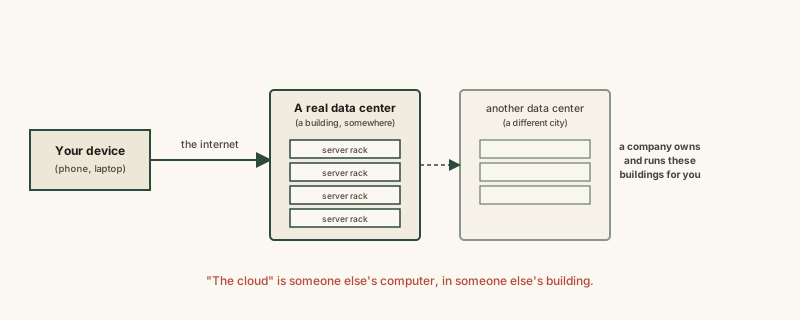
Nothing in this picture is virtual in the sense of not existing — every box is a real machine consuming real electricity in a real location. What's "virtual" is only that you don't have to see or manage it yourself.
Common mistakes
Common Mistakes
Assuming cloud data isn't stored anywhere physical since it's accessed remotely.
→ Remember every byte in the cloud lives on physical storage hardware inside an actual data center — remote access doesn't mean non-physical.
Treating 'the cloud' as one single entity or company.
→ There are many separate cloud providers, each running their own separate data centers — using 'a cloud service' means using one specific company's infrastructure, not a shared universal system.
Believing cloud storage is inherently safer than local storage just because it's 'in the cloud.'
→ Cloud storage typically has stronger built-in redundancy than a single local drive, but it still depends entirely on that provider's security practices, reliability, and your own account security (like password strength and two-factor authentication).
Common misconception
“The cloud is a magical, abstract thing that exists everywhere and nowhere at once.”
The cloud is someone else's computer — a true statement, and one that has real implications people often miss. It means your data physically sits in a specific building, subject to that specific company's security practices, that country's laws, and that provider's uptime record. "It's in the cloud" isn't the end of the explanation — it's the start of asking whose computer, where, and under what terms.
What to do next
What to do next
- Next time an app says something is 'saved to the cloud,' picture the real data center it traveled to — it reframes what 'no internet connection' actually breaks.
- If you manage data for a business, check which physical region your cloud provider stores it in, especially if data-residency laws apply to your customers.
- Treat a cloud provider's security and reliability practices as a real decision criterion, the same way you'd vet any company handling your property.
- Read What a Server Actually Is next to see what one individual machine inside that data center is actually doing.