 KnowThis
Key Takeaways
Key Takeaways
- 1"End of support" means a vendor has stopped shipping security patches for that software, not that the software has stopped working or become unusable.
- 2Newly discovered vulnerabilities in unsupported software are never patched by the vendor, so the count of known, unfixed weaknesses only grows over time, even though the software looks and behaves exactly as it did before.
- 3Some vendors offer paid extended support that continues security patching past the standard end-of-support date, so the date isn't always a single hard cutoff for absolutely everyone using that software.
The concept
Once end of support is understood as "the patch pipeline stopped, not the software," it becomes clear why a program that still "works fine" can simultaneously be accumulating real security risk in the background.
What actually happens to a piece of software once it reaches its 'end of support' date?
Worked examples
Example 1: An old operating system version past its end-of-support date (baseline case)
Why does the newly disclosed vulnerability remain a permanent risk on this device?
Example 2: An organization paying for extended security support (edge case / variation)
What does this scenario reveal about 'end of support' that the baseline example doesn't?
Example 3: Continuing to use unsupported software connected to the internet (real-world / applied case)
Someone keeps using an old, unsupported web browser because "it still opens every site fine and nothing seems broken." The browser's continued normal function has no bearing on its accumulating, unpatched vulnerabilities, since browsers are frequently targeted software with an active, ongoing stream of newly discovered flaws. The practical risk here isn't hypothetical or distant — it grows the longer unsupported, internet-connected software stays in active use, entirely independent of how well it appears to perform.
Why is 'it still works fine' not a reliable signal that continuing to use this unsupported browser is safe?
How it works (visual)
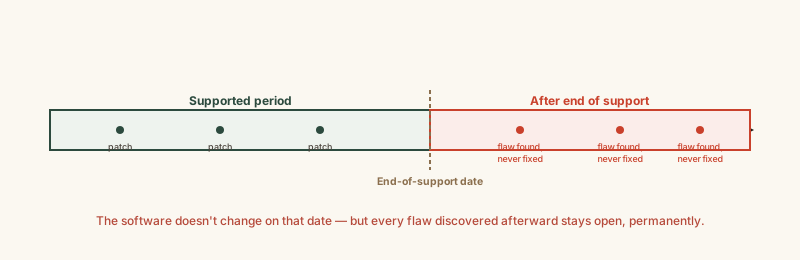
The flat, unchanged appearance of the software across the timeline is the point of the diagram — the growing risk happens entirely beneath the surface, with no visible signal from the software itself.
Common mistakes
Common Mistakes
Delaying operating system or software updates indefinitely because nothing currently seems broken.
→ Treat scheduled end-of-support dates as a real deadline for migrating or updating, independent of whether the software currently appears to function normally.
Assuming end-of-support risk only applies to large, well-known operating systems, not smaller apps, plugins, or device firmware.
→ Recognize any software, however small or obscure, can reach end of support and stop receiving security patches — check vendor lifecycle pages for anything handling sensitive data or network access.
Confusing 'end of support' with 'no longer usable.'
→ Understand the software often keeps working fine after this date; what changes is the security risk trajectory, not day-to-day functionality.
Common misconception
“If old software still runs fine, it's still safe to keep using.”
Whether software functions normally and whether it's accumulating unpatched security vulnerabilities are two entirely separate questions. Software that reached end of support can run exactly the same as before while newly discovered vulnerabilities in it go permanently unfixed, since the vendor is no longer releasing patches at all. The risk is real even when it's completely invisible from normal use.
What to do next
What to do next
- Check the vendor's published lifecycle or support page for the operating systems and major apps you rely on, to know their end-of-support dates in advance.
- Plan an upgrade or migration well before a scheduled end-of-support date, rather than waiting until after it passes.
- For unavoidable cases where migration isn't immediately possible, investigate whether a vendor offers paid extended security support.
- Prioritize updating or replacing any unsupported software that connects to the internet or handles sensitive data first, since that's where unpatched vulnerabilities are most exploitable.