 KnowThis
Key Takeaways
Key Takeaways
- 1A firewall decides whether a connection is allowed to happen at all, checking it against a rule set — it doesn't look inside the content of a connection it has already permitted.
- 2Rules typically filter by port, protocol, and source or destination address, similar to a checkpoint checking an ID against an approved list rather than searching everything a visitor is carrying.
- 3Because a firewall's job stops at the connection level, malicious content delivered over an already-allowed connection, like a phishing email over port 443, passes straight through untouched.
The concept
Once a firewall is understood as a connection-level gatekeeper rather than a content scanner, it becomes clear why it's one necessary layer of defense rather than a complete one — it answers "should this connection be allowed?", not "is what's inside this connection safe?"
What does a firewall's rule set primarily evaluate when deciding whether to allow a connection?
Worked examples
Example 1: A home router firewall blocking unsolicited inbound connections (baseline case)
Why does the router block the scanner's connection attempt in this scenario?
Example 2: A configured rule blocking outbound traffic to known-malicious addresses (edge case / variation)
What does this scenario demonstrate about firewall rules that the baseline home-router example doesn't?
Example 3: A phishing attachment arriving over an already-allowed connection (real-world / applied case)
Someone assumes their firewall would have caught a malicious email attachment, since "the firewall is supposed to stop bad stuff." In reality, the email arrived over a normal, already-permitted connection on a standard port, the same kind of connection used for every other legitimate email. The firewall had no rule reason to block that connection, because nothing about the connection itself, only its contents, was suspicious. Catching a malicious attachment is a job for antivirus scanning or email content filtering, not the firewall.
Why did the firewall not block the phishing email's malicious attachment in this scenario?
How it works (visual)
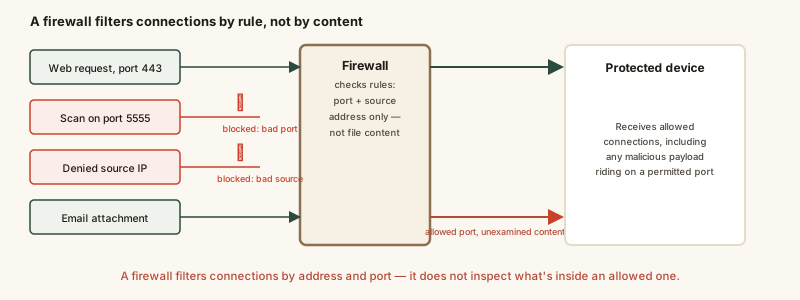
The fourth path in the diagram, the malicious file riding along an already-allowed connection, is the one people most often assume a firewall would stop. It's included deliberately to make that gap visible.
Common mistakes
Common Mistakes
Disabling the firewall entirely to troubleshoot a connectivity problem instead of adjusting the specific rule causing it.
→ Identify which rule is blocking the needed connection and adjust or add an exception for it, rather than removing the entire protective layer.
Treating a firewall and antivirus software as interchangeable or redundant tools.
→ Recognize they operate at different layers — a firewall filters which connections are allowed, while antivirus inspects content for known-malicious code. Both are typically needed together.
Assuming a firewall, once enabled, requires no further attention as new devices and services get added to a network.
→ Review and update firewall rules periodically, since a rule set that made sense for an older set of devices and services can leave new ones over- or under-protected.
Common misconception
“A firewall stops all attacks and makes a network fully protected.”
A firewall filters connections based on rules like port, protocol, and address — it does not inspect the content traveling inside a connection it has already allowed. Phishing emails, malicious attachments, and malware already communicating over a permitted port all pass through a firewall unexamined, because none of those involve the connection-level attributes a firewall actually checks. A firewall is one necessary layer among several, not a standalone solution.
What to do next
What to do next
- Keep your device's or router's firewall enabled by default, rather than disabling it to solve an unrelated connectivity issue.
- Pair firewall protection with antivirus software and cautious handling of attachments, since a firewall doesn't inspect content inside allowed connections.
- Review which inbound and outbound rules are actually needed periodically, removing exceptions no longer in use.
- If a specific connection needs to be allowed (like for a game or a shared device), add a narrow, specific rule for it rather than disabling the firewall broadly.