 KnowThis
Key Takeaways
Key Takeaways
- 1Phishing works by faking a trusted identity and manufacturing urgency — it's a social-engineering technique aimed at a person's judgment, not a technical exploit against a device.
- 2The core mechanism is a mismatch between what a message claims to be and what it actually is: a sender address that looks close but isn't exact, or a link whose visible text hides a different real destination.
- 3Anyone can be targeted, and being careful doesn't make someone immune forever — well-crafted, personalized phishing attempts (spear phishing) are specifically designed to defeat generic caution.
The concept
Once phishing is understood as identity fraud plus manufactured urgency, rather than a technical hack, the practical defense becomes clearer: slow down and independently verify the sender, instead of scanning the message itself for typos.
What is the core mechanism that makes a phishing message work, in most cases?
Worked examples
Example 1: A generic mass-sent phishing email (baseline case)
An email addressed to 'Dear Customer' claims a package delivery needs urgent fee confirmation via a link, from a sender address that's close to but not exactly a known company's domain. What type of attempt is this most likely?
Example 2: A researched spear-phishing message to an employee (edge case / variation)
Why is a targeted spear-phishing email, using a real project name and a real manager's name, generally harder to detect than a generic mass-sent phishing email?
Example 3: Verifying a suspicious request through a separate channel (real-world / applied case)
Someone receives a text message, apparently from a family member, saying they lost their phone and urgently need money sent to a new account. Rather than replying to the number that sent the message, they call the family member directly using a phone number saved from before, on a separate communication channel entirely. This single habit — verifying an urgent, unusual request through a channel the attacker doesn't control — defeats the large majority of phishing and impersonation attempts regardless of how convincing the original message looked, because it sidesteps the fake sender entirely instead of trying to spot it.
Why does contacting someone through a separately known, trusted channel (like a saved phone number) work as a defense against phishing and impersonation, even for a highly convincing message?
How it works (visual)
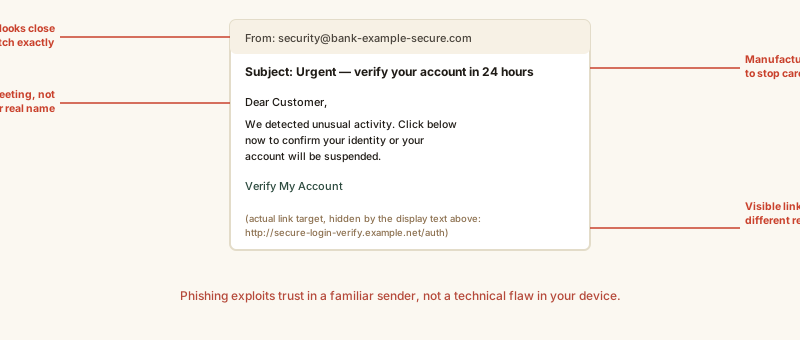
None of these four signs alone proves a message is fake, and a well-researched spear-phishing attempt may show none of them — which is exactly why independently verifying an unusual or urgent request matters more than scanning for these specific tells.
Common mistakes
Common Mistakes
Judging a message's legitimacy mainly by whether it 'looks professional,' with correct spelling and a real logo.
→ Recognize that a convincing appearance proves nothing on its own — well-resourced phishing, especially spear phishing, is often polished and error-free.
Clicking a link to 'check if it's real' rather than navigating to the site directly.
→ Open a new browser tab and type the organization's known address yourself, or use a saved bookmark, instead of clicking through an unsolicited link.
Assuming phishing only happens by email.
→ Treat unexpected urgent requests the same way across text messages, phone calls, and social media messages — the mechanism (impersonation plus urgency) is identical regardless of the channel.
Common misconception
“I'm too careful and too experienced with technology to fall for phishing.”
Generic caution defeats generic phishing, but spear phishing is specifically engineered to defeat exactly that kind of confidence — it uses real, researched details that remove the usual red flags entirely. Security-aware people and even security professionals have been successfully targeted by well-crafted spear-phishing attempts. The reliable defense isn't spotting every fake message on sight; it's independently verifying unusual or urgent requests through a separate channel before acting on them.
What to do next
What to do next
- Verify unusual or urgent requests — especially ones involving money or credentials — through a separate, independently known channel before acting.
- Hover over (or long-press on mobile) a link to check its real destination before clicking, rather than trusting the visible link text.
- Type an organization's address directly into your browser instead of clicking a link in an unsolicited message.
- Report suspected phishing to your email provider or employer's IT/security team — reporting helps block the same attempt from reaching others.