 KnowThis
Key Takeaways
Key Takeaways
- 1Malware is the umbrella category. Virus, worm, and trojan describe how malicious code spreads; ransomware describes what a payload does once it's running — these are two different questions, not four competing terms for the same thing.
- 2A virus needs a human action and a host file to spread; a worm spreads on its own across a network; a trojan spreads by disguising itself as something the user willingly installs.
- 3Ransomware isn't a fourth spreading method — it's a harmful payload (file encryption plus an extortion demand) that a virus, worm, or trojan can all be used to deliver.
The concept
Once malware is understood as two separate questions — how does it spread, and what does it do once running — a lot of confusing terminology sorts itself out, including why the same real-world attack is often accurately described using two or three of these terms at once.
What is the most accurate way to describe the relationship between 'malware' and 'ransomware'?
Worked examples
Example 1: A classic virus attached to pirated software (baseline case)
Why is the malware in this scenario classified as a virus rather than a worm?
Example 2: A worm exploiting an unpatched network vulnerability (edge case / variation)
What single trait distinguishes this scenario as a worm rather than a virus?
Example 3: A trojan delivering a ransomware payload (real-world / applied case)
An email arrives with an attachment disguised as an unpaid invoice. The recipient opens it, believing it to be a legitimate business document, and it installs itself as if it were ordinary software — this is the trojan layer, spreading purely by winning the user's voluntary trust. Once installed, it activates a ransomware payload, encrypting files across the device and any shared network drives it can reach, then displaying a demand for payment in exchange for the decryption key. This single incident is accurately described using two terms at once: a trojan (how it got in) delivering ransomware (what it did once inside).
In this scenario, why is it accurate to call the malware both a 'trojan' and 'ransomware' at the same time?
How it works (visual)
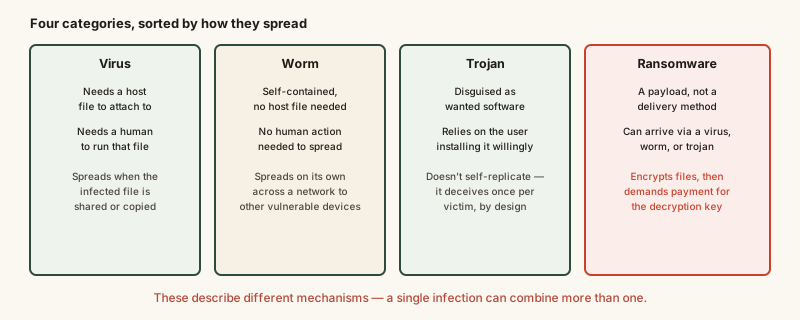
The chart separates the first three (spreading mechanisms) from the fourth (a payload) deliberately — it's the source of most of the confusion around these terms, and the diagram exists specifically to make that separation visible at a glance.
Common mistakes
Common Mistakes
Using 'virus' as a catch-all synonym for any kind of malware.
→ Reserve 'virus' for malware that specifically needs a host file and a human action to activate — use 'malware' as the general umbrella term for everything else.
Assuming ransomware is a totally separate infection method from viruses, worms, and trojans.
→ Recognize ransomware describes a payload's behavior (encrypt and extort), which any of the three spreading mechanisms can deliver — the categories answer different questions.
Believing installed antivirus software alone provides complete protection against every malware type.
→ Understand antivirus is strongest against known, file-based signatures; newer or file-less variants can evade it, which is why backups, timely updates, and cautious behavior remain necessary layers too.
Common misconception
“Antivirus software alone is full protection against malware.”
Antivirus is one layer, not a complete shield. It's most effective against known malware with a recognizable signature or an established behavior pattern. File-less malware, brand-new (zero-day) variants, and malware installed through a user's own trust, like a trojan, can all slip past detection that relies mainly on scanning files. Backups, prompt software updates, and cautious handling of attachments and downloads work alongside antivirus, not as an optional extra.
What to do next
What to do next
- Keep automatic updates turned on for your operating system and installed software, since many worms spread by exploiting vulnerabilities that a patch would have closed.
- Avoid opening attachments or installers from sources you didn't specifically request or verify, since trojans rely entirely on being run voluntarily.
- Maintain regular, separate backups of important files, since a working backup is what makes a ransomware demand irrelevant rather than urgent.
- Run periodic full-system scans in addition to real-time antivirus protection, since some malware behaves passively until scanned or triggered.