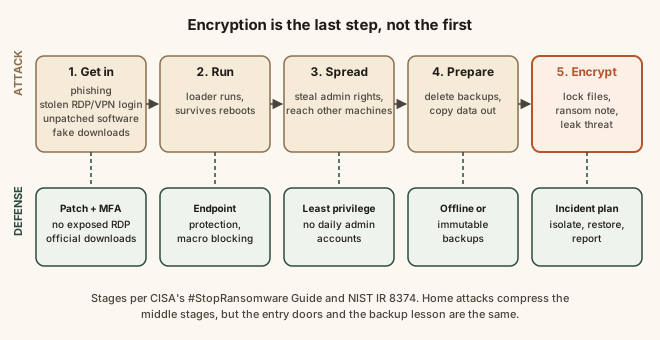
Ransomware infects a device in stages, not in one instant. First comes initial access, and CISA's #StopRansomware Guide names the common doors: phishing emails with malicious attachments or links, internet-facing remote access (such as Remote Desktop Protocol) protected by weak or stolen passwords, unpatched vulnerabilities in public-facing systems like VPN appliances, and malware hidden in fake updates or pirated software. Once inside, attackers often escalate privileges, move to other machines, delete or encrypt reachable backups, and copy data out to threaten a leak (double extortion), before finally encrypting files and leaving a ransom note. The encryption typically uses a fast symmetric key per file, which is itself locked with the attacker's public key, so files can't be recovered without the attacker's private key or an uninfected backup. Because the stages take time, defenses work at several points: patching, multi-factor authentication, not exposing remote access, macro and download controls, and offline or immutable backups. CISA, the FBI and the UK's NCSC all recommend reporting incidents and do not encourage paying.
Reading time
— 5 min
Updated
— Oct 3, 2026
Fact-reviewed
— Oct 3, 2026
This entry explains how ransomware gets in and spreads, cited to CISA, NIST, the FBI and the UK's NCSC. It is general security education, not incident response. If you are dealing with an active infection, disconnect the affected device from the network, don't pay before getting advice, and contact a qualified IT security professional. In the US, report to the FBI's IC3 or CISA; elsewhere, your national cyber security agency.
Key Takeaways
Key Takeaways
1Ransomware gets in through a short list of doors: phishing attachments and links, remote access protected only by a weak or stolen password, unpatched internet-facing software, and fake downloads.
2Encryption is usually the last step, not the first. Attackers often spend time spreading, disabling backups and copying data out before anyone sees a ransom note.
3Because it happens in stages, defenses work at several points: patching, multi-factor authentication, not exposing remote access, and at least one backup the infected device can't reach.
The concept
The movie version of ransomware is one wrong click and a red skull on the screen seconds later. Real attacks look more like a burglary. First the burglar finds a way in: a door left unlocked (software nobody updated), a key copied from somewhere else (a password leaked in another breach), or someone inside who lets them in (an employee opening a booby-trapped attachment). Then they walk around quietly, find the valuables, take some with them, and break the spare safe where you kept copies. Only then do they lock everything up and leave a note: pay, or you lose access, and maybe we publish what we took. On a home computer the stages are shorter, but the doors are the same. That's good news, because a burglary that takes several steps can be stopped at several steps.
In a typical business ransomware attack, when does file encryption usually happen?
Worked examples
These are composite scenarios built from the patterns CISA and NCSC describe, not accounts of specific incidents.
Example 1: The fake invoice (baseline case)
An accounts clerk receives an email that looks like it's from a regular supplier: "Invoice overdue, see attached." The attachment is a compressed file containing a script disguised with a document icon. Opening it runs a small loader, which contacts the attacker's server and downloads the next stage. Nothing visible happens. Over the next days the attacker uses that foothold to collect saved passwords, reaches a file server, and sets the ransomware to run overnight. The clerk's click was step one of perhaps six. Each later step (the outbound connection, the password theft, the access to the server) was a further chance for monitoring, endpoint protection or limited user permissions to catch it.
Example 2: No click at all (edge case)
A five-person office leaves Remote Desktop open to the internet so the owner can work from home. The admin password is one the owner also used on a shopping site that was breached years ago. Automated scanners find open RDP ports constantly; an attacker tries leaked username and password pairs and gets in. Nobody opened an email or downloaded anything, so "don't click suspicious links" training would not have helped. What would have: putting remote access behind a VPN or gateway rather than exposing RDP directly, requiring multi-factor authentication, and using a unique password. All three appear in CISA's guide.
Example 3: The backup that wasn't (applied)
A freelancer's laptop is infected through a cracked copy of editing software. Their work folder syncs to a cloud drive, and a USB backup drive stays plugged in all the time. Ransomware encrypts the work folder, the synced cloud copies update to the encrypted versions, and the always-connected USB drive is encrypted too. Recovery now depends on whether the cloud service keeps version history long enough to roll back. The fix is the principle behind CISA's advice to keep offline backups: at least one copy the infected device can't write to, such as a drive that's disconnected after each backup, or a cloud backup with versioning that the laptop can't delete. See how automatic backups work.
Quick check
Which backup survives a ransomware infection on the computer it protects?
How it works (visual)
The ransomware chain, and where each defense breaks it
Common mistakes
Common Mistakes
✕
Treating an always-connected drive or a synced folder as your backup.
→ Keep at least one copy the device can't write to: disconnected after each run, or a versioned cloud backup the computer can't delete.
✕
Postponing updates on routers, VPNs and remote-access tools.
→ Internet-facing systems are scanned for known flaws constantly. Patch them first, and turn on automatic updates where available.
✕
Exposing Remote Desktop directly to the internet.
→ Put remote access behind a VPN or gateway with multi-factor authentication, or turn it off if it isn't needed.
✕
Using an administrator account for everyday work.
→ A standard account limits what malware can change if it runs. Use admin rights only when installing or changing settings.
Common misconception
“If I have antivirus installed, I can't get ransomware.”
Antivirus catches many known strains at the moment they run, but attackers who get in with a stolen password or through an unpatched server may disable security tools or use legitimate admin software that looks normal. CISA's guidance layers defenses for that reason: patching, multi-factor authentication, limited privileges, and offline backups for when everything else fails.
What to do next
What to do next
Turn on automatic updates for your operating system, browser, and router or VPN firmware.
Enable multi-factor authentication on email, cloud storage and any remote-access account.
Set up one backup the device can't reach after it runs, and test restoring a file from it.
Download software only from the vendor or official app store; skip cracked programs and pop-up 'update' prompts.
Save the reporting contacts now: in the US, ic3.gov and CISA (report.cisa.gov); elsewhere, your national cyber agency.
FAQ
FAQ
Related terms
Related terms
Ransomware
Malicious software that encrypts files or locks systems and demands payment, usually in cryptocurrency, for the key to restore them.
Initial access
The first foothold an attacker gains in a device or network, for example through a phishing attachment, a stolen password or an unpatched flaw.
Remote Desktop Protocol (RDP)
A Windows feature for controlling a computer over a network. When exposed to the internet with weak or reused passwords, it is a common ransomware entry point.
Lateral movement
An attacker spreading from the first compromised machine to others on the same network, often using stolen administrator credentials.
Double extortion
Copying data out before encrypting it, then threatening to publish it if the ransom isn't paid, so backups alone don't remove the leverage.
Hybrid encryption
Encrypting each file with a fast symmetric key, then locking those keys with a public key whose private half only the attacker holds.
Offline (immutable) backup
A backup copy that can't be reached or changed from the infected system, such as a disconnected drive or a write-once cloud snapshot.
This entry was researched from public sources and drafted with AI-assisted tools, then edited — errors are still possible. Spot one, or want a topic covered? Read our disclaimer.
 KnowThis