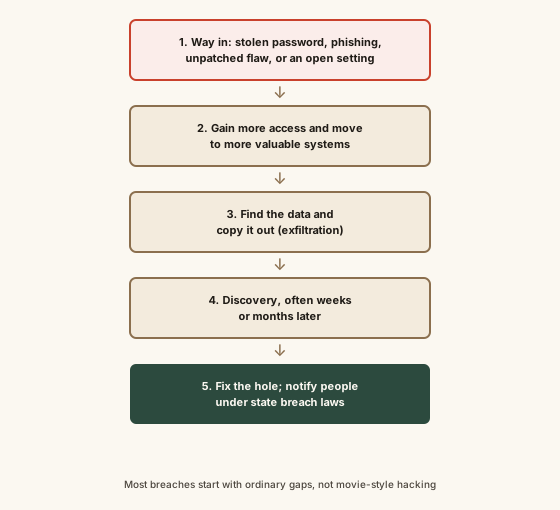
A data breach happens when someone gets access to information they shouldn't have and it's exposed or taken. Verizon's annual Data Breach Investigations Report has found year after year that the most common ways in are stolen or reused credentials, phishing and other tricks aimed at people, exploited vulnerabilities in unpatched systems, and simple errors such as misconfigured cloud storage, with vendors and other third parties an increasingly common path. After getting in, attackers typically move to more valuable systems, locate data, and copy it out, often long before anyone notices. The FTC's breach-response guidance tells businesses to secure systems, fix the vulnerabilities, and notify affected people as their state's laws require; every U.S. state has a breach notification law. For individuals, the practical defenses are unique passwords, multi-factor authentication, and a free credit freeze at the three bureaus, with IdentityTheft.gov as the federal recovery resource if data is misused.
Reading time
— 4 min
Updated
— Sep 26, 2026
Fact-reviewed
— Sep 26, 2026
Key Takeaways
Key Takeaways
1Most breaches start simply: a stolen or reused password, a tricked employee, an unpatched system, or data left open by a wrong setting.
2After getting in, attackers look around, find valuable data and copy it out, often weeks or months before anyone notices.
3You can't stop a company being breached, but unique passwords, multi-factor authentication, and a free credit freeze sharply limit the harm to you.
The concept
Think of a company's data like valuables in an office building. Movies show thieves drilling through the vault. In real life, most get in with a copied key card (a stolen password), by talking the receptionist into letting them in (phishing), through a window nobody fixed (an unpatched system), or because someone left the back door propped open (a misconfigured setting). Once inside, they walk the halls, find the file room, and quietly carry boxes out. Often nobody checks the cameras until months later. That's why breach notices so often describe something that happened long before you got the letter.
A shopping site you used is breached and passwords leak. A week later, someone logs into your email. What most likely happened?
Worked examples
Example 1: The phished employee (baseline case)
An accounts clerk gets an email that looks like it's from IT: "Your password expires today, sign in here." The page is fake and captures the password. The company has no multi-factor authentication on remote access, so the attacker logs in as the clerk, finds a shared drive with customer records, and copies it out over a weekend. The breach is found three months later when the data appears for sale. Every step used ordinary access, with no "hacking" in the movie sense.
Example 2: The open storage folder (edge case: no attacker skill needed)
A developer sets a cloud storage folder to public while testing and forgets to change it back. It holds a backup of a customer database. Automated scanners that search the internet for open storage find it within days. Nobody broke in, because nothing was locked. This is still a reportable breach under most state laws, and it's the reason "errors" show up as a major category in breach reports.
Example 3: Your response to a breach letter (real-world use)
You get a notice that a clinic's billing vendor was breached and your name, birth date and Social Security number were exposed. What was taken decides the response. A Social Security number is a new-account fraud risk, so you place a free credit freeze at Equifax, Experian and TransUnion, as the FTC recommends. If the same password was used anywhere, you change it there and turn on multi-factor authentication. If you later see accounts you didn't open, you report it at IdentityTheft.gov to get a recovery plan.
Quick check
A breach notice says only your email address and name were exposed. What's the most realistic risk?
How it works (visual)
The usual path of a data breach
Common mistakes
Common Mistakes
✕
Reusing one password across many sites.
→ Use a password manager so every account has a unique password. Then one breach stays one breach.
✕
Ignoring a breach notice because nothing bad has happened yet.
→ Stolen data is often used months later. Act on what was exposed: change passwords, freeze credit if your Social Security number was taken.
✕
Clicking links in emails that claim to be about the breach.
→ Scammers copy real breach news. Go to the company's site or the official notice address directly instead.
Common misconception
“Data breaches are mostly the work of elite hackers breaking through advanced defenses.”
Year after year, Verizon's breach reports show that the most common ways in are much more ordinary: passwords stolen or reused from earlier leaks, people tricked by phishing, known flaws that were never patched, and simple mistakes like storage left open to the internet. That's actually good news. Ordinary habits (unique passwords, multi-factor authentication, prompt updates) block a large share of real attacks.
What to do next
What to do next
Move your accounts to a password manager so no password is reused.
Turn on multi-factor authentication for email, banking and any account that can reset other accounts.
Place a free credit freeze at Equifax, Experian and TransUnion; lift it temporarily when you apply for credit.
Keep phones, computers and routers updated so known flaws get patched.
If breached data is misused, report it at IdentityTheft.gov to get a step-by-step recovery plan.
FAQ
FAQ
Related terms
Related terms
Data breach
An incident where information is accessed or taken by someone who isn't authorized to have it, whether through an attack or an accident.
Credential stuffing
An attack that takes usernames and passwords leaked from one site and tries them automatically on many other sites, betting that people reuse passwords.
Misconfiguration
A setting left wrong, such as a cloud storage folder set to public, that exposes data without any hacking at all.
Exfiltration
Copying data out of a victim's systems to a place the attacker controls.
Credit freeze
A free block, set at each of the three U.S. credit bureaus, that stops new lenders from pulling your credit report, making it much harder to open accounts in your name.
This entry was researched from public sources and drafted with AI-assisted tools, then edited — errors are still possible. Spot one, or want a topic covered? Read our disclaimer.
 KnowThis