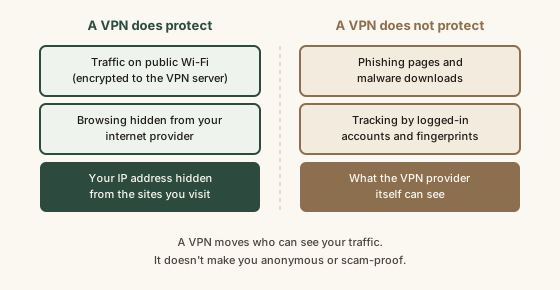
A virtual private network (VPN) creates an encrypted tunnel between your device and a VPN server, so the local network (such as public Wi-Fi) and your internet service provider see only encrypted traffic going to the VPN, and the websites you visit see the VPN server's IP address instead of yours. Per the FTC and the Electronic Frontier Foundation, a VPN does not protect against phishing, malware, or tracking through logged-in accounts, cookies, and browser fingerprinting, and it moves visibility of your traffic to the VPN provider, which makes choosing a trustworthy provider part of the protection itself. Because most websites already use HTTPS encryption, a VPN's main added value today is hiding which sites you visit from the network and ISP, and changing your apparent location.
Reading time
— 4 min
Updated
— Sep 25, 2026
Fact-reviewed
— Sep 25, 2026
Key Takeaways
Key Takeaways
1A VPN encrypts your traffic from your device to the VPN server, so the local Wi-Fi network and your internet provider can't see which sites you visit.
2Websites see the VPN server's IP address instead of yours, which hides your approximate location.
3It does not stop phishing, malware, or tracking through logged-in accounts, cookies, and fingerprinting, and the VPN company itself can now see your traffic.
The concept
Picture your internet traffic as mail. Without a VPN, the cafe Wi-Fi and your internet company can read the address on every envelope, meaning they can see which websites you're visiting. A VPN puts all your envelopes inside one locked pouch addressed to the VPN company. The cafe and your internet provider only see a locked pouch going to one place. The VPN company opens it and forwards each envelope to its real destination, so websites see the VPN's address instead of yours. That's genuinely useful. But notice what it doesn't do: it doesn't check whether a letter you're sending is going to a scammer, and the VPN company can see every address on every envelope.
If you want the plumbing of how the tunnel is built, see what a VPN actually does in Technology Basics. This post is about the practical question: which threats it covers and which ones it leaves wide open, like phishing and malware, which need other defenses.
Quick check
You connect to airport Wi-Fi with a VPN on and visit your bank's site. Who can see that you visited your bank?
Worked examples
Example 1: Coffee shop Wi-Fi (baseline case)
On an open cafe network, anyone running the network, or snooping on it, can log which domains your laptop contacts. With HTTPS, they can't read your messages or passwords, but they can see "this device visited a health clinic's site and a job board." Turn on a trustworthy VPN, and all they see is encrypted traffic to one VPN server. This is the scenario the FTC's public Wi-Fi guidance has in mind, and it's where a VPN earns its keep.
Example 2: The "your package is delayed" text (what it misses)
With the VPN on, you tap a link in a fake delivery text and enter your card number on a lookalike page. The VPN encrypts that session perfectly, all the way to the scammer. It protected the connection, not the decision. Stopping this takes checking the real sender and site, not network encryption.
Example 3: Shopping while logged in (tracking it doesn't touch)
You browse an online store with a VPN set to another city. Your IP address now looks like that city, but you're signed into your account, your browser carries the store's cookies, and your device has a recognizable fingerprint. The store knows exactly who you are. EFF lists this as one of the main misunderstandings: IP address is only one of many ways you're identified online.
Quick check
Which of these threats does a VPN meaningfully reduce?
How it works (visual)
What a VPN covers, and what it leaves open
Common mistakes
Common Mistakes
✕
Treating a VPN as a complete security tool that makes you safe from hackers.
→ Use it for what it does (network privacy) and keep the basics that stop most real attacks: updates, a password manager, and two-factor authentication.
✕
Picking a free VPN app with no clear business model.
→ Remember the provider sees your traffic. Choose one with a clear privacy policy, an independent audit, and a way it actually earns money, per EFF's guidance.
✕
Believing a VPN makes you anonymous.
→ Accounts, cookies, and fingerprints still identify you. Anonymity needs very different tools and habits.
Common misconception
“With a VPN on, nobody can see what you do online.”
A VPN changes who can see your traffic rather than making it invisible. Your local network and ISP lose visibility; the VPN provider gains it. Sites you log into still know it's you, and trackers can still recognize your browser. The EFF describes a VPN as a tool that protects against specific observers on the network, not as a cloak of anonymity.
What to do next
What to do next
Decide which observer you want to hide from (public Wi-Fi, your ISP, or site location checks). If none apply to you, you may not need a VPN at all.
If you use one, pick a provider with an independent no-logs audit and a clear paid business model rather than an unknown free app.
Check the padlock (HTTPS) on any site where you type a password or card number, VPN or not.
Keep the higher-impact basics in place: software updates, unique passwords, and two-factor authentication.
FAQ
FAQ
Related terms
Related terms
VPN (virtual private network)
A service that encrypts internet traffic between your device and a remote server, then sends it on to the wider internet from that server.
IP address
The numeric address that identifies a device or network on the internet. Websites see it on every request, and it can reveal an approximate location.
HTTPS
The encrypted version of the web protocol, shown by the padlock in a browser. It protects the content of traffic between your browser and a website, with or without a VPN.
ISP (internet service provider)
The company that connects you to the internet, such as a home broadband or mobile carrier. Without a VPN it can see which sites you connect to.
Browser fingerprinting
Identifying a device by combining details like screen size, fonts, and browser settings. It works regardless of IP address, so a VPN doesn't block it.
This entry was researched from public sources and drafted with AI-assisted tools, then edited — errors are still possible. Spot one, or want a topic covered? Read our disclaimer.
 KnowThis