 KnowThis
Key Takeaways
Key Takeaways
- 1A VPN wraps your traffic in encryption and sends it through an intermediary server, hiding what you're doing from your local network and ISP — but it doesn't erase your traffic's visibility, it relocates it to the VPN provider instead.
- 2Websites you visit see the VPN server's IP address instead of yours, which is genuinely useful for changing your apparent location or hiding your IP from a site, but it doesn't make you anonymous if you log into an account that identifies you anyway.
- 3A VPN protects data in transit between you and its server; it does nothing to secure a device that's already compromised, and it doesn't stop a website itself from tracking you through cookies, accounts, or browser fingerprinting.
The concept
Once you see a VPN as relocating who can see your traffic rather than erasing that visibility altogether, the rest of what it can and can't do falls into place quickly.
A VPN is often described as making your internet traffic 'invisible.' What's the most accurate way to describe what it actually does?
Worked examples
Example 1: Using public WiFi at a coffee shop (baseline case)
Example 2: Logging into a personal account while connected to a VPN (edge case / variation)
Someone connects through a VPN specifically to stay anonymous, but then logs into their personal social media account. Does the VPN still keep them anonymous from that social media platform?
Example 3: Accessing a work network remotely (real-world / applied case)
An employee working from home connects to a company VPN to access internal systems that aren't exposed to the public internet. Here the VPN's job isn't primarily about privacy from an ISP — it's creating a secure, encrypted tunnel that makes the employee's device appear to be on the company's private internal network, letting it reach internal file servers or applications that would otherwise reject connections from outside addresses entirely. This is the original, still-common corporate use case the term "virtual private network" was built around, distinct from the consumer privacy-and-location-masking use case that most people encounter today.
How it works (visual)
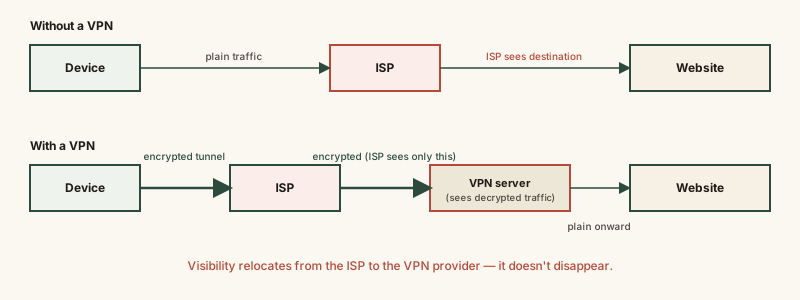
The website at the far right sees a different visitor IP address in each scenario, and the party with visibility into the unencrypted traffic shifts from the ISP (top) to the VPN provider (bottom) — the traffic's visibility doesn't disappear, it relocates.
Common mistakes
Common Mistakes
Believing a VPN makes you completely anonymous online.
→ A VPN hides your IP address and encrypts traffic in transit, but logging into accounts, accepting cookies, or browser fingerprinting can still identify you regardless of VPN use.
Assuming a VPN protects you from malware or a compromised device.
→ A VPN secures data in transit between your device and its server — it does nothing to stop malware already running on your device or a phishing site convincing you to hand over credentials.
Trusting a VPN provider's privacy claims without considering that the provider itself can see decrypted traffic.
→ Recognize that a VPN shifts visibility from your ISP to the VPN provider — a provider's no-logs policy is a trust claim about their business practices, not a mathematical guarantee.
Assuming a VPN will make streaming, gaming, or browsing faster.
→ Routing traffic through an extra server and adding encryption overhead typically adds some latency and can reduce speed, though the connection may occasionally beat a poorly-routed default path in specific cases.
Common misconception
“A VPN hides your online activity from literally everyone, with no one able to see what you're doing.”
A VPN specifically hides your traffic from your local network and your ISP by encrypting it and rerouting it through the VPN provider's server. But the VPN provider itself typically has technical access to your decrypted traffic at the point it forwards it onward, and any website you log into with a personal account still knows exactly who you are. "Hidden from your ISP" and "invisible to everyone" are very different claims — only the first one is actually accurate.
What to do next
What to do next
- Use a VPN when connecting to public or untrusted WiFi — this is its clearest, most defensible everyday use case.
- Don't expect a VPN to anonymize activity where you're logging into a personal account anyway — the VPN can't undo that identification.
- If choosing a VPN provider, treat a 'no-logs' claim as a trust decision about that specific company, not an automatic technical guarantee.
- Read HTTP vs HTTPS Explained next to see what protection already exists on most websites without a VPN, and where a VPN adds something HTTPS alone doesn't.