 KnowThis
Key Takeaways
Key Takeaways
- 1HTTPS isn't a different protocol from HTTP — it's the same HTTP wrapped in TLS encryption, which scrambles the data in transit and verifies the server's identity before any page content is exchanged.
- 2The padlock icon confirms a private, verified connection to whatever server you're actually talking to — it does not confirm that server or its content is trustworthy, safe, or legitimate.
- 3Before HTTPS existed as the default, passwords, form data, and page content on most sites traveled as plain, readable text — anyone on the same network path could potentially read or alter it in transit.
The concept
This is the single most important nuance about HTTPS: it's a statement about the connection's privacy and the server's proven identity, not a statement about the server's intentions once you're securely talking to it.
A website has a valid padlock icon and uses HTTPS. What does this actually guarantee?
Worked examples
Example 1: Logging into an account on a site with the padlock icon (baseline case)
Example 2: A scam site that also has a valid padlock icon (edge case / variation)
A suspicious website that appears to impersonate a well-known company also shows a valid padlock icon in the browser. Does this padlock prove the site is legitimate?
Example 3: Public WiFi and the risk plain HTTP once posed (real-world / applied case)
Before HTTPS became the near-universal default, using plain HTTP over public WiFi at a coffee shop or airport meant that anyone else on that same network, with modest technical tools, could potentially observe unencrypted page content, form submissions, and even session cookies passing over the shared network. This was a well-documented, practical risk, not a theoretical one — it's a major reason browsers now actively warn users when a site or a form on a site isn't using HTTPS, and why the industry pushed hard to make HTTPS the default across the web rather than an opt-in extra.
How it works (visual)
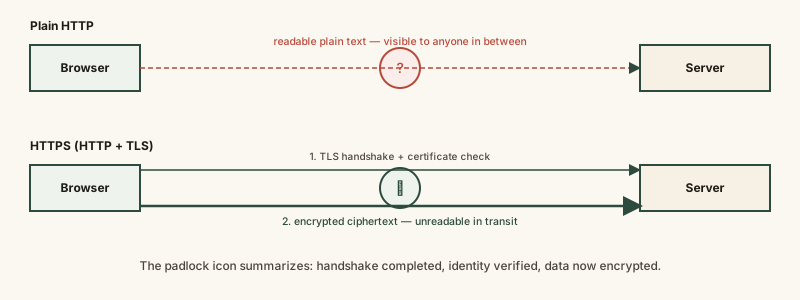
The handshake step at the top of the HTTPS flow is what establishes both the encryption keys and the verified identity of the server before any actual page content moves — this is the mechanism the padlock icon is summarizing.
Common mistakes
Common Mistakes
Treating the padlock icon as proof a website is safe, honest, or legitimate.
→ Treat the padlock as proof the connection is encrypted and the domain's ownership was verified — separately check that the domain name itself is the real one you intended to visit.
Assuming HTTP and HTTPS are two entirely unrelated protocols.
→ HTTPS is HTTP layered with TLS encryption and identity verification — the underlying request-and-response mechanics of HTTP are unchanged, just wrapped in a secure layer.
Believing a site without HTTPS is automatically dangerous to simply read.
→ Plain HTTP mainly risks exposing data you submit (like forms or logins) or lets content be tampered with in transit — merely reading a static, non-interactive HTTP page carries a smaller (though not zero) risk.
Assuming the certificate authority that issues a site's certificate vouches for the site's content or business practices.
→ A certificate authority only verifies that whoever requested the certificate actually controls the domain in question — it makes no judgment about what that domain is used for.
Common misconception
“Once a site has the padlock icon and HTTPS, everything about visiting it is completely safe.”
HTTPS secures the connection between your browser and whatever server is actually running that domain — it says nothing about what that server's operator does with your data once it arrives, or about the legitimacy of the domain's content. Phishing and scam sites routinely use fully valid HTTPS, because obtaining a certificate only requires proving control of a domain, not passing any check on honesty or intent.
What to do next
What to do next
- Check the actual domain name in the address bar, not just the presence of a padlock, before entering sensitive information anywhere.
- Treat a browser warning about a site 'not being secure' or a certificate error as a real signal worth pausing on, not a routine popup to dismiss.
- Remember that HTTPS protects data in transit, not the trustworthiness of the destination — both matter, and they're separate checks.
- Read What a VPN Actually Does next to see what additional protection, if any, a VPN adds on top of a connection that's already using HTTPS.