 KnowThis
Key Takeaways
Key Takeaways
- 1A modem's job is translation: it converts the specific signal format your ISP delivers (over a cable, fiber, or phone line) into ordinary network data, and back again.
- 2A router's job is distribution: it takes that single internet connection from the modem and shares it — usually over both WiFi and wired ports — among every device in your home.
- 3Many ISP-provided boxes are actually a modem and router combined into one unit (a gateway device), which is why the distinction can feel invisible until something needs troubleshooting or upgrading separately.
The concept
Once the two jobs are separated — translate the signal, then distribute the connection — a lot of home-network troubleshooting advice ("unplug the modem," "restart the router") stops being an interchangeable ritual and starts targeting the actual likely fault.
A home network has separate modem and router devices. The internet stops working entirely for the whole house, including a wired connection plugged directly near the router. What's the more useful first troubleshooting step?
Worked examples
Example 1: A typical home setup with separate modem and router (baseline case)
Example 2: An all-in-one ISP-provided gateway device (edge case / variation)
Someone wants to use their own high-performance router with an ISP-provided all-in-one gateway device, instead of relying on the gateway's built-in WiFi. What's the cleanest way to do this?
Example 3: Upgrading WiFi coverage without changing internet providers (real-world / applied case)
A household experiencing weak WiFi coverage upgrades to a newer router with better range and additional wireless radios, while keeping their existing modem and ISP plan entirely unchanged. This works because the two jobs are genuinely separable: the modem's translation job doesn't need to change just because the router's distribution job is being improved. This is also why "buy a better router" is completely different troubleshooting advice from "upgrade your internet plan" — one improves how a fixed amount of bandwidth gets distributed inside the home, the other increases how much bandwidth is actually available to distribute in the first place.
How it works (visual)
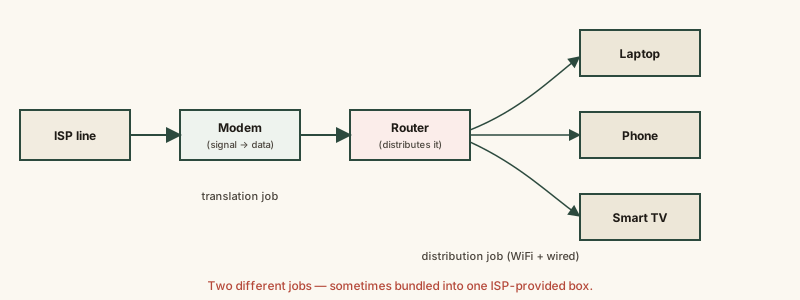
Everything to the left of the router in this chain is about getting one usable connection into the house; everything to the right is about sharing that one connection among many devices — two genuinely different jobs, even when a single box performs both.
Common mistakes
Common Mistakes
Using 'modem' and 'router' interchangeably when troubleshooting internet problems.
→ Identify which job is actually failing — no signal reaching the house at all points to the modem; devices can't get online despite a working modem points to the router.
Assuming buying a new router will increase your internet plan's speed.
→ A router only distributes the bandwidth the modem is already receiving from your ISP — it can't create more bandwidth than what your plan and modem actually deliver.
Restarting only one device (just the router, or just the modem) when troubleshooting a total outage.
→ Restart the modem first and let it fully reconnect to the ISP before restarting the router, since the router depends on a working connection from the modem to have anything to distribute.
Assuming an ISP-provided all-in-one gateway device can't be replaced or supplemented with better equipment.
→ Most gateways support a bridge mode specifically for pairing with a separate, user-owned router — check the ISP's settings or support documentation rather than assuming it's locked in.
Common misconception
“A modem and a router are just two different brand names for the same device.”
They perform genuinely different jobs. A modem converts the specific signal format an ISP delivers into standard network data; a router then takes that single connection and distributes it, with its own private addressing, to multiple devices, often over WiFi. Many consumer devices bundle both functions into one box, which is exactly why the distinction gets blurred in everyday use — but the two jobs remain separable, and separating them is exactly what happens when someone plugs their own router into an ISP-provided modem or bridged gateway.
What to do next
What to do next
- During a total outage, restart the modem first and give it a minute or two to fully reconnect before restarting the router.
- If WiFi coverage is weak but the internet plan itself is fine, look at upgrading the router, not the internet plan or the modem.
- If you want to use your own router with an ISP-provided all-in-one gateway, check for a 'bridge mode' setting rather than running two routers in sequence.
- Read How WiFi Works next to see exactly what the router is doing once it starts broadcasting your home network wirelessly.