 KnowThis
Key Takeaways
Key Takeaways
- 1An IP address is a numeric mailing address for a device — without one, nothing on a network would know where to send a reply.
- 2Most home devices share one public IP address (your router's) through a technique called NAT, while each device also has its own private IP address only visible inside your home network.
- 3IPv4's roughly 4.3 billion addresses ran out of easy headroom years ago, which is the entire reason IPv6 — with an effectively inexhaustible address space — was designed as its replacement.
The concept
The public/private split explains something that trips a lot of people up: your phone can show one IP address in its own settings, while a "what's my IP" website shows a completely different number. Both are correct — they're just answering different questions.
Your phone's WiFi settings show an IP address like 192.168.1.14, but a 'what is my IP' website shows a completely different number. Why don't they match?
Worked examples
Example 1: A phone joining home WiFi (baseline case)
Example 2: Two homes on opposite sides of the world using the identical private IP address (edge case / variation)
Two completely unrelated homes both have a laptop assigned the private IP address 192.168.1.5. Is this a problem?
Example 3: Why a website sees "one visitor" from an entire office building (real-world / applied case)
Fifty employees in the same office each browse a website from their own laptop, but the website's server logs may show all fifty requests arriving from a single public IP address — the office's shared internet connection. This is NAT operating exactly as designed: every device behind that router shares one public identity to the outside world. It's also why some websites' "block this IP for suspicious activity" security measures can accidentally affect an entire office or household at once — the server genuinely cannot tell, from the IP address alone, that fifty separate people are behind it rather than one person browsing unusually fast.
How it works (visual)
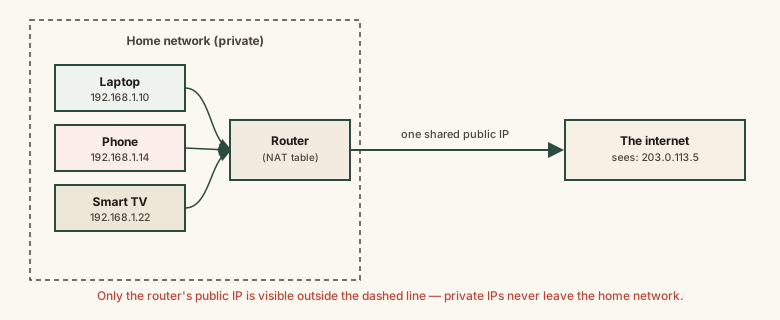
Everything inside the router's box is invisible from outside — the internet only ever sees the router's single public address. The router's internal translation table is what makes replies land back on the correct device rather than getting lost or delivered to the wrong laptop.
Common mistakes
Common Mistakes
Assuming every device on a home network has its own unique public IP address.
→ In most homes, only the router has a public IP address; every other device gets a private address shared to the outside world via NAT.
Thinking an IP address permanently identifies a specific person.
→ An IP address identifies a network connection (often shared by many people, like a household or office), not an individual — and many home IP addresses change periodically anyway.
Believing IPv6 is just a longer version of IPv4 with the same basic scarcity problem.
→ IPv6's address space (2^128) is astronomically larger than IPv4's (2^32) — it was designed specifically so address exhaustion stops being a structural concern at all.
Assuming a private IP address like 192.168.1.5 can be reached directly from outside your home network.
→ Private IP ranges are non-routable on the public internet by design — reaching a device from outside requires going through the router's public address and, typically, deliberate port forwarding.
Common misconception
“Your IP address reveals your exact home address or identity to anyone who sees it.”
An IP address typically reveals your internet provider and a general geographic region (often city- or region-level, sometimes far less precise), not a street address or a name. Pinpointing an actual identity from an IP address generally requires the internet provider itself to look up which customer account was using that address at a given time — information providers don't hand out to random third parties without legal process.
Someone claims that seeing your IP address lets them find your exact home address immediately. Is this accurate?
Try it yourself
A smaller prefix number means a bigger block of addresses. This shows the usable host count for a given IPv4 subnet size (total addresses minus the network and broadcast addresses reserved in every subnet).
What to do next
What to do next
- Check your device's own network settings and compare it against a 'what is my IP' website — you'll see the private-vs-public split described here directly.
- If you ever need to let an outside device reach something on your home network (like a home security camera or a game server), know that it involves your router's public IP address plus deliberate port forwarding, not the device's private address alone.
- Don't panic if someone claims to have your IP address — understand what it realistically does and doesn't reveal about your identity or location.
- Read How the Internet Actually Works and DNS Explained next to see how an IP address gets used once a packet is addressed, and how a domain name gets turned into one in the first place.