 KnowThis
Key Takeaways
Key Takeaways
- 1DNS exists because humans remember names and computers need numbers — it's a lookup directory that converts a domain name into an IP address before a connection can even begin.
- 2A DNS lookup isn't one single request — it's a chain of queries that can travel from a resolver to a root server, to a TLD server, to the domain's own authoritative server, each one narrowing down the answer.
- 3Caching at almost every stage of this chain (your browser, your device, your resolver) is what makes repeat visits to the same site feel instant instead of repeating the whole lookup chain every time.
The concept
This chain sounds slow described step by step, but it usually completes in a fraction of a second — and thanks to caching at nearly every layer, most everyday lookups skip most of the chain entirely. That same reliance on a small number of shared DNS providers is exactly the kind of dependency behind why one company's outage can take down hundreds of unrelated websites at once.
Why does DNS use a multi-step chain (resolver, root server, TLD server, authoritative server) instead of one single server that knows every domain's IP address directly?
Worked examples
Example 1: Visiting a website for the first time (baseline case)
Example 2: Revisiting the same site minutes later (edge case / variation)
A website loads almost instantly on a second visit within the same minute, with seemingly no DNS delay at all. What's the most likely explanation?
Example 3: A site becomes unreachable right after its owner changes servers (real-world / applied case)
A website's owner moves it to a new hosting provider, updating its DNS record to point to a new IP address. Some visitors reach the new server immediately, while others still land on the old one, or get connection errors, for anywhere from minutes to a day or more. This delay is a direct, expected consequence of caching and TTLs: any resolver or device that cached the old IP address before the change won't ask again until that cached record's TTL expires, even though the authoritative record has already been updated correctly. This is why site migrations are commonly planned around lowering a domain's TTL in advance, so the eventual cutover propagates to the wider internet faster once the change is made.
How it works (visual)
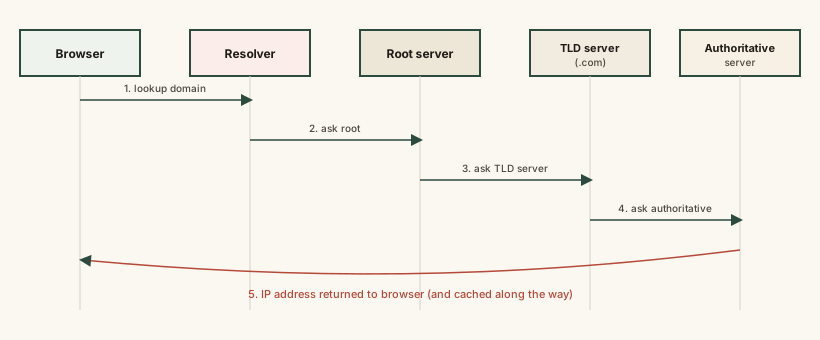
Every arrow in this chain represents a real network request — but because resolvers and devices cache answers at every stage, most everyday lookups short-circuit the chain well before it reaches the authoritative server at the far end.
Common mistakes
Common Mistakes
Assuming a DNS change (like moving a website to a new server) takes effect everywhere instantly.
→ Expect a propagation delay driven by caching and each record's TTL — some visitors will see the change immediately, others only after their cached copy expires.
Thinking DNS is the same thing as your internet connection or web hosting.
→ DNS is only the address-lookup step. A DNS problem (like a misconfigured record) can make a perfectly working website unreachable simply because visitors can't find its address.
Believing a single 'master DNS server' holds every domain's record.
→ DNS is deliberately distributed — root servers, TLD servers, and each domain's own authoritative servers each hold only a piece of the full picture.
Not clearing or considering DNS cache when troubleshooting why a site 'won't load' after a known server change.
→ A stale cached DNS record on your own device or resolver can point you at an old, no-longer-correct address even after the site owner has fixed things on their end.
Common misconception
“If a website is 'down,' it's always the website's server that's broken.”
A site can appear completely broken to visitors purely because of a DNS problem — an expired domain registration, a misconfigured record, or a DNS provider outage — while the actual web server behind it is running perfectly fine and reachable by its raw IP address. DNS is a separate layer from the server itself, and failures in that lookup layer look identical to visitors as a genuinely offline site, even though nothing about the server changed.
What to do next
What to do next
- Next time a site seems 'down' right after you know its owner changed hosting, consider DNS propagation delay before assuming the new server is broken.
- If you manage a website and plan to migrate servers, lower the DNS record's TTL in advance so the eventual switch propagates faster.
- Notice how much faster a second visit to the same site feels compared to the first — that gap is largely DNS caching at work.
- Read What Is an IP Address next to see exactly what DNS is resolving a domain name into, and why that address itself needs explaining too.