 KnowThis
Key Takeaways
Key Takeaways
- 1There is no central switchboard running the internet — it's thousands of independently owned networks agreeing to forward each other's traffic using shared rules called protocols.
- 2Every message you send gets chopped into small packets, each addressed and routed independently, then reassembled in order at the destination — this is called packet switching.
- 3A packet's route between two points is decided hop by hop by routers along the way, not planned in advance, which is why the same request can take a different path each time.
The concept
Two ideas do all the real work here: breaking a message into packets, and letting independent routers decide, one hop at a time, where each packet goes next. Once those two pieces click, the rest of networking — IP addresses, DNS, HTTPS — is just detail layered on top.
Why does the internet use packet switching (breaking messages into small independently routed pieces) instead of reserving one dedicated line per conversation?
Worked examples
Example 1: Loading a simple webpage (baseline case)
Example 2: A packet takes a different route than the one before it (edge case / variation)
You run the same web request twice within a minute and notice the packets took a different sequence of router hops each time. What does this indicate?
Example 3: A video call staying smooth while a file downloads in the background (real-world / applied case)
Run a video call and a large file download on the same home connection at once. Both are being broken into packets and interleaved onto the same physical link to your ISP — there's no dedicated "video call lane" and "download lane." This is exactly why a big background download can make a call choppy: the router and the link itself are handling a shared queue of packets, and if the download's packets crowd out the call's packets, the call's packets arrive late or out of order. Home routers commonly include traffic-prioritization features (often marketed as Quality of Service, or QoS) specifically to push time-sensitive packets like video-call audio ahead of less time-sensitive ones like a background file download, within that same shared link.
How it works (visual)
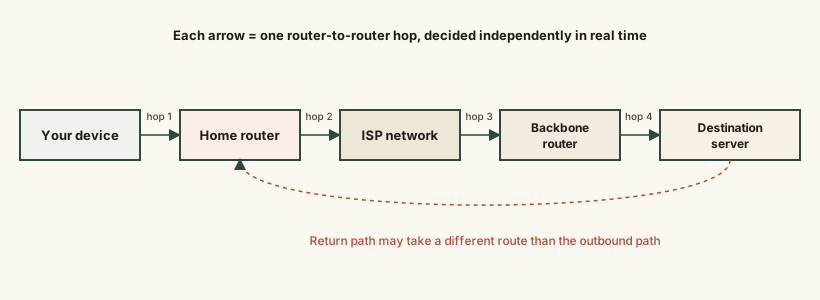
Each box in the chain is an independently owned and operated network; each arrow is one hop decided in real time by the router at that box. No single company or device controls the whole path from end to end — the internet works because every operator along the way agrees to run compatible protocols and forward traffic that isn't addressed to them.
Common mistakes
Common Mistakes
Picturing the internet as one big centrally-controlled network, like a single company's system.
→ Think of it as thousands of independent networks (ISPs, universities, cloud providers) that agree to forward each other's packets using shared protocols — no single owner.
Assuming a message travels as one continuous stream over one fixed path.
→ Remember it's broken into small packets that can each take a different route and arrive out of order, then get reassembled correctly by TCP at the destination.
Confusing 'the internet' with 'the Web.'
→ The internet is the underlying network infrastructure (packets, routers, protocols); the Web (pages linked by HTTP/HTTPS) is just one of many things that run on top of it — email and video calls are others.
Assuming more hops always means a slower connection.
→ Hop count matters less than the physical distance and congestion along the path — a 20-hop route across a fast backbone can easily beat a 5-hop route over a congested, longer physical distance.
Common misconception
“If you could just find the 'central server' the internet runs on and it went down, the whole internet would go down.”
There is no central server the internet depends on. It's a mesh of independently operated networks connected at many points; if one network, router, or cable goes down, traffic reroutes around it through other paths, though localized outages (like an undersea cable cut affecting one region) absolutely can and do happen. The design goal from the start was resilience against exactly this kind of single point of failure — which is a deliberate consequence of packet switching, not an accident.
A single router along a common path goes offline for maintenance. What is the most likely immediate effect on traffic that used to pass through it?
Try it yourself
Time = file size (converted to megabits) divided by your connection's speed in megabits per second. This is the same math your download progress bar is quietly running.
Real transfers are usually slower than this ideal number due to protocol overhead, other traffic sharing the link, and server-side limits.
What to do next
What to do next
- Run a traceroute (or tracert on Windows) to a website and count the hops — it's a direct, visible demonstration of the router-by-router path described here.
- Notice that reloading a traceroute later can show a different path — that's normal, dynamic routing at work, not an error.
- Next time a video call gets choppy during a big download on the same connection, remember they're sharing one queue of packets, not separate lanes.
- Read the next entries in this series — What Is an IP Address and DNS Explained — to see exactly how a packet's destination address gets resolved and used.