 KnowThis
Key Takeaways
Key Takeaways
- 1Bandwidth measures capacity — how much data can move per second — not how quickly any single request starts getting a response; that second thing is latency, and it's a separate measurement entirely.
- 2Doubling your bandwidth helps most with large transfers (downloads, streaming quality) but does little to fix a connection that feels sluggish during quick back-and-forth actions like web browsing, video calls, or online gaming.
- 3A connection can advertise very high bandwidth and still feel 'slow' if latency or jitter is high — this is exactly why a satellite internet plan can have generous bandwidth but still feel laggy compared to a lower-bandwidth wired connection.
The concept
Once bandwidth and latency are separated as two different measurements, a lot of confusing real-world experiences — a fast-looking plan that still feels laggy in games, a slow-looking plan that streams video just fine — stop being contradictions.
A household upgrades from a 100 Mbps to a 500 Mbps internet plan but notices no improvement in how responsive their online video games feel. Why might this be?
Worked examples
Example 1: Downloading a large file on two different plans (baseline case)
Example 2: A high-bandwidth satellite connection that still feels laggy (edge case / variation)
A satellite internet plan advertises high bandwidth similar to a cable plan, but video calls over it feel noticeably more laggy than the same calls over cable. What does this indicate?
Example 3: Multiple people streaming and gaming on one home connection (real-world / applied case)
A household has several people streaming video, one person on a video call, and another playing an online game, all sharing one internet plan at once. The available bandwidth gets divided among all of these simultaneous uses, and if the combined demand approaches or exceeds the plan's total bandwidth, packets start queuing up in the router's buffers — the bufferbloat effect — adding latency to every single stream and connection, including the video call and the game, even though no single activity is using an unreasonable amount of data on its own. This is a case where the practical fix isn't more bandwidth alone, but managing how that bandwidth gets prioritized across simultaneous uses, since latency-sensitive activities like calls and games suffer disproportionately when they're queued behind large streaming or download traffic.
How it works (visual)
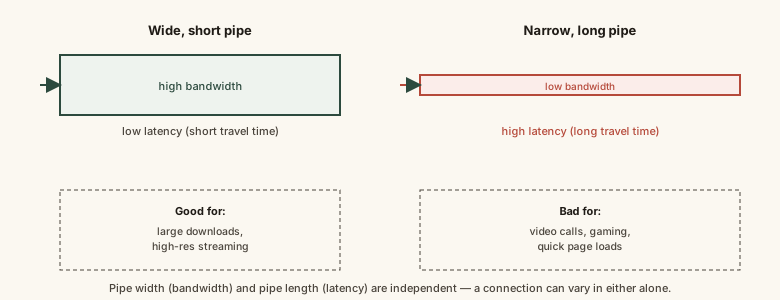
A connection's real-world feel comes from both dimensions at once — how wide the pipe is, and how long it takes anything to travel through it — which is why comparing internet plans on advertised Mbps alone leaves out half the picture.
Common mistakes
Common Mistakes
Assuming a higher Mbps number always means a snappier, more responsive-feeling connection.
→ Check whether your actual complaint is about transfer speed (bandwidth) or responsiveness during quick interactions (latency) — they're solved by different things.
Confusing megabits (Mbps, used for internet speed) with megabytes (MB, used for file sizes).
→ Divide an Mbps number by 8 to estimate the equivalent MB per second — a 100 Mbps connection tops out around 12.5 MB/s, not 100 MB/s.
Upgrading to a much higher-bandwidth plan expecting it to fix laggy video calls or games.
→ Investigate latency and network congestion first — bandwidth upgrades mainly help large transfers, not the responsiveness of quick, small exchanges.
Blaming a slow-feeling connection entirely on the ISP without considering local network congestion.
→ Multiple devices streaming or downloading at once on the same home network can create bufferbloat-driven latency spikes that have nothing to do with the ISP's own network.
Common misconception
“If your internet plan advertises 500 Mbps, every online activity on that connection should feel five times faster than a 100 Mbps plan.”
Bandwidth increases mainly speed up activities that move a lot of data continuously, like large downloads or high-resolution streaming. Activities built on many small, quick exchanges — web browsing, video calls, online gaming — are usually limited by latency and how responsive the connection is under load, not by total bandwidth. A 500 Mbps connection with high latency can feel less responsive during a video call than a well-configured 100 Mbps connection with low latency.
Try it yourself
Time = file size (converted to megabits) divided by your connection's bandwidth in megabits per second — the same underlying math as a download progress bar, assuming the full bandwidth is available to that one transfer.
Real downloads are usually somewhat slower than this ideal figure due to protocol overhead, shared network load, and server-side limits.
What to do next
What to do next
- Before upgrading your internet plan to fix 'slowness,' identify whether the complaint is about large-transfer speed (bandwidth) or responsiveness during quick interactions (latency) — they need different fixes.
- If video calls or games lag while others in the house stream or download, consider that shared-bandwidth congestion (bufferbloat), not your plan's advertised speed, may be the real culprit.
- Remember to divide an Mbps figure by 8 when comparing it against a file size shown in megabytes, to avoid overestimating real download speed.
- Read Latency Explained next for the mechanism behind why distance and routing — not bandwidth — set the floor on how responsive a connection can feel.