 KnowThis
Key Takeaways
Key Takeaways
- 1Latency measures delay, not capacity — it's the time for one piece of data to make a round trip, and it's a separate property from bandwidth entirely.
- 2Most latency in a long-distance connection comes from propagation delay: the pure physical time it takes a signal to travel the distance involved, limited by the speed of light in the cable it's traveling through — no amount of extra bandwidth shortens this.
- 3Activities built on quick back-and-forth exchanges (video calls, online gaming, web browsing) are especially sensitive to latency, which is why a technically 'fast' high-bandwidth connection can still feel sluggish for these specific uses.
The concept
Once propagation delay is understood as a physical, distance-based floor rather than a fixable inefficiency, a lot of latency behavior — why nearby servers feel snappier, why satellite connections lag, why gaming servers matter — becomes predictable rather than mysterious.
A gamer connects to two different game servers with identical bandwidth requirements: one physically located nearby, one on another continent. Why does the distant server typically produce noticeably higher latency, even with the same internet plan?
Worked examples
Example 1: Pinging a nearby server versus a distant one (baseline case)
Example 2: A congested network adding queuing delay on top of distance (edge case / variation)
A connection's latency to the same nearby server jumps from 15ms to 90ms during a period of heavy local network use, then drops back down once the congestion clears. What changed?
Example 3: Why content delivery networks exist (real-world / applied case)
Large websites and streaming services often use a content delivery network (CDN) — a system of servers distributed across many geographic locations worldwide — specifically to reduce latency for users far from the service's main data center. Instead of every user's request traveling all the way to one central server, a CDN serves content from a location physically closer to each user, directly shortening the propagation delay portion of the round trip. This is a deliberate, distance-based engineering solution: since propagation delay can't be reduced by adding bandwidth, the practical fix is reducing the actual physical distance data has to travel by putting copies of that data closer to where people are requesting it from.
How it works (visual)
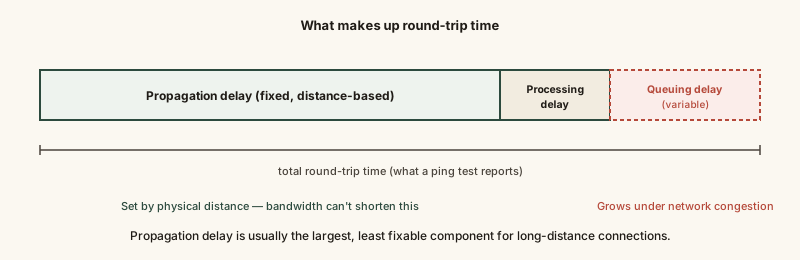
Propagation delay is the fixed, distance-based floor that no amount of bandwidth can lower; processing and queuing delay are the smaller, more variable pieces that local network conditions and routing efficiency can actually influence.
Common mistakes
Common Mistakes
Assuming a higher-bandwidth internet plan will fix a laggy video call or game.
→ Check latency specifically (using a ping test to the relevant server) — bandwidth upgrades mainly help large transfers, not the round-trip delay that makes calls and games feel responsive or sluggish.
Treating latency as a single fixed number for a connection rather than something that fluctuates.
→ Remember latency includes a variable queuing-delay component driven by current network congestion, on top of a fixed propagation-delay floor set by distance.
Assuming latency to a given server is the same no matter where you connect from.
→ Propagation delay scales directly with physical distance — connecting to a server on another continent will almost always show meaningfully higher latency than connecting to one nearby.
Confusing latency with download speed when describing a connection as 'slow.'
→ Clarify whether the complaint is about how long large transfers take (bandwidth) or how responsive quick interactions feel (latency) — they point to different causes and different fixes.
Common misconception
“If your internet plan is fast enough (high bandwidth), latency isn't something you need to think about.”
Bandwidth and latency are separate properties of a connection. A high-bandwidth connection to a physically distant server can still have high latency, because the dominant source of latency for long-distance connections — propagation delay — is set by physical distance and the speed of light, not by how much data the connection can carry per second. This is exactly why choosing a nearby game server or a well-distributed content delivery network can matter more for responsiveness than upgrading to a faster internet plan.
Try it yourself
Round-trip time = distance there and back, divided by the speed light travels through fiber-optic glass (roughly 200,000 km/s, about two-thirds the speed of light in a vacuum). This estimates the propagation-delay floor alone, before adding real-world processing and queuing delay.
Real-world ping times are typically higher than this physical floor due to processing delay at each router hop, queuing delay under congestion, and cable routes that aren't perfectly straight lines.
What to do next
What to do next
- Run a ping test to a server you regularly use and note the round-trip time in milliseconds — lower is better for anything requiring quick back-and-forth interaction.
- For gaming or video calls, choose the geographically nearest available server or region when given the option — it directly reduces propagation delay.
- If a connection feels laggy despite plenty of bandwidth, investigate local network congestion (queuing delay) before assuming your internet plan needs upgrading.
- Read Bandwidth vs. Speed Explained and How Data Travels Undersea next to connect this idea to the physical cable routes that set the real-world distance floor on latency.