 KnowThis
Key Takeaways
Key Takeaways
- 1WiFi replaces the cable between your device and your router with radio waves — the router still needs a wired connection to the internet somewhere upstream.
- 2Lower frequencies (like 2.4GHz) travel farther and pass through walls better; higher frequencies (like 5GHz) carry more data but lose strength over distance and obstacles faster — this is a physical trade-off, not a design flaw.
- 3WiFi range and speed drop with distance and obstacles because radio wave energy spreads out and gets absorbed — a weak signal isn't 'less internet,' it's a weaker, more error-prone radio connection forcing a slower, more cautious data rate.
The concept
Once you see WiFi as radio waves carrying data instead of a cable carrying it, most of its quirks — walking to another room and losing bars, a microwave interfering with a call, a router placed in a closet performing badly — stop being mysterious and start being predictable physics.
A 5GHz WiFi connection feels extremely fast right next to the router but noticeably slower two rooms away, while the same router's 2.4GHz connection stays more consistent throughout the house. What explains this?
Worked examples
Example 1: Connecting a laptop to home WiFi (baseline case)
Example 2: A microwave oven disrupting a WiFi call (edge case / variation)
Why might a video call over a 2.4GHz WiFi connection briefly glitch when a nearby microwave oven turns on, while a 5GHz connection in the same room stays unaffected?
Example 3: Placing a router in a closet vs. a central open room (real-world / applied case)
A router tucked inside a closet, behind a closed door, tends to deliver noticeably weaker WiFi throughout a home compared with the identical router placed centrally in an open room. Every wall, door, and piece of furniture between the router and a device absorbs some of the radio wave's energy — a phenomenon called attenuation — and a closet compounds this with an enclosed metal or dense-material box working against the signal before it even reaches the first wall. Placing a router centrally and elevated, with fewer obstacles in the most-used rooms, is a purely physical fix: it reduces the number and thickness of obstacles the signal has to pass through to reach your devices, which is why "just move the router" is often more effective advice than buying new hardware.
How it works (visual)
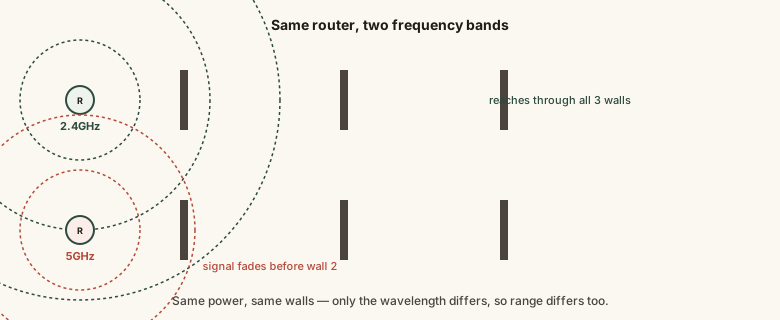
Both bands come from the same router and antenna hardware — the difference in reach shown here comes entirely from the physical behavior of longer versus shorter radio wavelengths, not from one signal being inherently "stronger."
Common mistakes
Common Mistakes
Assuming more WiFi signal bars always means a faster internet connection.
→ Signal bars measure radio connection quality between your device and the router, not the speed of the internet line behind that router — a strong WiFi signal to a slow internet plan is still a slow connection overall.
Believing 5GHz is simply 'better' than 2.4GHz in every situation.
→ 5GHz is faster at close range but has shorter reach and worse wall penetration — 2.4GHz is often the better practical choice for devices far from the router or in obstacle-heavy homes.
Placing the router in a closet, cabinet, or basement corner for tidiness.
→ Put the router in a central, elevated, open location — every wall and enclosure between it and your devices weakens the signal before it even leaves the room.
Thinking WiFi and 'the internet' are the same thing.
→ WiFi is just the wireless link between your devices and your router; the router still needs a wired connection to an ISP for there to be any internet to distribute in the first place.
Common misconception
“Turning off WiFi at night or using a VPN protects you from WiFi radio waves being 'unsafe' to be around.”
WiFi uses low-power radio waves in the same general category as many everyday consumer electronics, and the frequencies and power levels used are regulated specifically to stay within established safety limits set by national telecommunications regulators. There's no credible evidence that typical household WiFi exposure poses a health risk at these power levels — the "unsafe radiation" framing conflates WiFi's non-ionizing radio waves with much higher-energy types of radiation (like X-rays) that work through an entirely different physical mechanism.
Is WiFi radiation the same category of radiation as X-rays, just weaker?
Try it yourself
Wavelength = speed of light ÷ frequency. Shorter wavelengths (higher frequency, like 5GHz) diffract around obstacles less easily than longer wavelengths (lower frequency, like 2.4GHz) — this is the physical root of the range-vs-speed trade-off.
What to do next
What to do next
- Move your router to a central, elevated, open location if you can — it's the single highest-impact free fix for weak WiFi in most homes.
- Switch a device having range trouble to your router's 2.4GHz band specifically, and switch a device close to the router to 5GHz for maximum speed.
- If a call or stream glitches near a microwave, note whether the affected device is on 2.4GHz — moving it to 5GHz is a real fix, not a placebo.
- Read Modem vs. Router Explained next to see exactly which device does the WiFi broadcasting and which one connects to your ISP.