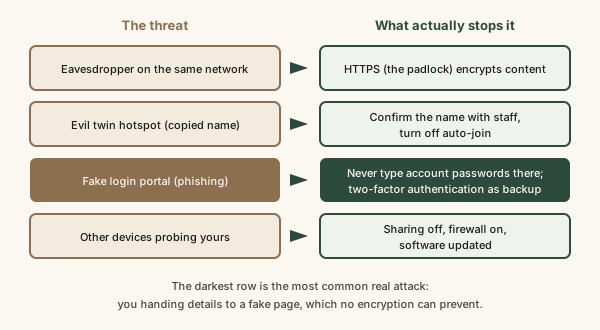
On public Wi-Fi, everyone on the network shares the same local connection, and you usually can't verify who runs the hotspot. Because the large majority of web traffic now uses HTTPS encryption, an eavesdropper generally can't read passwords or messages sent to properly secured sites, as the FTC notes. The risks that remain are: fake 'evil twin' hotspots that imitate a real network name, fake captive-portal login pages that ask for account or card details, other devices on the network reaching yours through file sharing or unpatched services, the network operator seeing which sites you visit, and any app or site that still sends data without encryption. CISA and NIST SP 800-153 guidance point to the same defenses: confirm the network name with staff, use HTTPS sites and up-to-date software, turn off sharing and auto-join, prefer your phone's hotspot for sensitive tasks, and use a trusted VPN when you want to hide browsing from the local network.
Reading time
— 5 min
Updated
— Oct 1, 2026
Fact-reviewed
— Oct 1, 2026
This entry explains how public Wi-Fi attacks generally work, cited to the FTC, CISA and NIST. It is security literacy, not a professional security assessment. If you think an account or device has been compromised, follow the provider's recovery steps or report it at IdentityTheft.gov (US) or your country's equivalent.
Key Takeaways
Key Takeaways
1The old warning, that hackers on cafe Wi-Fi read your passwords, is mostly outdated: HTTPS now encrypts the large majority of web traffic.
2The real risks are fake hotspots (evil twins), fake login portals that phish for details, other devices reaching yours, and the network seeing which sites you visit.
3What actually stops them: confirming the network name, never typing account passwords into a Wi-Fi login page, turning off sharing and auto-join, keeping software updated, and using mobile data for sensitive tasks.
The concept
Joining public Wi-Fi is like plugging your laptop into a shared power strip in a room full of strangers, where you also can't be sure who installed the power strip. Ten years ago, the main fear was strangers reading your mail as it passed by. Today most websites seal every letter (that's the padlock, HTTPS), so the contents are safe even on a shared network. The problems that are left are about trust and exposure. Is this really the cafe's network, or someone's laptop pretending to be it? Is the login page real, or a trap asking for your email password? Is your laptop sharing folders with everyone in the room? And the network owner can still see the outside of your envelopes, meaning which sites you visit, even if not what you say to them.
For the network plumbing behind this, see how Wi-Fi works and HTTP vs HTTPS. Technology Basics also has a shorter primer, why public Wi-Fi is riskier; this post goes further into which attacks are realistic today and ranks the defenses.
Quick check
You're on airport Wi-Fi and log into your bank's website (padlock showing). Which risk is still realistic?
The risks, ranked by how often they matter
Phishing through the network. A fake login portal or a pop-up asking you to "sign in with your email" to get online. Encryption doesn't help when you type the password into the attacker's page yourself. See how phishing works.
Evil twin hotspots. "Airport_Free_WiFi" might be the airport or a laptop in the lounge. Joining puts the attacker in control of your DNS, your portal page and your traffic routing.
Exposed devices. Shared folders, media servers or an unpatched service on your laptop are reachable by anyone on the same network.
Visible browsing. The operator sees which domains you visit and when. That's a privacy issue rather than a theft risk, and it's the main thing a VPN fixes.
Unencrypted leftovers. Old apps, some smart devices and the occasional site that still uses plain HTTP. Rare now, but not zero.
Worked examples
Example 1: Checking email at a cafe (baseline case)
You join the cafe's network after confirming the name with the barista, accept the terms on the portal, and open your webmail. The mail service uses HTTPS, so another customer capturing traffic sees encrypted data going to the mail provider's servers. The realistic exposure here is small: the cafe can see you visited your mail provider. This is the everyday case, and it's why blanket "never use public Wi-Fi" advice overstates the danger.
Example 2: Two networks with the same name (edge case)
At a conference, your phone shows "ConferenceWiFi" twice, and it auto-joins because you used a network with that name last year. One is real; one is a small device in someone's bag. On the fake one, a page appears: "Session expired, sign in with Microsoft or Google to continue." If you enter your password there, the attacker has it, padlock or not, because you sent it to them directly. Two-factor authentication is what limits the damage, especially app-based codes or a security key, since a phished password alone no longer opens the account (see what 2FA actually does).
Example 3: The laptop that shares too much (applied)
A freelancer works from a hotel lobby with folder sharing still switched on from the home office setup, and the network profile set to "private" rather than "public." Anyone on the hotel network can browse the shared folder of client invoices. No hacking skill required. The fix takes ten seconds: mark the network as public (which turns off discovery and sharing on most systems), keep the firewall on, and install pending updates so known holes are closed. This is exactly the device-side hygiene CISA's wireless guidance emphasizes.
Quick check
Which single habit stops the attack in Example 2 before it starts?
How it works (visual)
Who can attack you on public Wi-Fi, and what stops each one
Common mistakes
Common Mistakes
✕
Assuming a network is legitimate because its name matches the venue.
→ Anyone can broadcast any name. Confirm the exact name with staff, and be suspicious when two similar names appear.
✕
Treating a password-protected cafe network as private.
→ If the password is printed on the wall, everyone in the room shares it. It keeps out passers-by, not other customers.
✕
Leaving auto-join on for every network you've ever used.
→ Forget public networks after using them, or turn off auto-join for them, so your device won't silently connect to a lookalike.
✕
Relying on a VPN as the whole defense.
→ A VPN hides your browsing from the network, but it won't stop you entering a password on a fake page or a neighbor reaching an open share.
Common misconception
“Anyone on public Wi-Fi can easily steal your passwords and credit card numbers.”
On sites using HTTPS, which is now the large majority of the web, the contents of what you send are encrypted even on an open network, as the FTC notes. Theft on public Wi-Fi today usually needs your cooperation: you typing details into a fake portal or site. The real risks are deception and exposure, not effortless interception.
What to do next
What to do next
Confirm the exact network name with staff before joining, and pick the public (not home or private) network profile when asked.
Never enter an email, bank or social account password on a Wi-Fi login page.
Turn off file sharing and AirDrop-style discovery for strangers, and keep the firewall on.
Turn off auto-join for public networks, and forget them after use.
Keep your device and browser updated, and use two-factor authentication on important accounts.
Use your phone's mobile data or hotspot for banking or work logins when you can, and a trusted VPN if you want to hide which sites you visit.
FAQ
FAQ
Related terms
Related terms
Evil twin
A rogue Wi-Fi hotspot set up with the same or a similar name as a legitimate one, so devices and people connect to the attacker's network instead.
Captive portal
The web page a public network shows before letting you online, used for terms, logins or payment. A fake one can be used to collect details.
HTTPS
The encrypted form of the web protocol, shown by a padlock in the browser. It protects the content between your browser and the site even on an untrusted network.
Threat model
A short answer to: who might attack, what they want, how they would do it, and what actually stops them.
Auto-join
A device setting that reconnects automatically to any network with a name it has joined before, which an evil twin can exploit.
WPA3 / Enhanced Open
Newer Wi-Fi security standards. Enhanced Open encrypts each user's connection on open networks, but it doesn't prove the hotspot is legitimate.
This entry was researched from public sources and drafted with AI-assisted tools, then edited — errors are still possible. Spot one, or want a topic covered? Read our disclaimer.
 KnowThis