 KnowThis
Key Takeaways
Key Takeaways
- 1Public WiFi is riskier mainly because many unrelated, unvetted strangers share the same network — not because of anything different about the radio technology itself.
- 2A network requiring a shared password (like a cafe's WiFi) still shares that same encryption key among every customer, which is a different, weaker kind of protection than a private home network provides between its own devices.
- 3What actually protects the content of your traffic in transit is HTTPS encryption on the site or app you're using — it works the same whether the underlying network is trustworthy or not.
The concept
Once public WiFi risk is understood as "more strangers sharing the medium, plus weaker network-level encryption guarantees," the practical takeaway follows directly: the network's trustworthiness matters less than whether your actual traffic is separately encrypted end to end.
What is the primary reason public WiFi is generally considered riskier than a private home network?
Worked examples
Example 1: Logging into an unencrypted site over open airport WiFi (baseline case)
What specifically makes the login credentials vulnerable in this scenario?
Example 2: Connecting to a rogue access point with a familiar-sounding name (edge case / variation)
Why doesn't using only HTTPS sites fully protect against the evil-twin risk in this scenario?
Example 3: Doing online banking over public WiFi using the bank's official app (real-world / applied case)
Someone uses their bank's official app over a hotel's public WiFi network to check their balance. The app communicates using HTTPS end to end, meaning the content of that connection, account numbers, balances, transaction details, remains encrypted regardless of who else shares that hotel network. This is a reasonable, low-risk action specifically because the protection comes from the app's own encryption, not from any trust placed in the hotel's network. A separate concern, like connecting to the wrong network name entirely, would still apply here just as in Example 2, which is why confirming the exact network name with staff remains worthwhile even when using well-encrypted apps.
Why is using the bank's official app over public WiFi in this scenario considered reasonably safe?
How it works (visual)
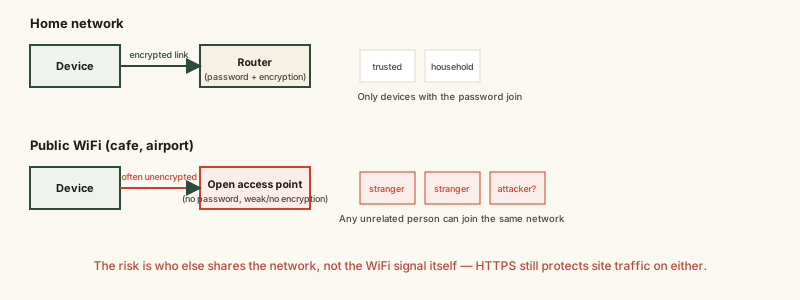
The comparison highlights the actual variable that matters: not whether a network requires a password, but who else shares it and whether your own traffic is separately encrypted regardless of the network.
Common mistakes
Common Mistakes
Assuming any WiFi network requiring a password is automatically as secure as a home network.
→ Recognize a shared public password is known to every customer using that network, which is a fundamentally weaker guarantee than a private home network's unique encryption key.
Avoiding all use of public WiFi entirely, even for HTTPS-protected sites and apps.
→ Focus on whether the specific site or app you're using shows HTTPS (or its own end-to-end encryption), rather than avoiding public networks altogether for tasks that are already well protected.
Connecting automatically to any WiFi network with a plausible-sounding name without confirming it with staff.
→ Ask venue staff for the exact official network name before connecting, since evil-twin networks specifically rely on close-but-not-exact names going unnoticed.
Common misconception
“Public WiFi is unsafe to use for anything sensitive, period.”
The network being public isn't what determines safety on its own — whether the specific connection is encrypted is. A banking app or any HTTPS website protects its content end to end, regardless of who else is on the same network. The genuinely risky pattern is using unencrypted (HTTP) sites or apps on a shared network, or connecting to the wrong network entirely, not public WiFi as a category.
What to do next
What to do next
- Confirm the exact official network name with venue staff before connecting, to avoid a similarly-named evil-twin network.
- Check for HTTPS (a padlock icon in the browser) before entering sensitive information on any site, especially on a shared network.
- Prefer official apps over browser logins where available, since many are built to enforce encrypted connections by default.
- Consider a VPN for an added layer of protection on networks you're unsure about, understanding it protects the connection to the VPN provider, not your identity everywhere online.