 KnowThis
Key Takeaways
Key Takeaways
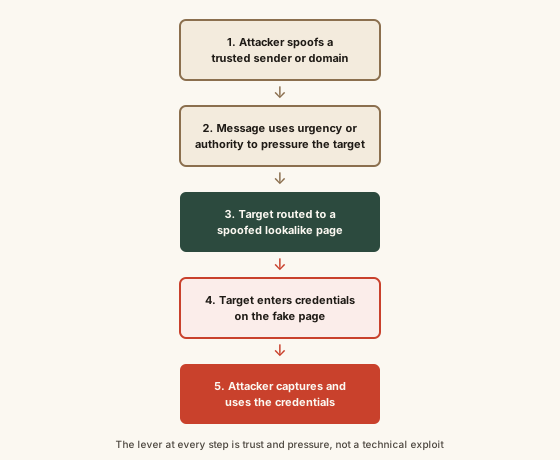
- 1Phishing works by exploiting urgency, authority, and trust — the psychological pressure to act fast is the actual mechanism, not just a poorly hidden bad link.
- 2Attackers spoof a sender's identity or a website's domain so a message or page looks like it's from a legitimate, trusted source when it isn't.
- 3The goal is usually credential harvesting: directing the target to a fake login page built to closely resemble the real one, then capturing whatever is typed into it.
The concept
Because standard email and caller ID were never designed to cryptographically verify who's really on the other end, per CISA and NIST guidance, spoofing a sender's apparent identity is technically straightforward — which is exactly why both agencies frame independent verification, not vigilance about how a message looks, as the actual defense. For a broader walk-through of how attackers construct these lookalike messages and pages, see this companion explainer on phishing mechanics; and since a strong, unique password limits the damage if one account's credentials are ever harvested, the two defenses work together rather than replacing each other.
Per CISA guidance, what is the core psychological mechanism phishing messages rely on to work?
Worked examples
Example 1: A spoofed "verify your account" bank email (baseline case)
Example 2: A targeted "IT department" spear-phishing message (edge case / variation)
Example 3: Business email compromise targeting a wire transfer (real-world / applied case)
In the business email compromise example, no malicious link or fake login page was involved. Does this still count as phishing, per CISA's framing?
How it works (visual)
Common mistakes
Common Mistakes
Believing 'just don't click suspicious links' is a complete defense against phishing.
→ Understand phishing can succeed through a spoofed request alone, as in business email compromise — verify unusual or urgent requests through an independent, already-known contact channel, not by judging the message itself.
Assuming a message is legitimate because the sender name and logo look correct.
→ Recognize that display names and logos are trivial for an attacker to spoof, per CISA guidance — check the actual sending domain and, when in doubt, contact the organization directly through a channel you already trust, not one provided in the message.
Treating urgency in a message as a sign it's important, rather than a possible warning sign.
→ Treat manufactured urgency itself as a red flag, per CISA's guidance — legitimate organizations rarely require you to bypass normal verification steps immediately.
Common misconception
“Phishing is really just about spotting a bad link — if you don't click suspicious links, you're safe.”
Per CISA guidance, phishing's actual mechanism is impersonation combined with psychological pressure, and a malicious link is only one possible delivery method — not the defining feature. Business email compromise, for example, can trick a target into wiring funds through a spoofed executive request with no link involved at all. NIST SP 800-63B similarly treats credential phishing as a risk serious enough to warrant authentication methods that resist it structurally, precisely because relying on individual users to visually catch every spoofed message isn't a reliable long-term defense on its own.
What to do next
What to do next
- Treat urgency and authority in an unexpected message as a warning sign, per CISA guidance — legitimate organizations don't typically require you to bypass normal verification.
- Verify unusual or high-stakes requests (password resets, wire transfers, account 'verification') through a contact channel you already know is real — not a link or phone number provided in the message itself.
- Check the actual sending domain and destination link address, not just the display name or logo, since both are simple for an attacker to spoof.
- Report suspected phishing using your email provider's built-in reporting tool or CISA's reporting channel, rather than simply deleting it.