 KnowThis
Key Takeaways
Key Takeaways
- 1Two-factor authentication requires two independent categories of proof — commonly something you know (a password) and something you have (a phone or security key) — not just a longer or harder password.
- 2Because the two factors are independent, an attacker who steals only the password still can't get in without also possessing the second factor, which is the entire point of the design.
- 3Not all second factors offer equal protection — a text-message code is better than nothing, but a hardware security key or authenticator app resists a wider range of attacks, including certain phishing techniques.
The concept
Once you see it as two independent checks instead of one stronger one, the rest follows: why a stolen password isn't enough on its own, and why some second factors are meaningfully more resistant to attack than others.
A login system asks for a password, and then asks the user to answer a security question they set up earlier (like their mother's maiden name). Is this genuine two-factor authentication?
Worked examples
Example 1: Logging in with a password and an authenticator app code (baseline case)
Why does requiring a code from an authenticator app meaningfully improve security over a password alone, even if an attacker already knows the correct password?
Example 2: A SIM-swap attack targeting a text-message code (edge case / variation)
A SIM-swap attack can defeat which type of two-factor authentication, and why doesn't it affect an authenticator app in the same way?
Example 3: An organization requiring phishing-resistant hardware keys for sensitive access (real-world / applied case)
A workplace that handles particularly sensitive systems requires employees to use a physical hardware security key, rather than a text-message or app code, to log in. The key uses cryptography that checks the exact website address being logged into as part of the verification, so even if an employee is tricked into visiting a convincing fake login page, the key won't complete the authentication there — because the fake page's address doesn't cryptographically match what the key expects. This is the specific property NIST calls phishing-resistant authentication, and it's why some organizations mandate it for their highest-risk accounts specifically, rather than treating all forms of two-factor authentication as equally strong.
Why might an organization specifically require a hardware security key instead of accepting a text-message code for its most sensitive accounts?
How it works (visual)
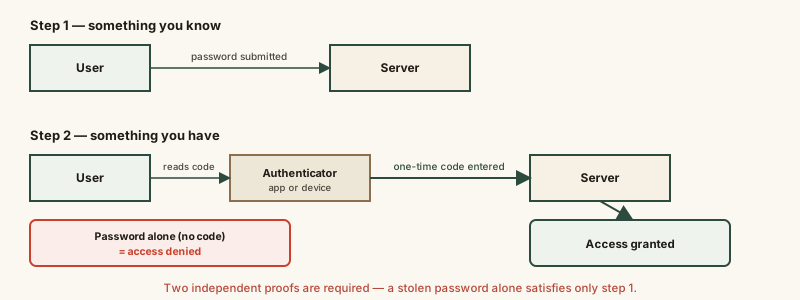
Each step is a separate checkpoint with its own failure mode — passing the first doesn't shortcut the second, which is precisely what stops a stolen password from being sufficient on its own.
Common mistakes
Common Mistakes
Treating a security question as a genuine second factor.
→ Recognize that a security question is still 'something you know,' the same category as a password — real 2FA needs a second, different category, like a device or a biometric.
Assuming all forms of two-factor authentication offer the same protection.
→ Understand that text-message codes, while much better than a password alone, are more vulnerable to SIM-swap attacks than an authenticator app or hardware security key.
Turning 2FA on for a login but ignoring the account's recovery/backup codes.
→ Save the backup codes generated when you enable 2FA somewhere safe — losing both your password and your second-factor device with no backup code can lock you out of your own account.
Common misconception
“Two-factor authentication makes an account impossible to break into.”
Two-factor authentication makes a stolen password alone insufficient — a major, real improvement — but it isn't an absolute guarantee. Certain second factors (text-message codes especially) have documented weaknesses like SIM-swap attacks, and some phishing techniques can prompt a person to hand over a one-time code in real time. It substantially raises the difficulty of unauthorized access; it doesn't make it theoretically impossible.
What to do next
What to do next
- Turn on two-factor authentication for email, banking, and any account that offers it — email especially, since it's often the recovery path into everything else.
- Prefer an authenticator app or hardware security key over a text-message code where the option exists, since both resist SIM-swap attacks.
- Save the backup/recovery codes generated when you enable 2FA somewhere safe, before you ever need them.
- Never read a one-time code out loud to someone who contacted you unexpectedly, even if they claim to be from the company itself — a legitimate provider never needs you to say the code to them.