 KnowThis
Key Takeaways
Key Takeaways
- 1The core benefit of a password manager isn't remembering fewer passwords — it's making a unique password on every account practical, which stops one breached site from exposing your other accounts too.
- 2Password managers encrypt your stored credentials locally before syncing, so even the company running the service generally can't read your actual passwords.
- 3Losing or forgetting your single master password is the real remaining risk — most managers offer a recovery process, but it's deliberately harder than a normal password reset, by design.
The concept
This is why security guidance consistently ranks a password manager above almost any other single step a person can take — it removes the human tendency to reuse passwords, which is the root cause behind most account-takeover incidents.
A major retailer's website is breached and usernames/passwords leak. Why does this matter much less for someone using a password manager than for someone who reuses one password everywhere?
Worked examples
Example 1: Setting up a new account (baseline case)
Example 2: Forgetting the master password (edge case / variation)
Example 3: A phishing site mimicking a real login page (real-world / applied case)
Why might a password manager's refusal to autofill on a login page actually be a useful warning sign?
How it works (visual)
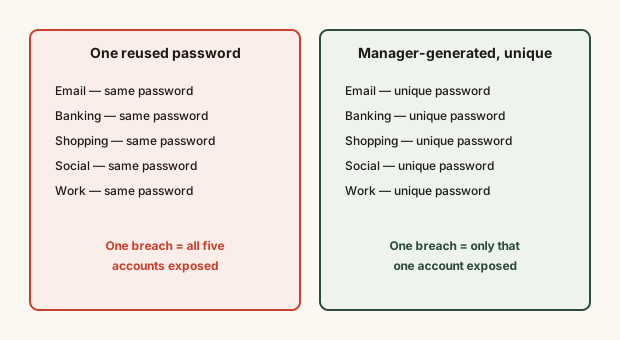
The difference isn't about password strength alone — it's about containment. A breach anywhere should only ever be a problem for that one account, and uniqueness is what makes that true.
Common mistakes
Common Mistakes
Using a weak, easy-to-guess master password since it feels like "just one more password."
→ Make the master password a long, memorable passphrase — it's the single point protecting everything else, so it deserves real strength and should never be reused elsewhere.
Never setting up account recovery options before they're needed.
→ Set up the provider's recovery key or emergency-access feature immediately after creating the vault, while it's easy, not after being locked out.
Assuming a password manager alone makes an account unhackable.
→ Pair it with two-factor authentication on important accounts — a strong unique password and 2FA address different attack types, not the same one twice.
Common misconception
“Storing all your passwords in one place is riskier than keeping them scattered in your memory or a notes app.”
A reputable password manager encrypts the vault so strongly that, per NIST guidance on credential storage, the practical risk of a properly implemented manager being broken into is far lower than the near-certain risk of password reuse across dozens of sites — "scattered in memory" in practice means a handful of reused, guessable passwords, which is the actual common failure mode a manager eliminates.
What to do next
What to do next
- Set up a password manager and let it generate a unique password for every new account going forward.
- Choose a long, memorable master password you've never used anywhere else, and set it up immediately.
- Save the provider's recovery key somewhere safe as soon as the vault is created, not after a lockout.
- Turn on two-factor authentication for your most important accounts (email, banking) in addition to using the manager.