 KnowThis
Key Takeaways
Key Takeaways
- 1A password manager is an encrypted vault holding one separate entry per site — it looks up the matching entry by exact site address, it doesn't guess or search.
- 2One master password (or a device unlock like a fingerprint) decrypts the whole vault, which is what makes it practical to use a long, unique, computer-generated password on every single account.
- 3It reduces password reuse risk but isn't an unbreakable shield — a weak master password, a lost recovery code, or a breach of the provider itself can still expose everything inside at once.
The concept
Once you picture it as an index lookup behind one lock, the rest follows: why it can afford to give every site a different, unmemorable password, and why losing the master password (with no recovery code saved) means losing access to everything at once.
How does a password manager decide which stored password to fill in when you visit a website?
Worked examples
Example 1: Forty accounts, one master password (baseline case)
Why does using a password manager let someone safely use a different password for every account, instead of reusing one they can remember?
Example 2: A password manager stays silent on a look-alike domain (edge case / variation)
A password manager that normally autofills a login form suddenly offers nothing on a page that looks identical to a familiar site. What does that most likely mean?
Example 3: A company deploys a shared vault for its employees (real-world / applied case)
A business rolls out a password manager across its staff so employees stop reusing personal passwords for work tools. Thanks to zero-knowledge architecture, IT administrators can enforce policy — requiring a strong master password, requiring two-factor authentication on the vault itself, revoking a departing employee's vault access — without ever being able to read any individual employee's stored passwords. The organization gets centralized control over access, not centralized visibility into the passwords themselves, which is a deliberate and meaningful distinction.
In a company-wide password manager deployment, can an IT administrator see an individual employee's stored website passwords?
How it works (visual)
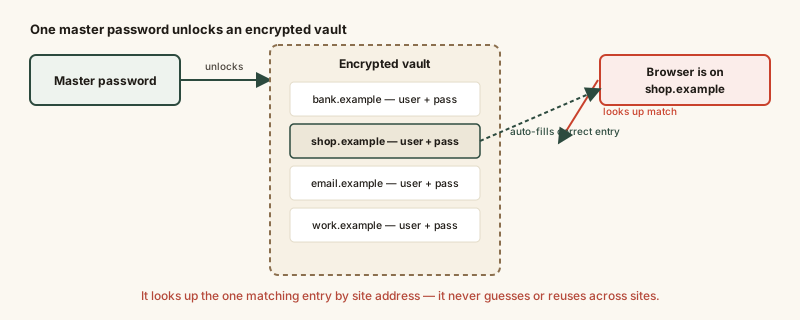
Every box in that vault is a separate, independent secret — compromising one saved entry doesn't hand over the others, because they aren't related to each other beyond sharing the same master lock.
Common mistakes
Common Mistakes
Reusing the master password somewhere else, or picking a short, guessable one.
→ Treat the master password as the single most important password to exist — long, unique, and used nowhere else, since it's the key to every other secret you hold.
Assuming a password manager makes phishing impossible.
→ It removes one specific failure mode (typing a password into a look-alike site the manager doesn't recognize) but doesn't stop someone from manually copying and pasting a password if they're determined to.
Never saving or printing the emergency recovery code, then losing the master password.
→ Store the recovery code somewhere safe and offline the day you set up the vault — a genuine zero-knowledge design has no backdoor, so a lost master password with no recovery code means permanently lost access.
Common misconception
“Once I'm using a password manager, I don't need two-factor authentication anymore.”
A password manager protects password secrecy and uniqueness. Two-factor authentication protects against what happens after a password is stolen anyway — through a breach, a keylogger, or a phishing page that does capture it. They defend against different failure points and are meant to be used together, including turning on two-factor authentication for the vault itself, not just for the accounts stored inside it.
What to do next
What to do next
- Choose a password manager with a published zero-knowledge encryption architecture, not one that stores plain or reversible passwords on its servers.
- Turn on two-factor authentication for the vault itself — it's the single account whose compromise would matter most.
- Let the manager generate long, random passwords instead of typing in ones you'd choose yourself.
- Save the emergency recovery code somewhere safe and offline the day you set the vault up, before you ever need it.