 KnowThis
Key Takeaways
Key Takeaways
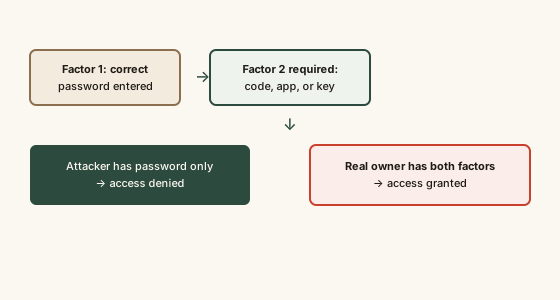
- 1Two-factor authentication requires two different categories of proof — typically a password plus a code or device — before granting access.
- 2It's specifically designed to stop the most common real-world attack: a stolen or reused password being used to log in from an attacker's device.
- 3Per CISA and NIST guidance, an authenticator app or hardware key is generally more resistant to interception than a text-message code, though any 2FA is far better than none.
The concept
This is also why a data breach notice for one account should prompt checking every other account using the same password, not just changing the one that was breached — reused passwords are exactly what credential stuffing exploits.
An attacker obtains someone's correct password from a breached, unrelated website. The person had 2FA enabled with an authenticator app on their main email account. What happens if the attacker tries to log in?
Worked examples
Example 1: Logging into a bank account with an authenticator app (baseline case)
Example 2: SMS 2FA versus a SIM-swap attack (edge case / variation)
Example 3: A hardware security key at a workplace (real-world / applied case)
Why does NIST guidance note that SMS-based 2FA codes are more vulnerable than an authenticator app or hardware key?
How it works (visual)
Common mistakes
Common Mistakes
Assuming a strong, unique password alone is enough protection.
→ Enable 2FA wherever it's offered, especially on email, banking, and any account used to reset other accounts.
Treating all 2FA methods as equally secure.
→ Prefer an authenticator app or hardware key over SMS text codes where the option exists, per NIST guidance on SIM-swap risk.
Approving an unexpected 2FA push notification without checking if you actually initiated the login.
→ Deny and investigate any 2FA prompt you didn't trigger yourself — it usually means someone already has your password.
Common misconception
“Two-factor authentication is mostly a hassle that only adds friction without much real security benefit.”
Per CISA, enabling multifactor authentication is one of the highest-impact individual security actions available, because it directly defeats the most common real-world account compromise method — reused or breached passwords tried against other sites. A stolen password alone becomes useless against an account with 2FA enabled, which is a substantial, measurable security gain for a small amount of added login friction.
What to do next
What to do next
- Turn on 2FA for email, banking, and any account that can be used to reset other accounts' passwords — these are the highest-value targets to protect first.
- Where offered, choose an authenticator app or hardware security key over SMS text-message codes.
- Never approve a 2FA prompt you didn't personally trigger — treat it as a signal your password may be compromised.
- This is general security education, not a guarantee against every attack — for account compromise or suspected fraud, contact the affected service and, where financial accounts are involved, your financial institution directly.