 KnowThis
Key Takeaways
Key Takeaways
- 1CAPTCHA works by presenting a task that's historically been quick and reliable for humans but slow or error-prone for automated scripts, or by scoring behavior passively in the background instead.
- 2Modern "invisible" verification systems continuously score signals like mouse movement and typing rhythm, often letting a real user through with no visible challenge at all.
- 3CAPTCHA is a probabilistic filter that raises the cost of automation, not an unbreakable lock — sophisticated bots and paid human-solving services can and do bypass it.
The concept
Once CAPTCHA is understood as a probabilistic filter rather than a hard technical wall, it makes sense why sites layer it with other defenses, like rate limiting and account monitoring, instead of relying on it alone.
What does CAPTCHA stand for, and what does that name reveal about how it works?
Worked examples
Example 1: A classic distorted-text challenge (baseline case)
Why does distorting the text specifically help this CAPTCHA tell humans from simple bots?
Example 2: An image-selection challenge against a more advanced bot (edge case / variation)
What does this scenario illustrate about challenge-based CAPTCHA over time?
Example 3: An invisible, behavior-based check with no visible challenge (real-world / applied case)
A returning visitor fills out a contact form and submits it without ever seeing a CAPTCHA challenge at all. In the background, a passive verification system had been continuously scoring signals like mouse movement patterns, typing rhythm, and general browsing behavior throughout the visit, and concluded with high enough confidence that the visitor was human that no explicit challenge was needed. A different visitor, with none of those consistent human-like signals, might see an explicit challenge appear specifically because their behavioral score was ambiguous.
Why did the first visitor in this scenario never see a visible CAPTCHA challenge?
How it works (visual)
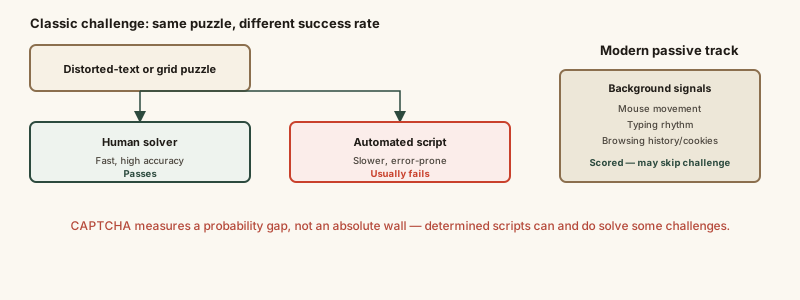
The two tracks in the diagram, explicit challenge and passive scoring, aren't mutually exclusive — many modern systems use passive scoring as the default and fall back to an explicit challenge only when the score is inconclusive.
Common mistakes
Common Mistakes
Assuming failing a CAPTCHA challenge multiple times means you've been personally flagged as a bot forever.
→ Understand a failed attempt usually just reflects an ambiguous behavioral score at that moment, not a permanent judgment — trying again, sometimes on a different network, often succeeds.
Assuming a site showing CAPTCHA is automatically secure overall.
→ Recognize CAPTCHA addresses one specific problem, filtering out basic automated abuse — it says nothing about a site's broader security practices like encryption or data handling.
Believing solving one CAPTCHA guarantees no future challenges will appear on the same device or site.
→ Expect behavioral and challenge-based scoring to be reassessed for new sessions or suspicious activity, since verification isn't a one-time, permanent unlock.
Common misconception
“CAPTCHA is unbreakable — if a form has one, no bot can get through.”
CAPTCHA is a probabilistic filter, not an absolute barrier. Advanced bots using machine-learning-based image or text recognition can solve many classic challenges with real success rates, and CAPTCHA farms sidestep the problem entirely by paying real humans to solve challenges on a bot's behalf. CAPTCHA raises the cost and friction of automated abuse meaningfully, which is valuable, but it doesn't make a form immune to bots.
What to do next
What to do next
- If a CAPTCHA challenge seems unusually persistent, try a different network or clearing cookies, since network reputation and browsing history both feed behavioral scoring.
- Don't rely on CAPTCHA as a site's only line of defense against abuse — pair it with rate limiting and monitoring for unusual account activity where you control a service.
- If you rely on audio or accessibility alternatives for CAPTCHA challenges, look for sites offering them explicitly, since not every implementation includes accessible alternatives by default.
- Treat repeated, unexpected CAPTCHA prompts on a familiar site as a possible signal worth investigating, like unusual network conditions or a compromised device, rather than dismissing it as random.