 KnowThis
Key Takeaways
Key Takeaways
- 1A cookie is just a small piece of text a website hands your browser to hold onto and send back — nothing more powerful than that by design.
- 2Cookies exist because the underlying web protocol, HTTP, has no memory between requests on its own; cookies are the bolt-on mechanism that lets a site recognize the same visitor across multiple page loads.
- 3First-party cookies (set by the site you're on) and third-party cookies (set by something embedded in that site, like an ad) use the identical mechanism for very different purposes — staying logged in versus being tracked across sites.
The concept
Everything a cookie does — keeping you logged in, remembering a shopping cart, or following your browsing across sites for ad targeting — comes down to that same simple loop: store a value, send it back automatically, let the server recognize it.
Why does a website need cookies at all if it could just remember your browser on its own?
Worked examples
Example 1: Staying logged in with a session cookie (baseline case)
Set-Cookie instruction containing a unique identifier tied to that login session. On every following page request, the browser automatically attached that identifier back to the server, which checked it against its own records and recognized the request as coming from an already-authenticated visitor — no password re-entry needed, because the cookie is doing the "remembering" on the server's behalf.After logging into a website once, you can browse to several other pages on that site without re-entering your password. What is doing the work of 'remembering' that you're logged in?
Example 2: The same mechanism used for cross-site tracking (edge case / variation)
Why can an advertising script on one website 'know' you looked at a product on a completely different website?
Example 3: Clearing cookies and what actually resets (real-world / applied case)
A user clears their browser's cookies to "start fresh" and finds they're logged out of every site, their shopping cart is empty, and a site that previously skipped its cookie-consent banner shows it again. All three effects come from the same cause: clearing cookies deletes the stored text values entirely, so every site that depended on recognizing a previously stored identifier now sees what looks like a first-ever visit. This is a useful mental check for what cookies actually control — if clearing them resets a behavior, that behavior was being driven by a stored cookie value; if a behavior survives cookie clearing, something else (like an account tied to a password login on a different device, or browser-level settings) is responsible instead.
After clearing all cookies, a person is logged out of every website and a cookie-consent banner reappears on a site that previously didn't show it. What does this confirm?
How it works (visual)
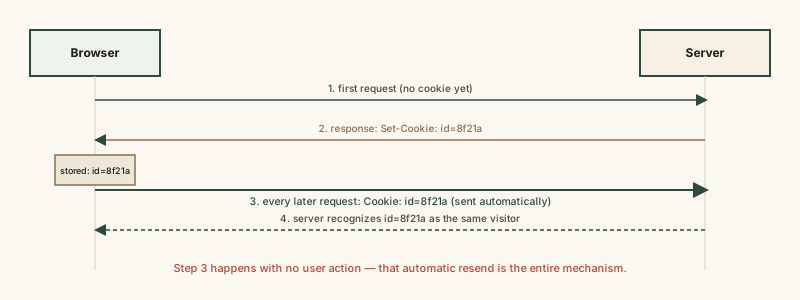
The critical detail is the word "automatically" in the last step — the browser resends the stored value without the user doing anything, which is both what makes staying logged in seamless and what makes cross-site tracking possible when the same mechanism is used by an embedded third party.
Common mistakes
Common Mistakes
Treating cookies as programs that can run, install software, or infect a device.
→ Remember a cookie is only a small piece of text data — it has no ability to execute code or install anything on its own. The privacy concern is what the data enables (tracking), not any malicious action by the cookie itself.
Assuming all cookies exist for tracking or advertising.
→ Distinguish first-party cookies used for essential functions like staying logged in or keeping a shopping cart from third-party cookies used for cross-site tracking — they use the same mechanism for very different purposes.
Believing clearing cookies deletes a browsing history or a saved account permanently.
→ Clearing cookies removes the local recognition tokens stored in the browser — it logs you out and resets site-specific memory, but doesn't delete an account that exists on a server, nor does it delete browser history (a separate, unrelated setting).
Common misconception
“Cookies are inherently malicious, like a virus that infects your computer when a site sets one.”
A cookie is just a small piece of text data with no ability to execute code, install software, or directly access files on a device. The legitimate privacy concern with cookies isn't that the cookie itself is dangerous — it's that a stored identifier, especially a third-party cookie shared across many sites, can be used to build a profile of someone's browsing behavior over time without them realizing how widely that one embedded script is deployed.
What to do next
What to do next
- Next time you see a cookie-consent banner, remember it's mainly disclosing third-party tracking cookies, not the first-party session cookie that keeps you logged in.
- If a site behaves oddly after logging in on a new device, check whether cookies are being blocked entirely — some sites depend on a session cookie to function at all.
- Don't assume clearing cookies wipes your accounts or browsing history — it only resets what each site's cookie was tracking locally in your browser.
- Read How Online Ad Targeting Actually Works next to see what happens once a cross-site tracking cookie is set.