 KnowThis
Key Takeaways
Key Takeaways
- 1Autocorrect compares each word you type against a built-in dictionary and a personal word list built from your own past typing, choosing the closest likely intended word.
- 2It's a feedback loop: every suggestion you accept or manually undo updates your personal word list, which is why a word that gets 'fixed' wrong the first several times often stops being corrected after repeated use.
- 3Autocorrect (which changes what you typed) and predictive text (which suggests what to type next) are two different features that often get blamed for each other's mistakes.
The concept
A quick way to see the personal-history part of the loop directly is to compare how the same unfamiliar word is treated the first time versus after it's been typed and kept several times.
A person types an uncommon name repeatedly over several days, correcting autocorrect's wrong guess back to the name each time. What's most likely to happen?
Worked examples
Example 1: Fixing an ordinary typo (baseline case)
Why is autocorrect generally reliable at fixing common typos of well-known words?
Example 2: A name or slang term the keyboard hasn't learned yet (edge case / variation)
Why does autocorrect tend to guess wrong more often for names and slang than for common words?
Example 3: The same learned model behaving differently in casual texts vs. formal email (real-world / applied case)
A keyboard that's built up a personal history mostly from quick, casual texting — full of contractions, abbreviations, and informal phrasing — can produce corrections that feel out of place when the same person switches to writing a formal email, because the learned word list and its weighting still reflect casual-context habits rather than the current, more formal one. This isn't the keyboard "forgetting" anything; it's applying the same personal model across a context it wasn't specifically shaped around, which is a useful reminder that autocorrect learns from patterns in typing, not from an understanding of what kind of message is currently being written.
How it works (visual)
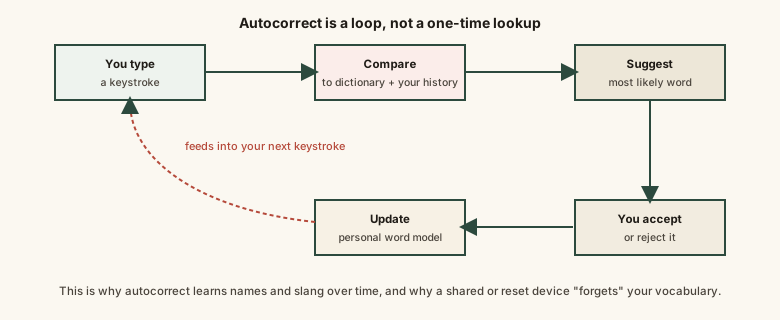
Every accepted or rejected suggestion feeds back into the same loop, which is exactly why autocorrect on a well-used personal keyboard tends to fit its owner's own vocabulary better over time.
Common mistakes
Common Mistakes
Expecting autocorrect to learn a word permanently after typing it correctly just once.
→ Overriding the default dictionary usually takes several confirmed uses of the same word before it's reliably added to the personal word list.
Getting frustrated at repeat wrong corrections without using the keyboard's 'add to dictionary' or 'learn word' option where available.
→ Manually adding a frequently used non-dictionary word speeds up the learning process instead of waiting for repetition alone to build it.
Blaming autocorrect for a wrong word that was actually a tapped predictive-text suggestion.
→ Autocorrect changes what's already been typed; predictive text offers taps for what to type next — they're separate features that are easy to mix up after the fact.
Assuming autocorrect behaves identically after switching to a new keyboard app.
→ Different keyboard apps generally maintain their own separate personal dictionaries, so switching apps can mean starting that learned history over.
Common misconception
“Autocorrect fully understands what you're trying to say.”
Everyday autocorrect primarily compares typed letters against a built-in dictionary and a personal word list built from your own typing history — it's not reading or understanding the meaning of your sentence. That's exactly why it can confidently swap in a wrong but common word: it's picking the closest known match, not the one that makes the most sense in context.
What to do next
What to do next
- Manually add frequently used names or technical terms to your keyboard's personal dictionary to speed up the learning process.
- Review autocorrected text before sending, especially names, addresses, or technical terms.
- Remember that switching keyboard apps also switches (or resets) your learned personal word list.
- Use a single tap to undo one unwanted autocorrection rather than assuming disabling autocorrect entirely is the only fix.