 KnowThis
Key Takeaways
Key Takeaways
- 1Phone heat comes from four main sources — the processor doing work, the battery charging or discharging, the screen backlight, and radio signal transmission — all dumping heat into one small, mostly sealed enclosure.
- 2Thermal throttling is a deliberate, built-in feedback loop: when internal temperature crosses a threshold, the phone slows its own processor to cut heat production, which is a protection working correctly, not a malfunction.
- 3Mild warmth during charging or heavy use is completely normal; genuine warning signs look different — a phone that's hot while sitting idle and untouched, or a battery that visibly swells or bulges the case.
The concept
The everyday test for whether phone heat is expected or worth a second look comes down to what the phone was doing right before you noticed it.
A phone feels noticeably warm after 45 minutes of video calling with the screen at full brightness. What's the most accurate read on this?
Worked examples
Example 1: Warm phone during a long call in direct sunlight (baseline case)
Why does direct sunlight make a phone's normal operating warmth feel worse than the same activity indoors?
Example 2: Fast charging while gaming with a case on (edge case / variation)
Why does a protective case make a phone run hotter during fast charging and gaming at the same time?
Example 3: Recognizing heat that's actually worth investigating (real-world / applied case)
A phone that's warm during a game, a call, or a charge is following the ordinary pattern above and should cool back down once the activity stops. A phone that's hot while sitting untouched on a table, with no app open and not charging, is a different situation — it usually points to a stuck background process or a hardware issue rather than expected heat production, since none of the four normal heat sources should be active. A battery case that looks swollen or a back panel that bulges outward is a separate, more serious warning sign entirely, unrelated to ordinary thermal behavior, and worth having checked rather than waited out.
How it works (visual)
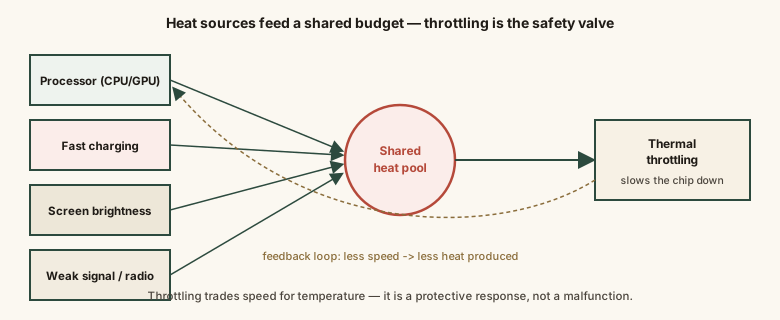
All four sources share one small enclosure and one cooling path, which is exactly why stacking several of them at once — charging, gaming, and full brightness together — produces more noticeable heat than any single one alone.
Common mistakes
Common Mistakes
Assuming any warmth means the battery is failing.
→ Mild warmth during charging, gaming, or heavy use is expected heat production from normal operation, not a sign of imminent battery failure.
Using the phone under a blanket, pillow, or thick case while fast charging or gaming for long stretches.
→ These trap heat against the phone and block its only cooling path (passive heat transfer to surrounding air), making normal warmth worse than it needs to be.
Repeatedly force-closing apps to try to 'cool down' the phone.
→ Modern operating systems already suspend background apps; force-closing and reopening an app from scratch often costs more processing effort — and heat — than leaving it suspended.
Leaving a phone in direct sunlight or a hot parked car and blaming an app for the resulting heat.
→ Ambient heat adds directly to the phone's own internally generated heat and reduces how effectively it can cool itself — the environment, not the app, is usually the main driver here.
Common misconception
“A hot phone is always a battery that's about to fail or catch fire.”
Mild, temporary warmth during charging, gaming, video calls, or heavy multitasking is completely normal — it's the expected result of the processor, battery, screen, and radio all generating heat in a small sealed case with no fan. Thermal throttling exists specifically to keep this warmth from becoming a problem by slowing the processor down. Genuine warning signs look different: heat while the phone is idle and untouched, or a battery that visibly swells or bulges the case.
What to do next
What to do next
- Remove thick cases during extended fast charging or gaming sessions to let heat escape more easily.
- Avoid leaving your phone in direct sunlight or a hot car, since ambient heat adds directly to the phone's own heat load.
- If your phone is hot while sitting idle with nothing running, restart it or check for a stuck background app rather than assuming heavy use.
- Don't panic over warmth during charging or gaming — that's the thermal throttling feedback loop working as designed, not a sign of failure.