 KnowThis
Key Takeaways
Key Takeaways
- 1Buffering happens when the download rate falls behind the playback rate, draining a temporary reservoir of already-downloaded video called the buffer faster than it can refill.
- 2Streaming apps usually try to avoid buffering first by quietly lowering video quality through adaptive bitrate streaming — visible buffering often means that safety net already failed to keep up.
- 3A strong WiFi signal icon reflects link quality to the router, not the actual end-to-end throughput reaching a distant video server, which is why buffering can happen even with 'full bars.'
The concept
The clearest way to see the rate-mismatch mechanism directly is to compare two identical download situations that differ only in whether the incoming rate keeps pace with playback.
A video needs 5 Mbps to play smoothly, and the current connection is only delivering 3 Mbps of actual throughput. What happens?
Worked examples
Example 1: Smooth streaming on a stable connection (baseline case)
On a connection with plenty of spare throughput above what the video needs, what does the buffer do over time?
Example 2: A shared WiFi network with a live sports stream (edge case / variation)
Why might a live sports stream buffer more than a pre-recorded show on the exact same shared WiFi connection?
Example 3: Downloaded video vs. streamed video on the same trip (real-world / applied case)
A video downloaded in full before a flight or a subway ride never buffers during playback, because the entire file is already stored on the device — there's no live download rate to fall behind at all, since nothing needs to arrive over a network while it plays. The same video watched by streaming instead depends entirely on a live connection keeping pace with playback in real time, which is exactly why a spotty connection affects one and not the other, even though the video content itself is identical either way.
How it works (visual)
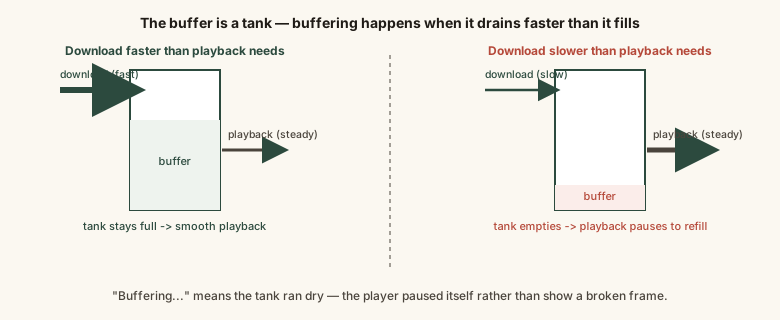
Buffering isn't a mysterious app failure — it's the visible result of the outflow arrow (playback) briefly outpacing the inflow arrow (download), draining the reservoir that normally protects against exactly this kind of dip.
Common mistakes
Common Mistakes
Blaming the video app itself whenever buffering happens.
→ Buffering is usually a network throughput issue — a temporary shortfall between download rate and playback rate — rather than a flaw in the app.
Assuming a fully loaded-looking progress bar means the entire remaining video has already downloaded.
→ Most streaming apps only buffer a rolling window ahead of the current playback position, not the whole remaining file, to save bandwidth and stay flexible on quality.
Restarting the router the instant a brief buffering hiccup appears.
→ Short-lived throughput dips often clear up on their own within seconds as the buffer refills; a restart is only worth it if buffering is frequent and sustained.
Not accounting for other devices on the same network competing for the same shared bandwidth.
→ Multiple simultaneous streams, downloads, or video calls on one connection all divide the same overall throughput, which can starve any single stream even with a strong WiFi signal.
Common misconception
“A full-bars WiFi signal means a video should never buffer.”
The signal-strength icon reflects the quality of the local link between your device and the router — it says nothing about the actual throughput available all the way to the video's server, which can bottleneck due to network congestion, server load, or other devices sharing the same connection. Buffering can happen with a perfect WiFi signal if end-to-end throughput to the source still falls short of what the video needs.
Try it yourself
A rough illustration of the core buffering relationship: dividing your connection's throughput by the video's required bitrate. A result above 1 means the buffer should keep filling faster than playback drains it; below 1 means it will eventually run dry.
This is a simplified snapshot using a single throughput and bitrate value. Real connections and adaptive bitrate streaming both fluctuate continuously, which is why a video can dip in and out of buffering risk during a single playback session.
What to do next
What to do next
- If you know your connection is limited, manually lower video quality to stay comfortably ahead of a rebuffer rather than letting adaptive streaming fight for it.
- Treat repeated buffering as most often a network or server throughput issue, not necessarily a fault with the app itself.
- Remember that other devices sharing the same WiFi network divide the same overall bandwidth, which can starve a single stream.
- Expect live streams to buffer more readily than on-demand video, since a live encoder can't offer content ahead of the live moment for the player to draw from.