 KnowThis
Key Takeaways
Key Takeaways
- 1A screenshot captures a device's own native pixel grid, and since pixel density and resolution vary between devices, the same content produces images with different raw dimensions and sharpness.
- 2Devices with different screen aspect ratios can capture different amounts of visible content in a single screenshot, not just different sharpness, purely because more or less of a page fits in the visible area.
- 3Messaging and social platforms often recompress or resize a shared screenshot further, adding an extra layer of visual difference on top of whatever the original device already captured.
The concept
The clearest way to see the pixel-density effect directly is to compare the raw output of two screens with identical physical size but different native resolutions.
Two phone screens are the same physical size, but one has twice the native pixel resolution of the other. What's the most accurate expectation for screenshots of the same webpage taken on each?
Worked examples
Example 1: Same webpage, two different pixel densities (baseline case)
Why can two devices show what looks like the identical app layout to the eye, yet produce screenshots with clearly different raw pixel dimensions?
Example 2: Different screen aspect ratios capturing different amounts of content (edge case / variation)
Why might two people scrolled to the same position on the same webpage end up with screenshots showing different amounts of visible content?
Example 3: A screenshot losing quality after being shared (real-world / applied case)
A screenshot that looks sharp on the device that took it can look noticeably softer by the time a friend views it after it's been sent through a messaging app or posted to a social platform, because many of these platforms automatically recompress or resize images to reduce file size and bandwidth use before delivering them. This additional compression step happens after the original device-level pixel-density differences already discussed — meaning a screenshot's final appearance for a viewer often reflects two separate layers of change: the originating device's own resolution, and whatever processing the sharing platform applied on top of it.
How it works (visual)
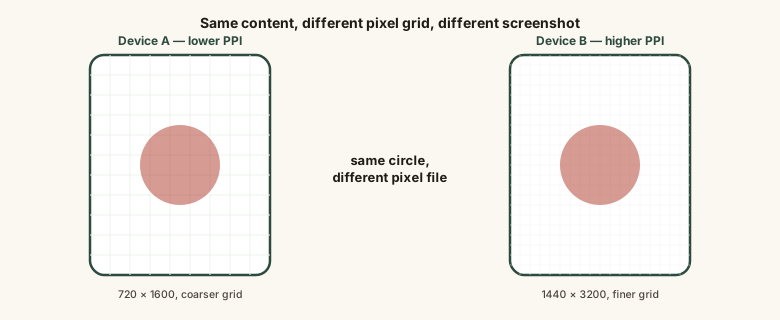
Same physical screen size, same on-screen content, but a different number of actual pixels underneath — that gap is what a screenshot always faithfully reproduces.
Common mistakes
Common Mistakes
Assuming a screenshot is a universal, pixel-identical image no matter where it's viewed.
→ A screenshot captures one specific device's own pixel grid at the moment it was taken, and platform recompression can change it further once shared.
Believing a higher-resolution device always produces a 'bigger-looking' screenshot of the same content.
→ Higher pixel density usually means a sharper, more detailed capture of the same logical content, not a larger-appearing one, since the app's layout scales to fit each device's own screen.
Assuming two screenshots of 'the same app screen' from two different phones must show identical content.
→ Differing screen aspect ratios can mean different amounts of a scrollable page are actually visible and captured, even at the same scroll position.
Comparing raw screenshot file sizes across devices as a measure of image quality.
→ File size differences mostly reflect resolution, pixel density, and compression settings, not a meaningful quality comparison on their own.
Common misconception
“A screenshot is a pixel-perfect, universal image that looks identical everywhere it's viewed.”
A screenshot captures the specific device's own native pixel grid at the moment it's taken. Since pixel density, resolution, and screen aspect ratio all vary between devices, the same underlying content can produce screenshots with different sharpness, raw dimensions, and even different amounts of visible content. Sharing a screenshot through a messaging or social platform can add a further layer of change, since many of these automatically recompress or resize images before delivery.
Try it yourself
Pixel density is calculated from a screen's native pixel resolution and its physical diagonal size — the same underlying math that explains why two screens of the same physical size can still produce very different-looking screenshots.
This is a simplified pixels-per-inch calculation based on native resolution and diagonal size. It illustrates the underlying pixel-density math, not a manufacturer's official specification for any particular device.
What to do next
What to do next
- When sharing 'how to' screenshots for a broad audience, expect layout details to shift slightly on different-density or different-aspect-ratio screens.
- Expect some quality loss any time a screenshot travels through a messaging or social platform, separate from the original device's own capture quality.
- Don't assume you can align screenshots pixel-for-pixel between two different devices.
- When comparing display sharpness between two phones using screenshots, compare based on pixel density, not raw file size.