 KnowThis
Key Takeaways
Key Takeaways
- 1A phone's accelerometer constantly senses the direction of Earth's gravity across three internal axes, and it's that reading — not the compass or GPS — that tells the phone which way is up.
- 2Screen auto-rotation is a feedback loop: sense the gravity direction, compare it to the current orientation, and adjust the display if the tilt crosses a threshold.
- 3During real physical motion — a workout, a bumpy vehicle ride — the accelerometer senses gravity mixed together with actual movement, which is exactly why auto-rotation can misbehave in those situations even though the phone's orientation logic is working correctly.
The concept
The clearest way to see the accelerometer's actual job is to look at what changes, and what doesn't, when a phone is simply rotated in place without being physically moved through space.
A phone sitting still is rotated slowly from portrait to landscape, with no other movement involved. What is the accelerometer actually detecting to trigger the screen rotation?
Worked examples
Example 1: Rotating a phone from portrait to landscape at rest (baseline case)
Why doesn't the compass (magnetometer) need to be involved for a phone to correctly rotate its screen between portrait and landscape?
Example 2: Auto-rotation during a workout or a bumpy vehicle ride (edge case / variation)
Why is auto-rotation more likely to misbehave during a workout or a bumpy vehicle ride than while sitting still?
Example 3: A phone lying flat on a table doesn't randomly flip orientation (real-world / applied case)
A phone resting flat on a table, screen facing up, stays in whatever orientation it was last in rather than flickering between portrait and landscape, even though gravity is technically pulling straight down through the screen with no strong tilt toward any one side. This isn't a limitation of the accelerometer — it's a deliberate design choice: near-flat readings fall into a defined dead zone that the operating system ignores for triggering rotation, specifically to prevent the screen from flipping unpredictably whenever a phone is simply set down on a surface.
How it works (visual)
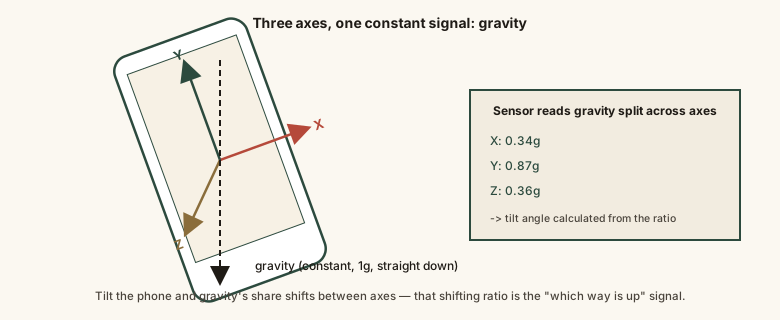
Whichever way the phone tilts, gravity's pull redistributes across these three axes in a predictable pattern — that redistribution alone is the entire signal orientation detection runs on.
Common mistakes
Common Mistakes
Assuming the compass (magnetometer) is what tells a phone which way is up.
→ The compass senses magnetic north for directional heading; the accelerometer senses gravity's pull to determine up/down orientation — they're separate sensors doing separate jobs.
Blaming auto-rotate failures on a table or flat surface as a bug.
→ Near-flat orientation is a deliberately defined dead zone the operating system ignores for rotation triggers, to avoid the screen flickering unpredictably when set down.
Expecting perfect auto-rotation behavior during vigorous physical motion.
→ The accelerometer can't fully separate gravity from real acceleration during workouts or bumpy rides, which is an inherent sensing limitation, not a defect.
Thinking accelerometers only matter for games or fitness tracking.
→ The accelerometer also drives everyday UI behavior like screen auto-rotation, which most people rely on without realizing which sensor is behind it.
Common misconception
“The phone's compass is what detects orientation and controls screen rotation.”
Screen orientation is determined by the accelerometer, a separate sensor that measures the direction of Earth's gravitational pull across three internal axes — not the compass (magnetometer), which senses magnetic north for direction-finding features like map heading. An accelerometer alone measures total acceleration, which is why many phones also add a gyroscope, forming an inertial measurement unit that combines both readings for steadier orientation tracking, especially during real physical motion.
Try it yourself
A simplified illustration of the core math behind orientation sensing: the ratio of gravity sensed on two accelerometer axes reveals the tilt angle between them, in degrees from vertical.
This shows only the basic two-axis tilt relationship. Real orientation sensing combines all three axes at once and, on most phones, blends in gyroscope data for a steadier reading during motion.
What to do next
What to do next
- Recognize that auto-rotate is driven by the accelerometer sensing gravity's direction, not the compass or GPS.
- Expect occasional auto-rotate hiccups during workouts or vehicle travel — that's an inherent motion-versus-gravity ambiguity, not a broken phone.
- Use a manual orientation lock in situations, like reading in bed at an odd angle, where you don't want gravity-based auto-rotation at all.
- Don't be surprised that a phone lying flat on a table won't rotate — that's an intentional dead zone, not a malfunction.