Screen 'size' is conventionally a diagonal length measurement in inches, while sharpness is a separate quantity, pixels per inch (PPI), calculated from the screen's pixel resolution and its physical diagonal size — two different units answering two different questions that are easy to conflate.
Reading time
— 4 min
Updated
— Aug 21, 2026
Fact-reviewed
— Aug 21, 2026
Key Takeaways
Key Takeaways
1Screen 'size' (a '27-inch monitor,' a '6.1-inch phone') is conventionally the diagonal distance across the visible display, corner to corner, in inches — not the width or the height alone.
2Resolution (like 1920 x 1080) is a separate quantity entirely: a count of pixels, with no built-in physical size until you also know the screen's actual diagonal measurement.
3Sharpness is captured by pixels per inch (PPI), calculated from resolution and diagonal size together — which is why two screens can share the same diagonal 'size' but look meaningfully different in sharpness, or share the same resolution but differ in PPI because one is physically larger.
The concept
A screen's advertised "size" is its diagonal measurement corner to corner, in inches. Its resolution (like 1920×1080) is a completely separate number — how many pixels are packed in, not how big the screen physically is.
Because size, resolution, and sharpness are three separate quantities, comparing screens on just one of them — the most common shopping mistake — can be actively misleading.
Quick check
A shopper compares two monitors: Monitor A is 27 inches with a 1920x1080 resolution; Monitor B is 24 inches with the same 1920x1080 resolution. Which one will generally look sharper?
Worked examples
Example 1: Calculating PPI for a laptop screen (baseline case)
A 13-inch laptop screen with a resolution of 2560×1600 pixels. First find the total diagonal pixel count using the Pythagorean theorem: √(2560² + 1600²) = √(6,553,600 + 2,560,000) = √9,113,600 ≈ 3,019 pixels diagonally. Then divide by the diagonal screen size: 3,019 ÷ 13 ≈ 232 PPI — a genuinely sharp display by typical laptop standards.
Example 2: The same resolution on a much larger television (edge case / variation)
A 65-inch television with the same-family resolution, 3840×2160 (4K): diagonal pixel count = √(3840² + 2160²) = √(14,745,600 + 4,665,600) = √19,411,200 ≈ 4,406 pixels. PPI = 4,406 ÷ 65 ≈ 68 PPI — dramatically lower than the laptop's 232 PPI despite the TV having a much higher raw pixel count (3840×2160 vs 2560×1600). This isn't a contradiction: PPI measures density, and the TV's much larger physical screen spreads even a higher pixel count much more thinly. It's also why a 65-inch 4K TV still looks sharp in practice — televisions are viewed from much farther away than laptops, so the eye can't resolve individual pixels even at a lower PPI.
Quick check
Why doesn't the television in Example 2 look noticeably blurry to viewers, despite its much lower PPI than the laptop?
Example 3: Comparing two smartphones by size alone, and why that's misleading (real-world / applied case)
Two phones are both advertised as "6.1-inch" displays. Phone A has a resolution of 2532×1170 (PPI ≈ 460); Phone B has a resolution of 1792×828 (PPI ≈ 326). Despite sharing the identical advertised diagonal size, Phone A packs noticeably more pixels into that same physical space, producing a visibly sharper display — text and images render with more fine detail. A shopper comparing only the "6.1-inch" headline figure between the two phones would have no way to know this meaningful difference exists; only checking resolution (and calculating or looking up PPI) reveals it.
How it works (visual)
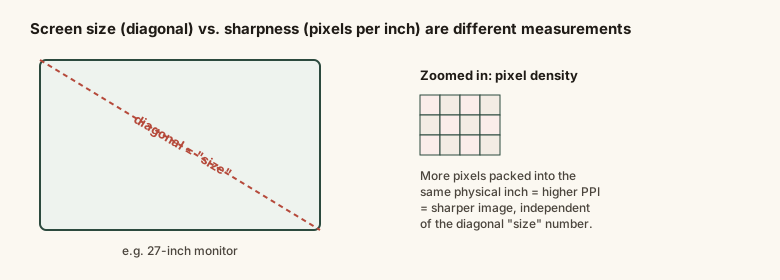
Screen 'size' (diagonal) vs. sharpness (pixels per inch) — two different measurements
The diagonal line answers "how big" the screen is; the pixel grid answers "how sharp" it looks — two genuinely independent questions that a single advertised "size" number can never answer on its own.
Common mistakes
Common Mistakes
✕
Assuming a larger advertised screen 'size' (diagonal inches) automatically means a sharper display.
→ Check resolution and calculate (or look up) PPI separately — a larger diagonal with the same resolution actually means a lower pixel density, not a sharper image.
✕
Comparing two screens' sharpness using resolution alone, without accounting for their physical size.
→ Remember sharpness (PPI) requires both resolution and physical diagonal size together — resolution by itself doesn't determine how sharp an image looks.
✕
Treating a screen's diagonal measurement as if it directly tells you the width or height.
→ Use the diagonal together with the aspect ratio to calculate actual width and height — the diagonal alone doesn't fully determine a screen's shape.
Common misconception
“A screen's advertised 'size' in inches tells you roughly how sharp or detailed the image will look.”
Screen size (diagonal inches) and image sharpness (pixels per inch) are independent measurements. A larger screen with the same resolution as a smaller one has a lower pixel density and generally looks less sharp up close, not more. Comparing screens on sharpness requires checking resolution and physical size together, not the advertised diagonal size alone.
Quick check
Why is the diagonal pixel count in the PPI formula calculated using the Pythagorean theorem (√(width² + height²)) rather than just adding width and height pixels together?
Try it yourself
Calculate pixels per inch (PPI) from resolution and screen size
Pixels per inch (PPI)91.79
What to do next
What to do next
When comparing screens, check resolution and physical size together, not the advertised diagonal size alone.
Use the calculator above to compute PPI for any two screens you're comparing.
Remember viewing distance affects perceived sharpness as much as PPI — a lower-PPI television viewed from across a room can look just as sharp as a higher-PPI laptop viewed up close.
Check a screen's aspect ratio alongside its diagonal size if you need to know its actual width and height.
FAQ
FAQ
Related terms
Related terms
Diagonal measurement
The conventional way screen 'size' is measured — the straight-line distance from one corner of the visible display to the opposite corner, in inches.
Resolution
The number of individual pixels a screen displays, expressed as width x height (e.g. 1920 x 1080) — a count of pixels, not a physical size.
Pixels per inch (PPI)
A measure of pixel density — how many pixels are packed into each inch of the screen's diagonal — calculated from resolution and physical diagonal size together, and the real driver of how sharp an image looks.
Aspect ratio (screen)
The ratio between a screen's width and height (e.g. 16:9) — needed alongside the diagonal measurement to fully determine a screen's actual width and height in inches.
A shopper compares two monitors: Monitor A is 27 inches with a 1920x1080 resolution; Monitor B is 24 inches with the same 1920x1080 resolution. Which one will generally look sharper?
This entry was researched from public sources and drafted with AI-assisted tools, then edited — errors are still possible. Spot one, or want a topic covered? Read our disclaimer.
 KnowThis